The Have-Done List

June 23, 2009

Thanks for visiting. Please consider joining over 10,000 other readers in subscribing to our RSS feed or following us on Twitter.

A to-do list is what most people see as the pinnacle of personal productivity.  You set a plan, work the plan, and the check items off the list. To-do lists can be a great.  They help you focus on what is important instead of just what happens to be on your mind.

note-main

However, there are times when creating a to-do list isn’t the best thing. There are times when you need to be able to freely explore and do whatever comes to mind.  Vacations are one example.  If you create a to-do list (and I know some people who do) for your vacation, it might take away from some of what you need to get out of a vacation.

I also find that there are times where I need to focus on a particular area, but without having a pre-defined set of tasks. For example, if I set aside a day to work on improving this website, I may or may not have a list of things I need to do.  Sometimes it might be best for me to just find tasks and do them instead of trying to come up with all the tasks ahead of time.

Spending a day at the library is another example.  If you have a preset idea of exactly what you want to accomplish, you might miss some valuable things you could be do that just come serendipitously your way.

The most likely reason people aren’t able to follow a to-do list during a normal work day is because of unexpected fires and emergencies. You have a great plan, but the whole world seems like it is conspiring to prevent you from touching even one item on your list.  It isn’t that you aren’t accomplishing anything, it is just not the stuff you had on your to-do list.

This is where the idea of a have-done list comes in.  Instead of feeling guilty because you spent a day following no prescribed path, simply take note of what you did.  At the end of the day, make a shortlist of what you accomplished.  This gives you a chance to reflect on how well this approach to work fits with your personality.  It will also help you better understand the types of things that you do naturally and the types of things you avoid.  This understanding can benefit you when trying to use a to-do list in the future.

Basically, my point is to give yourself a way to see what you’ve accomplished without worrying about deciding what you are going to do ahead of time.  Most likely, a to-do list of some type will be the most beneficial for the majority of situations, but making a have-done list at the end of the day helps for those times where a to-do just isn’t appropriate.

Originally published February 26, 2007.

SmartShopper Grocery List Organizer Review
June 11, 2009

Many times I’ve wondered about ways to keep a centrally located, well organized grocery and errand list. Members of my family have a tendency to “borrow” the list to add something, only to forget to put the list back. Though a pen and paper are often the best and most efficient way to keep track of a to-do list, some families might need something a bit more creative.

smartshopper-main

When I was handed the Grocery List Organizer to review, I was a bit apprehensive as to how well the device would actually function. Fortunately, I have been pleasantly surprised.

Appearance

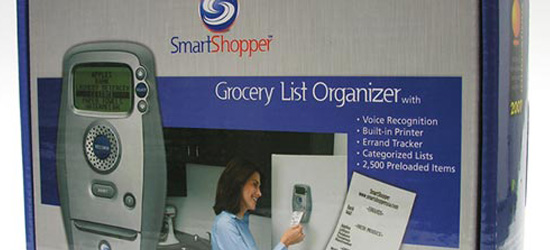
The Organizer is an oblong-shaped device with a small screen located at the top, a large “Record” button in the middle and a few navigational buttons located near the side. The “Record” button allows the user to press and record a desired item into the speaker on the device. It then brings up several likely results from the library, or precisely the item the user spoke. In the past, I have been a bit disappointed with many types of voice recognition software. In this case, most of the time the first result was what I had wanted the device to retrieve. The device also has a built-in printer and a handy “Print” button on the front just below the “Record” button. And as for having a centrally located list, the device can be stuck to the refrigerator or any other surface that works with the convenient magnets on the back if the Organizer.

Interface and Voice Recognition

Most of the things I thought up and that are regular purchases for me were already in the library. However, the device does allow for the addition of new items to the library. A couple of items I expected to be in the library were not. However, as I said, the device library can be edited to accommodate this need.

Navigating through the menus is a fairly simple and straightforward process. The instructions that come inside the box are accurate and it is worth your time to read them, as it doesn’t take long to figure out how everything works.

Printing

The neatest thing about the device, for me, is that it doesn’t require an ink cartridge to print the list of items. Ink cartridges, as a rule, are fairly expensive and can be a hassle to replace. However, the miniature printer for the SmartShopper gadget takes a simpler route. It comes with two replacement paper rolls and runs off 4 AA batteries, which most households already use on a consistent basis.

When the user selects “Print,” the list comes with items organized into categories such as “Dairy” and so on. This makes a trip around the supermarket potentially more efficient.

Conclusion

For someone that does a whole lot of grocery shopping and errands, the Grocery List Organizer could be a worthwhile investment. It is a bit pricey (around $100), so for the college student living off Ramen Noodles and Mac n’ Cheese, it probably wouldn’t be quite so useful. However, for families that want a way to make grocery shopping a bit easier on the one responsible, the product might save some time and effort looking for lost lists.

Mark’s Notes

Anna did a good job of covering the basic usage of the SmartShopper, but I wanted to add a few of my impressions as well.  The device gives you a glimpse of the future when voice recognition is embeded into all kinds of things.  While it seems a bit overkill as device that replaces a piece of paper and pencil I think it has some promise–particularly if you are dealing with very large lists.

One of the big advantages is that it orders the list by the type of product.  So all the bread products are together all the paper products are together, etc.  If you are like me and have no idea where anything is, it can save you a lot of wasted steps.  The ideal device would print out the products based on where they are found in your store and give you a map to follow. Maybe that is just a guy thing though.  My wife has no problem quickly locating items that take me a good 10 minutes.

The voice recognition is surprisingly accurate and the database has a lot of things you wouldn’t expect.  My brother spent some time trying to stump it with all kinds of odd things. The SmartShopper fared better than I expected.  For example, it has calamine lotion and worcester sauce.   We discovered this can be a pretty entertaining game–pass the device between players seeing who can stump it with a grocery item that it doesn’t recognize.

My two year old saw what we were doing and wanted to try.  She sat down on the floor in front of it, pushed the button and said “deggs!” over and over again.  It never did figure out that she wanted eggs, but then the device isn’t really designed for little people still in the language acquisition stage of life.

Simple Stuff Reduction Tips

May 18, 2009

The more stuff you have, the more time you have to dedicate to managing and hunting for things. Here are several simple ways you can reduce the amount of stuff in your life to help make it easier to find things that are important.

pennies-main

  1. Keyring Cleanup - Get rid of any extra keys. If you are like most people, you probably have several keys that you can’t even remember what they go to. Sometimes it helps to keep a separate keychain at home for those odd little keys that you don’t want to lose, but don’t need to carry with you.
  2. Card Shuffle - Go through your credit cards, ID cards, supermarket cards and get rid of the ones you won’t use. I keep about 4 cards with me and the rest stay at home in a safe place in case I need them. I put my frequent flyer/hotel rewards cards in my computer bag because it keeps them out of my wallet but insures that they are with me when I travel.
  3. Glove Compartment - You probably have a bunch of junk in your glove compartment. Get rid of the expired proof of insurance cards and other random items that you no longer need. If you ever get pulled over, it is much easier to find the required information when you aren’t having to dig through 5 years of expired papers.
  4. Medicine Cabinet - Get rid of any expired medicine. It is safer to throw it out then keeping it around. Make note of anything that you are out of like aspirin and add it to your shopping list.
  5. Purge Your Paper - Your files will continue to grow unless you do something about it. While you need to take care to keep your important papers, you don’t need to keep every piece of paper forever. Taking 30 minutes to shred papers you no longer need can help put your file cabinet on a diet and make it easier to find things.
  6. Books - I love books. When I hit 800 books, I had to go on a major book cleaning binge. There are some books that you will simply never use again. This is particularly true of technology related books that become outdated very quickly. Some books are still worth something now, but you’ll be lucky to sell them for $0.10 in 9 months. Amazon makes a great place to sell books that you don’t need anymore.
  7. Software - Most people accumulate various pieces of software that they don’t really need any more. Even if you can’t bring yourself to throw away that Windows 95 CD, consider throwing away the box and simply keeping the keycode and the disk in a CD case. You can easily reduce several shelves worth of boxes to a small zippered pouch.
  8. Coins - I have a box full of coins. Since I bank online, I can’t take it in and have them counted and deposited. Instead, I keep it in the car where I can use it for tips at Sonic or toll roads. If you frequently travel toll roads, consider using plastic zip locks to pre-count the toll amount so you don’t have to fumble with a bunch of small coins while cars build up behind you. Chicago toll machines take pennies. There is something incredibly satisfying about dumping 80 pennies into the machine in order to lift the toll gate.

Originally published April 09, 2008.

The Power of Paper

March 26, 2009

Everyone has their favorite and least favorite tools.  For example, I love my computer, but tend to despise fax machines.  Today, I had a bunch of work to do that would have been much easier with a fax machine.  I managed to do everything I needed using a scanner and email, but I was finally forced to admit that there is still room for a fax machine in my tool set.  I still don’t really like fax machines, but sometimes it is the perfect tool for the job.  Today, I felt like I was using a screwdriver to drive nails–sure, the nail will go in eventually, but a hammer is really what you need.  It would be silly to decide that I don’t like hammers, so I’m going to use a screwdriver, but I’ve found that is what I’m prone to do with other tools.

stack-main

After this realization (I know it seems like common sense, but it struck me as profound for some reason), I started thinking about other areas where I might be much more efficient if I just break down and use the right tool.  Aha.  Paper.  Paper is another thing I don’t really like. Perhaps I suffered from paper cuts as a small child. A more plausible explanation has to do with the first desk I bought after college.  It was chosen based on purely aesthetics rather than function.  The desk was simple–a large sheet of glass slightly smaller than a door and a black metal frame for it to sit on.  I had two of them that would allow me to set up an L shaped work surface.

Unfortunately the desk had no drawers or storage whatsoever.  But, of course, since I had spent some significant money on it, I couldn’t blame the desk.  Gradually, I developed an increasing hatred of the paper in my life because it made my beautiful desk look ugly and disorganized. I took all of the loose sheets in my apartment out to the parking lot and set them ablaze while encouraging my neighbors to do the same…ok, maybe I wasn’t that extreme, but  I did start trying to get rid of paper.

The problem is, paper is just another tool.  When we bias ourselves against a particular tool or technology (paper is technology even if it is fairly low tech), we make decisions that are bad for our productivity.  There are many high tech gadgets available that are meant to replace paper, but sometimes paper is still the best tool.

Originally published September 12, 2006.

NomaDesk Review

March 16, 2009

Recently at Productivity 501, we have taken a look at several different tools intended for file sharing. All of these products shared the attribute of being available for both business and personal use, although some were better suited to one than the other.

noma-main

One additional file sharing tool that came to our attention is NomaDesk, the flagship product of the Belgian start-up Aventiv. Thought most file sharing software is developed with the average businessperson’s needs in mind, NomaDesk was created specifically for someone who is constantly “on the run.” Those that work from many different locations and from laptop computers know precisely what the challenges are for mobile businesspeople.

The Laptop User

While laptop computers are a wonderful invention, their small size and portable nature means that they are more likely to be damaged by being dropped or stolen. Consider this scenario from the developers at NomaDesk.

Ted, an experienced salesperson for a company has a daunting problem. He is scheduled to give a presentation and has the information saved on his trusty laptop. However, though an unfortunate series of events, Ted remembers, with horror written all over his face, that he has left the laptop somewhere else! Ted’s problem has a simple solution. Yes, you guessed it: NomaDesk.

For those that worry constantly about losing their data, NomaDesk is a wonderfully simple alternative to backing up all files on disks or other forms of storage devices. Instead of having a multitude of CD’s cluttering up space, NomaDesk creates a virutal file server on the user’s own computer, which allows the user to securely store files for sharing with select, authorized users. The Virtual Fileserver Network that NomaDesk uses allows clients to access files without an active network connection, while still keeping data secure from outside attack.

Integration

NomaDesk has made it easy for the user to set up contacts to share information with. The program draws information from Microsoft Outlook, Outlook Express and Google email.

Security

NomaDesk also includes a feature that helps ease clients’ fears about losing data to a thief if a NomeDesk enabled computer is stolen. If this particular conputer is reported to the company as stolen, all of the data will immediately be deleted to ensure data security.

Personal Fileserver

The NomaDesk product for single users is called the Personal Fileserver. This product allows the user to synchronize files on up to 5 different PC’s. As a file is changed on one computer, the information is relayed to all of the other computers, and the documents should be synced on all authorized computers. With this product, the user cannot invite team members to view documents (it does not support collaboration).

Public Fileserver

Using this product, authorized collaborators can read, but not write, the documents that are posted on your particular fileserver. This product does facilitate team collaboration with file sharing, and it allows the administrator to invite an unlimited number of collaborators to view shared data. Also, only the administrator can make changes to files. Other collaborators are not given this ability.

Team Fileserver

The Team Fileserver offers the complete, 2 way collaborative abilities that many businesspeople find helpful. The administrator has full control over what goes on with file sharing, but he or she can edit the access control to give  certain people a higher level of clearance.

Functions

NomaDesk allows the user to sync and locate files from a remote location even when the computer where the file originated is not online. For those that prefer a visual illustration of how NomaDesk works, this video tells about the different functions and attributes of NomaDesk.

System Requirements

The system requirements for NomaDesk are 512MB of RAM, Windows XP with service pack 2 or Vista, a processor at or above the Pentium 4 level and 1.5 GB of free hard drive space. For Mac users, the developers at NomaDesk are working on a version for Mac OS, but it isn’t out for use just yet.

Conclusion

NomaDesk offers a solid alternative to the traditional means of backing up and sharing personal and business-related data in a secure and hassle-free manner.

5 Minute Outliner 2.0 Review

February 24, 2009

Sometimes compatibility issues between technological devices leave us scratching our heads and disheartened at the loss of productivity that results. One such frequent frustrate-or is programs for mobile devices. Few truly helpful organizational programs are available for use with a wide range of cell phones or PDA’s. However, the developers at 5 Minute Downloads have created software that allows a user to effectively  visualize and organize ideas, create outlines for projects, import information from a personal computer, and to top it all off, stay compatible with other team members in the work place and with their mobile devices. The product in question is the 5 Minute Outliner, which boosts productivity by making communication and visualization of ideas easier and more efficient.

This product’s most attractive feature is that it is compatible with a wide variety of mobile devices. It is also very user-friendly, which is an absolute must for productivity. Any program that takes more time to learn how to use that the time it conserves is clearly not an aid to productivity, at least in the short-term. This program allows the user to conserve time that might be otherwise lost. For example, checklists for projects and grocery shopping, alike, can be entered in to this program and stored on a cell phone.

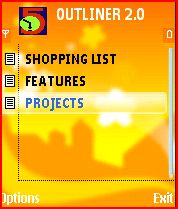
The design of the program is based around files and individual “nodes” for the storage and organization of information. The files are the top in the hierarchy of informational organization, which can be further expanded upon by creating nodes. For example, for a task labeled “Grocery List”, the user could enter the individual items needed from that particular list. This could also be typed up on a computer and synced with the mobile device if the user would find that route more of a time-saver. The following information about how to use the product is taken from the developer’s site.

To create a new file in the top level of tasks to do, the user would go to the menu and select “new.” The navigation button allows the user to select a particular file from the list. If the task needs to be further categorized, the user can create nodes by also going to “menu” and then “new.” To switch from a higher hierarchy to a lower level for a node, the navigation button is used; however, to return to a higher level, the user selects “menu” and “back.”

The “path view” feature of the program allows the user to see the outline of the project or chore from the file to the most specific node. This can be done by selecting “menu” and then “path.”

Another feature of the tool is that the “nodes” can be split into several further specific levels. This aspect of the program keeps the text from getting too long and unorganized. This can be accomplished by simply typing in <c> in the spot where the user wishes the new “child” level to split from the “parent” level. To add additional levels, the same process and symbol are used.

Overall, this tool offers the usability and the simplicity that a helpful productivity tool should. It allows organization without the usual hassle of learning how to navigate through a complex new system. This tool is really just a more efficient way of putting what would normally be a handwritten note into an electronic form. One of its most distinguishing and handy characteristics is that it is compatible with any mobile device, PDA, cell phone, Blackberry, etc. that is Java enabled. The only feature of this product that might not work on older phones or devices is the import feature.

These are only some of the capabilities and processes that this tool is capable of. For more information on the technical aspects of this product, you may visit the developer’s site.

What will Last?

February 16, 2009

A trip to the local library resulted in me spending most of my time browsing for older books–particularly the ones that were published before 1930.  A few days later, I was listening to a lecture on Shakespeare and was struck by the fact that much of his greatness comes from the fact that we have so many of his works fully intact.

book-main

In modern society, how much of what we produce will still be around 50 or 100 years after we die?  The change to magnetic media as the primary means of storing data condemns most of what we work on to a much shorter existence than the printed material of previous centuries.

Websites that represent a significant amount of one’s life work will disappear forever once the hosting fee stops being paid.

My family has a small notebook from my grandfather when he was a teenager.  How likely is it that the electronic records of a modern teenager will make it to their grand kids?

If you have memories that you want to convey to future generations, don’t trust it only to magnetic media.  Take the time to make physical copies of those photographs or written records that are important to you.

Originally published on March 20, 2007.

Articles on Going Paperless

December 4, 2008

  • 8 Tips for Going Paperless-Sheila Riley
    Now that technology offers so many different options for organizing documents and facilitating communication, using telecommunication instead of regular mail is a good option for many people. This article gives some ideas that were developed and used by the Blue Valley school district in Overland Park, KS.
  • The Perils and Perks of Going Paperless-James Champy
    As technology advances, many companies, especially those in the health care field, have begun to move toward paperless systems. This article explains some of the benefits and drawbacks of moving to a paperless system.
  • Going Paperless: Is It (Finally) Time?-Chad Dickerson
    This article explores the challenges that a person faces when switching over to a paperless system. The aspect of the paperless conversion that the author focuses on is the type of scanner that best fits this type of an adjustment.
  • Going Paperless-Unclutterer
    Sometimes the things that would have never been thought possible in earlier years become a reality. Paperless communication is one of those things. This article talks about some of the paper clutter that can be eliminated with a scanner and a bit of time. The author also provides a helpful link to another article on going paperless.
  • The Pain of Going Paperless-Gene Marks
    Even though technology can accomplish wonderful things and save tremendous amounts of time, it can also be overrated. As the author of this article points out, sometimes the old way of doing things is the more efficient way.
  • Going Paperless-Small Notebook
    As paper clutter builds up, often so does a person’s level of frustration! The author of this article shares their method of keeping paper clutter down to a minimum by using a computer and scanner, while acknowledging that paper is still good for some things.
  • Get Organized and More Efficient by Going Paperless-Money Blue Book
    Creating a paperless work space is, indeed, usually more efficient than its cluttered counterpart. The author of this article points out that, in addition to helping you cut down on mess, a paperless system enables a person to search through documents and keep from misplacing them as easily.
  • Pushing Paper Out the Door-Hannah Fairfield
    In this article, the author tells how one family organized what would normally be processes that use paper into paperless systems. The high cost of ink in recent years has also made the use of scanners and computers for storing information an attractive proposition.

Four Important Folders on my Computer

November 13, 2008

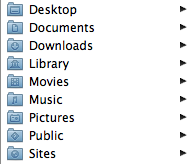
Here are four folders that I have in my Documents on my hard drive that I’ve found save me time.

Receipts - When I buy something online that I need to keep track of, I’ll print a copy of the receipt page to a PDF and save it in this file. Usually I’ll save it with the date as part of the file name. For example: 20071012-cell-phone-order.pdf. This makes it easy to find records of purchases.

Rebates - Rebates are awful. Basically, companies are betting on the fact that you won’t take the time to fill out the paperwork and send it in. I’ve found if I keep everything in a single location, it makes it a lot easier for me to gather up all the pieces of info I need and it is easier to make sure I get all the checks I’m suppose to. The scanner obviously makes this easier, but the real workhorse is Acrobat Standard. I can use it to fill out the forms and then save them. This works well on most forms, but it isn’t worth the trouble on those forms that have a separate box for each letter.

Backups - I use this directory to keep backups of various things I might need. Granted, my entire computer is backed up as well, but this gives me a place to keep things where I need to do a backup before making a big change. For example, I backup my financial software to this directory before doing global changes that could be difficult to recover from. I also backup my address book to this folder before syncing to a new cell phone or before making large-scale changes.

To File - This is a newer folder for me, but so far it seems to be working well. I created this when I decided to keep all documents out of my top level Documents folder. It now contains only other folders. I still needed a place to put something when I don’t have time to find or create a proper folder for it. The “to file” folder fills this function.

Originally published on January 15, 2007.

Paper vs. Importance

November 6, 2008

I have noticed the most important people have a very clear desk.  This also tends to be the case for people with much less important jobs.  To illustrate, I’ve created a graph.

I’m sure this isn’t true across the board, but it does seem to be at least partially true.  How clear are the desks of the most important three people at your organization?  Here are a few reasons that paper seems to go down as importance goes up:

  • The top person can always give his paper to someone else, so it pushes the paper down toward people of mid level importance.
  • The mid-level people will only push the paper down so far, themselves, because it is their neck on the line if something gets messed up.
  • The top person has more freedom to define what is important and work on just those things.  They can avoid trivial matters.
  • Top people have someone else to help manage and file the paper.  They also don’t have others dumping stuff on their desk.
Based on this chart, Al Gore has an extreme amount of mid-level importance. See this photo from Time:
So, what do you think?  Do you notice any type of correlation between someone’s importance in an organization and their desk-organizing skills?

Time Discounting

November 2, 2008

Clock
There is a psychological phenomenon known as time discounting. Basically, it means that a desired result in the future is perceived as less valuable than one in the present. For example, if you allow people to choose from being paid an amount in one year as opposed to being paid a smaller amount now, they will settle for a much smaller payment right now than they will in the future. There has been some research done on this and scientists found that a $100 payment in 12 months is just as attractive as $68 right now for the average person. This means that on average, people will discount the value of a gain made in one year by 22% over how they would value the gain made immediately.

Moneyclip_1
Time discounting applies to areas other than money as well. In particular it effects the way we perceive our efforts in the area of time management and organization. For example, spending half a day organizing your work space will give you benefits in the future, but it has a present cost. Because of time discounting, you are likely to underestimate the amount of benefit being organized will give you in the future. Another task that is 21% less beneficial, but with immediate results will likely appear to be more attractive.

Time discounting explains some of the reasons we procrastinate. Working on something that isn’t due for 2 weeks often has a lower perceived benefit than doing something much less important right now. This explains why it is sometimes easier to spend an evening watching television instead of preparing for a presentation that is coming up in a few weeks.

Just being aware of time discounting can be a big benefit. If you realize that you are likely to underestimate the value of future gains, you can compensate in your planning. Another possibility is to assign a “value” metric to each of your tasks. If you can do this ranking from a third person perspective and think about the value of the task and not when it needs to occur, it will give you better insight into its actual benefit.

Reference:
“Individual Differences in the Use of Time Management Mechanics and in Time Discounting” in Individual Differences Research, Vol. 4 No. 3, pp. 194-207

Originally published on June 9, 2007.

Dealing with Clutter

October 27, 2008

Everyone seems to have some degree of clutter in their lives.  The paperless office is still a dream, so we still have to deal with many pieces of “stuff” all around us.  This stuff can be paper, equipment, books, printouts, electronics, or any number of things.

A certian amount of clutter may be productive.  Some people just function better when things are in site.  However when clutter gets to the point that it slows you down, you need to do something about it.  If you find yourself spending time looking for things, that is a good indication that clutter is controlling you.

Here are several tips for reducing clutter in your life:

  1. Open your mail over the trash can. This will help make it easy to throw out things that aren’t necessary.  Any item that you can keep off your desk will save you time later.
  2. Create a filing system for things you need to keep. If you know you’ll need to keep your bank statements, create a file folder to keep them in.  Same thing with reciepts, insurance information and all the other paper that you’ll get in the mail.
  3. Organize electronics and gadgets by type or purpose. Most people accumulate a collection of tools, memory cards, special purpose cables, and electronics.  Try to keep these organized by their purpose.  For example, you might keep everything related to your cell phone (special cables, extra batteries, etc) in one area, while keeping all your computer related items in another.  Clear storage containers are great for this.  If you can see through the clear sides, it makes it easy to find what you are looking for.  If the items are organized by type, you can find the right container easily even if the item you are looking for isn’t in clear view, you just have to look for other items associated with it.
  4. Don’t use hanging files. You need to be able to create files quickly as they are needed.  Usually hanging files take much longer to setup than simple manila file folders.  Hanging files are great if the “cost” of creating them doesn’t keep you from putting off making one.  Regardless of what type of files you use, make sure they are easily accessible.  One compromise would be to use hanging files for all the letters of the alphabet, but put regular files in them with actual names on them.  This may give you the best of both worlds.  The hanging files help keep things organized and neat, but you can quickly create a new file in a matter of seconds.
  5. Get a CD case. CD’s can start to clutter things very quickly.  Loose CD’s can easily be damaged. A little money invested in a CD case can reduce your clutter very quickly.  Be sure to keep any software keys needed to install software with the CD’s as well.  You don’t want to discover a year later that you have the CD, but not the code to install it.
  6. Zippered file folders. Zippered file folders are a great way to organize information that you need to carry with you.  These organizational tools have 13 to 26 individual plastic compartments, but take up no more space than a spiral notebook.  This is a great way to file things that you want to deal with away from your desk. Just make sure you have a way to get the files into your main filing system when they no longer need to be mobile.
  7. Cut out the junk mail. Anything that you have to deal with takes up time–even if you simply throw it into the trash.  By contacting the people sending you junk mail, you may be able to get them to stop sending it.  If a 2-minute call can keep you from needing to deal with 12 items of mail over the next year, it is probably worth the investment in time.

Originally published on January 22, 2006.

Streamlining your business

October 21, 2008

Owners of small businesses are particularly concerned about productivity.  For a small company the difference between being highly efficient and moderately efficient can be the difference between profit and going out of business. Most efficient  practices are also applicable to personal productivity as well. However, with businesses, small productivity gains can be replicated over many people multiplying the  gains well beyond the benefits you’d get just for yourself.

A focus on productivity can let you cut your costs so you can make a profit even when your competitors are losing money. Here are eight key points to consider when establishing productive practices for your business.

  1. Simplify your processes.  Many processes become complicated over time.  By simplifying these processes you can make your processes more repeatable.  Also, simple processes are easier to automate, outsource, or pass on to less expensive employees.
  2. Automate your processes. Human time is expensive.  If something can be done by technology, you should seriously consider automating it.  Always do a cost benefit analysis in deciding what to automate.  Start with the things that give the best return on investment.  A $5,000 investment in technology to eliminate $50,000 in labor costs is a no-brainer.  A $100,000 to eliminate $3,000 in labor is probably worth passing.
  3. Measure everything. If you are serious about being productive, you need to be a good manager and measure all the important parts of your business. It is surprisingly easy for the daily effort of running your business to obscure the big picture of where you are spending your time and money.  Having good measurements in place will let your employees better understand how they are doing and will give you a basis for doing reviews.
  4. Standardize where you can. You only want to have to solve problems once.  By standardizing,  you can reduce the number of things that can go wrong. This gives you more time to concentrate
    on your business. For example, if you have 10 computers in your office, it will save you time if they are all the same (or similar) models.
  5. Think about the total cost. Don’t just look at the original cost of purchases.  Think in terms of the cost over the entire useful life over time.  For example, I used a discount host for my business website and email.  The pricing was very inexpensive.  However, the email went down at least once each week and required about an hour of my time working with them trying to get it back up.  I finally switched email to another more expensive host because the “cheaper” host was so expensive in terms of the amount of my time that it required.
  6. Focus your time. Many business owners combine their work and personal lives in unhealthy ways.  When you are working make sure you are able to give your total focus to working.  When you are relaxing, don’t be preoccupied with work.  It is easy to merge everything together so you don’t ever really get a chance to relax.
  7. Invest in education. Time spent on education can give some of the highest rates of return.  If you spend 5 hours per week for 18 weeks increasing your skills in a way that will save you 10 hours
    per week for the rest of your life, it is a very good investment.  It is hard to measure some of the return on education because it can often times open up avenues that weren’t even possible for you before.
  8. Solve problems once. When faced with a decision, try to see beyond the specific problem.  For example, don’t think in terms of “Mrs. Jones didn’t pay her bill.” Think in terms of “Some
    customers might not pay their bill on time–how should we handle late payments?” If you can understand the general issue behind the problem, you may be able to come up with a way to handle the general problem that eliminate it all together or allow you to create a policy that will let other employees deal with similar issues in the future without requiring your attention.

Originally published on October 2, 2006.

Dealing with an Unorganized Boss III

October 17, 2008

Bosses who don’t communicate

Many managers with no previous leadership experience are poor communicators.  This isn’t surprising, because the communication skills required to be a good manager are generally only learned through experience.

One common situation you’ll find yourself encountering under this type of person is working on a team of people who are out of sync. For example, your boss may tell you about an important upcoming project, but no one else hears about it until the last minute.  On the other hand, you may also find yourself in a position where everyone else knows some crucial piece of information except you.

The best solution is for your boss to learn how to communicate as a leader.  You can try to encourage them to communicate better by suggesting weekly meetings, memos to the whole team, etc. However, if you can’t change your boss, here are some things that might help improve the situation.

  • Create a group email address for the whole team.  Sometimes, giving your boss a mechanism to communicate with everyone just as simply as communicating with an individual, will help improve the communication.
  • Notify everyone on your team of critical information.  Don’t assume that your boss will tell people what they need to know.  This can be a simple matter of summarizing what your boss has told you and emailing it to the entire team, including your boss.  Your boss then has an opportunity to clarify themselves if you misunderstood something or they changed their mind.
  • Create informal weekly meetings with your coworkers to go over anything important.  Obviously, it is better if your boss is driving these, but even if it is just you and a few co-workers, a few minutes spent communicating can save you hours of work later on.

Other posts on dealing with an unorganized boss:

Part 1
Part 2
Part 3

Originally published on December 18, 2005.

Dealing with an Unorganized Boss II

October 16, 2008

Bosses who contradict themselves.

This can be a really annoying type of person to work for.  In mild forms, it just seems like they are slightly confused.  In really bad situations, these bosses seem totally deranged and malicious.  If you have a boss who will tell you to drop everything and work on X and then come back and ask why you aren’t working on Y, you are dealing with one of these bosses.

In most cases, these types of people aren’t outright malicious; they just have a very short memory, no clear goals, and are very unorganized.  You can usually improve the situation by putting their statements in writing.  For example, if your boss comes in and asks you to drop everything and work on X, write it on your whiteboard while they are there watching.  For bigger items, you might follow up with a memo or email.

In some cases, you might want to draft their instructions and get them to sign off on it.  Obviously, this is only worth while if it is something substantial, but having a plan or procedure that your boss has signed off on can be a powerful tool for you.  Keep in mind that this doesn’t mean your boss can’t ever change something.  You just want to make sure that when they make a change, they realize they are making a change.

Generally, you don’t want to be heavy handed about pointing out that your boss is contradicting him/herself.  Don’t beat them over the head with what they said previously, but just casually mention their previous position or directions as part of clarifying what that are saying currently. For example, if your boss gives you one procedure on Monday and comes in Tuesday with a different procedure, saying something like “OK, so does this replace the process (pulling out your notes or summary email you wrote) you gave me yesterday or is this a one time process?”  This isn’t confrontational and asks a legitimate question that will help gently point out to your boss that they are contradicting themselves.

In some cases you may need a little more leverage to help encourage your boss to stick with their decisions.  You can do this by making your boss’s decisions public.  This only works on decisions that impact more than just yourself.  It isn’t going to help you to broadcast every task your boss asks you to do. However, things that impact more than just one or two people are perfect for this treatment.  You follow the same type of procedure as above to write a summary of your boss’s directions.  Once your boss has agreed with them, distribute them to other people that they impact.  Better yet ask your boss to distribute them.  You might email your boss with your summary and say something like “This is the new policy as I understand it.  It might be helpful if you sent it out to the whole team so we are all on the same page.  Please edit or modify anything that I may not have gotten right.”

Your boss gets to look organized (for once) by actually putting something in writing and it makes it much more difficult to change their mind because “everyone” knows what they said.  If nothing else, it makes it much more difficult for them to forget.

If your boss is truly deranged and malicious, none of these techniques will work, but you may be able to use them as a litmus test to see if there is hope or if you should consider moving on to a less erratic work environment.

Other posts on dealing with an unorganized boss:

Part 1
Part 2
Part 3

Originally published on December 14, 2005.

Dealing with an Unorganized Boss

October 15, 2008

In the last few months, I’ve spoken with several people who are having a difficult time working with their boss.  In each case, the boss isn’t a bad person, but they are so unorganized that it is difficult to get much done under their leadership.  Obviously, the fault lies with the boss.  However, for people who are used to being highly productive, knowing where to place the blame offers little consolation.

This is the first in a series of posts listing common problems you’ll face with an unorganized supervisor and some suggestions on how to best deal with them.

The boss who doesn’t know what needs to be done.

This happens in two different forms. Some bosses know exactly what
they need to do, but aren’t really sure what they should have you work
on. Other bosses aren’t really clear on what they should be doing
(which of course means they have even less of a clue as to what you
should be working on).

If you find yourself in this situation, you’ll need to direct most of
your work yourself. However, you still need to keep your boss informed
and make sure that they approve what you are doing. Otherwise, you run
the risk of having them change your goals once you get started.

One way to do this is to make a list of everything you know needs to
be done and ask them to tell you what they would like you to work on.
This puts them in the position of feeling like they are managing you,
which means they are more likely to defend what you are working on if
it ever comes into question. Also, since you have their buy-in, they are
less likely to come in later and change what you are working on.

It is very important to make sure that any direction they give you
is documented. Most unorganized bosses will never put anything in
writing, so if you have a face to face meeting with them where say you
should be working on X and Y, don’t assume that they will remember that
conversation later. Be proactive by following up your conversation with
a short email summarizing your conversation. This gives you a record of
what you’ve been told to do and gives them a chance to clarify anything
that you may have misunderstood. If your boss later asks you why you
are doing something, you can refer back to your email that summarized
the meeting.

Other posts on dealing with an unorganized boss:

Part 1
Part 2
Part 3

Originally published on December 13 2005.

Links for Setting Up a Filing System

September 29, 2008

Everyone needs some type of filing system. Even if you are attempting to go paperless, chances are you will still need some type of filing system–even if it is computer based. The five articles below look at different ways to setup and improve your filing system. They deal paper based systems, but some of the principles will apply to paperless systems as well.

Taking a little time to improve your setup can be a very good investment. If you can reduce the amount of time you spend hunting for things each day by even just two minutes, it will save you 12 hours per year. If you have an article that you would recommend on filing, please add it in the comments.

  • Filing Organization Tips For Fast Office Filing - Jill Chongva
    A simple five point article on setting up an ideal filing system for small business. The entire task of setting up a filing system is given in five detailed steps Simple and effective tips that can keep you from having to do a reorganization of the filing system in the future.
  • 10 Ways to Improve Your Filing System - Lisa Kanarek
    This article is a very detailed reminder of tips that make filing system; your business time saver. Emphasis is given on choosing the right type of folder – hanging interior color coded files. Common guidelines that are often overlooked while maintaining files are mentioned elaborately. The content of the article truly depicts the expertise of the author in this regard.
  • Setting up an Organised Filing Cabinet or File System at Home - Susan Whelan
    The article highlights the logic behind a simple and organized filing system. The entire procedure of maintaining a good filing system are listed under three main headers – Access the available space, Set up folders and Keep it simple. Options provided to choose a filing cabinet is something that you can lookout for in this article.
  • How to set up an effective filing system - DeskDemon.com
    Starting from scratch, the author has provided the step by step procedures involved in creating a well-planned filing system. The advantages and disadvantages of different types of filing arrangements makes the article a must read one.
  • Filing Systems : A Four –Step Formula That Really Works - Sally Allen
    Best practices to make your filing system a neat and effortless one. A four point article, that will help you maintain an organized, hassle-free, and untiring filing procedure. Suggestions to maintain a retention schedule for files and options to file official documents including catalogs, prints, and envelopes are also listed.

$10,000 Stack of Paper

September 16, 2008

In my computer bag, I have small stack of papers that is worth a bit over $10,000.  This is a story about the importance of keeping good records.

Before my wife and I went to Mexico, we decided we needed a new car.  Our Buick had well over 200,000 miles on it.  The high mileage wasn’t a problem, but the area where we were going couldn’t easily get Buick parts.   It was a similar situation with our 20 year old BMW.  After some checking, we found that Volkswagens were pretty common and there was even a dealership in the area where we were planning to live.

We test drove about 15 vehicles before we found one we liked.  It was an off-lease 2003 Passat with a bit over 50,000 miles on it.  This gave us about 10,000 miles left of the power train warranty.  After checking it out, the only serious problem I could find had to do with an oil sludge buildup that occurred on some of the cars with that engine.  I talked to Volkswagen and they informed me that there was an extended warranty for that problem for an additional eight years with unlimited mileage–in the rare event it happened.

We bought the car and drove it in the US for a while before our move.  I had a dealer do all the preventative maintenance and asked them to check and make sure it didn’t look like there was any type of problem with oil sludge.

Everything checked out and the car worked great, getting us to Mexico without a problem and back when we decided to move back to the U.S.  I regularly had the oil changed–most of the time at a dealer.  Everything seemed fine until about 82,000 miles when the low oil pressure light came on for about two seconds and went off.  A few minutes latter the check engine light came on.

We took it to a dealer and explained the problem.  They checked it out and said that there were some vacuum tubes that needed replaced and that the spark plugs (which had just been changed) were now ruined and needed replaced as well.

We thought we were all set as we headed to Colorado, but somewhere in the middle of no-where, Western Kansas, the low oil pressure light came on again.  I called Volkswagen, who put me in touch with the nearest VW dealer (about 3 hours backtracking from where we were).  The mechanic told me that it was probably the sensor going out.  He said it could be an oil sludge issue, but since I had just had a dealer look at it, the sensor was probably at fault.

We continued our drive for about 30 minutes before the car completely died and wouldn’t start.  It turns out that the sensor was working properly and the oil intake had been plugged by oil sludge.  After getting our car towed to a Denver VW dealership, we were told that there were two parts to get approval for an engine replacement.

  1. The mechanics would have to look at the engine and send photos to VW headquarters to determine that it was really oil sludge.
  2. VW corporate would have to see my oil change records to determine that I had maintained the car properly.

At the VW dealership, I was told that the records were usually the biggest sticking point.  It took me about 30 minutes to sit down and go through my papers to create a detailed list of all the oil changes and put the documentation in the right order.  I gave Volkswagen a spreadsheet listing each oil change, the date, and the miles since the previous oil change.

I sat down with the service representative and walked him through the records.  He seemed pretty surprised that I had everything right there.  When he told me that there wasn’t anything else he could think of that VW would want, we continued on our vacation in a rental car.  About a week later, we came back through and picked up our car with a new engine.

So, basically, that stack of papers showing my oil changes was worth a new engine–about $10,000.

Interview: Managing Wires

July 15, 2008

We interviewed a number of bloggers about how they manage the wires in their office setup. Wireless technology was the most frequently mentioned solution, but there are a bunch of other great ideas as well.
Organization interview question: What is your best tip for managing the multitude of wires in a typical computer setup? (182)

Use a good computer desk or table along with zip ties to keep everything out of sight

John Richardson from Success Begins Today (rss)

I’ve also had good luck with using double sided velcro for this purpose. Another thing that seems to work well is using black electrician’s tape to tape up cables that are longer than what you need.

I use as many wireless devices as possible; I hate wires on the work surface. I use bluetooth mice, keyboards, and headsets. The wires I cant eliminate are neatly coiled and grouped with velcro or cable ties

Mark Nassal from Stress Free Productivity 101 (rss)

My wireless mouse and keyboard probably done more to clear the wires off my desk than anything else.

Besides eliminating the wires through bluetooth devices, the best thing to do is to have them all clustered together behind the monitor and out of sight. The visual and physical distraction of all of those cords drain at your focus. In a pinch, I use trash ties and rubber bands to keep all of the wires together, and I position my laptop so that the wires immediately take a run behind the TV

Charlie Gilkey from Productive Flourishing (rss)

Charlie is making an important point here. You can change your layout to minimize the amount of wires that are visible. I once had an office where my desk was positioned next to a closet. It was easy to hid things because I put a lot of my equipment (printer, network hub, etc.) in the closet. This cut down on visual clutter because I only had a few wires running out to my desk.

Bundle them together with Velcro straps. I also try not to unfurl them any longer than they need to be in order to reach from the computer to wherever the connected item is on my desk

Damian Bariexca from Apace of Change (rss)

Sometimes investing in the proper length cords is the best thing you can do. Short of that keeping the excess wrapped up tightly and out of site makes things much easier to manage.

I keep all my tech tools–scanner, printer, shredder, charger, etc.–in an armoire. A surge protector powers them all and plugs into the wall behind the armoire. Taming wires is hard, but keeping them behind closed doors is easy

Eva Holtz from College Admissions Secrets (rss)

This is a good idea if you have the furniture to do it. A closet works as well.

Try and keep less wiring around the computer. Go for a wireless keyboard and mouse and if you attach any extra peripheral for a particular purpose then do remeber to detach it later. More wires you have, the more clutter it will create

Abhijeet from Jeet Blog (rss)

Another vote for wireless. Keeping equipment that is only used infrequently off your desk is a great idea. I have a sheet fed scanner and a flatbed scanner. Since I only use the flatbed occasionally I leave it put up and only pull it out when necessary.

Another tip is to buy equipment that uses minimal wires. For example, my flat bed scanner is powered off USB, so there is no additional power cord. My ScanSnap requires USB and a power brick. USB probably isn’t strong enough to power the ScanSnap, but it sure would be nice to have a single cable.

Most cords come with a twistie tie or rubber band, so I just pull out only what is necessary and put the tie back on. But for the most people I would recommend just do whatever to get them tucked and not worry about

Ryan Cole from Practical Productivity (rss)

This helps, but you still end up with a mass of wires that can get tangled. Just getting them out of sight works well if you don’t redo your desk very often.

Honestly, I just plug it all in and chuck the wires behind the desk where I don’t have to think about them ;

Joel Falconer from JoelFalconer.com (rss)

Out of sight. Out of mind. :) I have a glass desk so there isn’t really anywhere to hide things behind the desk.

I have so many electronics and move things around so much that I just keep them off my desk and out of sight when I’m sitting at computer. I keep them safe from the cats, and I keep the outlets handy to me.

I don’t waste time trying to overly manage them or make them look good because I change things around a lot. For cable that we run throughout the house we use a staple gun to keep it attached to door ways and baseboards

Ariane Benefit from Neat & Simple Living (rss)

If your cords are thin enough, you can sometimes stuff them under the baseboard on carpeted rooms. Best Buy has an almost paper thin phone cable that works very well for this. If I could just find a thin network cable I’d be set.

The only cord in my computer setup is the power cord. I have a MacBook and I wirelessly connect to my printer, NAS, stereo speakers, and phone headset. I don’t use a mouse. And, I have a virtual Windows installation, so instead of three machines I use one. On the other side of the room where the printer and NAS live, I have their wires bundled with velcro ties and labeled at both ends

Erin Doland from Unclutterer (rss)

I have done this before and I really like it, but I find I end up with very bad ergonomics and my wrists start to hurt. Also I’m kind of addicted to my 30 inch monitor. :) If the ergonomics don’t bother you this can be an ideal way to keep things tidy–especially if you can keep your equipment in a closet or other piece of furniture.

The best way to answer this is to look at my article 5 Ways to Reduce Cord Clutter.

LJ from simpleproductivityblog (rss)

LJ’s article has 5 methods for dealing with cords.

By best suggestion is to eliminate as many of them as possible. Go wireless! You can get a wireless version of just about anything today. Of course, many of us use wireless networks, but there are also wireless mice, wireless print servers, and wireless keyboards. Why mess with the tangles and ugliness of cables? I say throwing them out is the only way to manage them.

Jeff Nickles from My Super-Charged Life (rss)

The wireless print server is something many people overlook. Usually the best place for your printer isn’t directly on your desk anyway, but many people keep it there so they don’t have to run wires all over the place. My printer isn’t wireless, but it does have a network connection. I keep it on top of a storage cabinet plugged into my wireless router.

Get a desk that has a back all the way to the floor :)

Honestly though, the only answer I can think of is to go wireless wherever possible. Other than that, I’ve had some success with rubber bands and zip-ties.

Sam from Sam I Am (rss)

This is a very good idea, but if you live somewhere dusty, you’ll have to find a way to keep it clean. I’m still partial to my metal frame, glass top desk so I can’t use Sam’s method.

I disconnect what I don’t use (scanner, Wacom tablet, webcam and more) and store them away. I hide the rest of the wires.

Soon it’ll be different, when I buy my iMac with wireless keyboard and wireless mouse, connecting to my wireless internet, integrated webcam, integrated drive, integrated everything. What wires? Maybe one to a USB hub far away, so I can connect stuff that doesn’t have wireless technology

Lodewijk van den Broek from How to be an Original (rss)

Keeping things put away helps a lot. This is another reason it can be very useful to have a closet or some type of storage area where you can put everything.

Fruitfultime Task Manager 2 Review

July 11, 2008

Many of us struggle with keeping our lives in proper order. It is nothing new, and there are many ways in which to attempt to prioritize one’s tasks and manage one’s time. There are a plethora of different programs available to the public that are meant to make a person’s life simpler and more productive by assisting that person with the organization of their daily routine. However, this is not to say that all of these programs are equally useful and user-friendly.

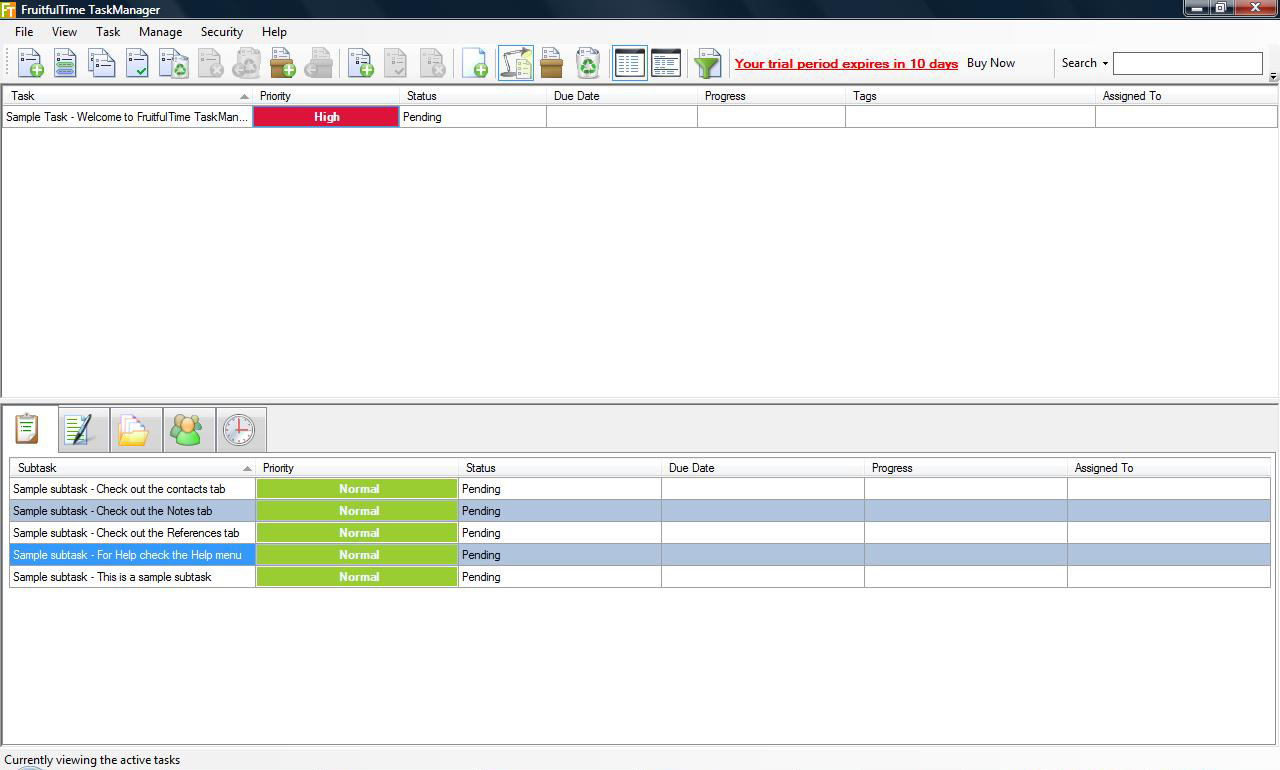
The developers of FruitfulTime Task Manager have put much thought and time into their latest version of the Task Manager, making it easier to use, more useful and less complex, in the very best sense of the word. Fruitfultime Task Manager 2 has been updated to improve several areas of the program.

The first of the newly revamped features is an always-visible search-as-you-type box. This feature makes the search process more efficient than ever before. This feature works much like the Search feature on Windows Vista, which I have found to be extremely helpful.

The second feature that the creators of Fruitfultime have worked on is the way tasks are organized. Now users of Fruitfultime Task Manager 2 can organize and prioritize tasks more easily and efficiently than ever before. For example, now users can filter tasks with options such as priority, status, progress and subtask filtration choices.

A third and well-thought-out feature of this newly updated program is the ability of the user to organize tasks with tags without any hassle. This version of the program allows a user to tag tasks in various different ways. A user may utilize right-click context menus and shortcuts to organize his or her tasks in order to put that particular task in a useful context.

With this software comes another useful tool called a “reminder.” These reminders can be set to alert a user at intervals such as, 12 hours before the event, 1 hour before, 30 minutes before, etc. Contact details are also archived, stored and managed in this one place, which makes it easy to look them up and organize them into useful groups.

As a whole, this program has been much improved in that it is more efficient and user-friendly than ever before. The new features that allow for the prioritization and organization of tasks make Fruitfultime Task Manager a wonderful tool for anyone that needs a hand in organizing his or her life.

Giveaway!

We are giving away a license for Fruitfultime Task Manager. To enter, simply add a comment telling how you or your coworkers keep track of your tasks and todo lists currently.  The contest runs for a week.

Update: We have a winner!  Jen Alford is now the owner of a copy of FruitfulTime 2. She was chosen at random for the commenters on this post.

Setting up a Home Office

July 9, 2008

Here are some articles with tips and ideas for getting started with setting up your home office.

  • How to Set Up Your Home Office - Beverly Block
    Working from home is the latest trend. The environment has a direct or indirect relationship with the output of your work. This article helps you to set up the right backdrop for your home office. The entire process involved in setting up home office is given in 5 simple steps.
  • Seven Rules in Setting Up Your Home Office - Jenny Fulbright
    This article is about giving importance to productivity and creating a balance with life. 7 important steps that covers all the aspects in setting up a home office and yet not getting interrupted by noticeable distractions. Each and every step is elaborate and does not allow the reader to overlook trivial facts. Thereby, creating harmony between two faces of life – Office and Home.
  • Get a Home Office Set Up on a Shoestring - Coral Nafie
    The place of work motivates you to become productive. Coral, an interior designer, has taken into account all the details that would help the reader design the work space from home. This article provides tips on maintaining the cost while creating a comfortable yet professional home office.
  • How to Set-up a Home Office - Linda Novey-White
    The 5 “P” logic is very well communicated to the readers. The distractions involved while starting home office cannot be assumed in the first place. This article throws light to all events that can make you unsuccessful, should you have your office set up at home. In addition, the basic decisive factors, one has to keep in mind while establishing home office is also highlighted.
  • Home Office: Identifying Your Needs - Marjan Zemljic
    Not very elaborate, but the article speaks, in general, about the requirements of setting up a home office. It’s more of sharing thoughts with the reader who would just be thinking of a home office. Reasons of having office space at home, locating the right place, furniture to be used, are all cited in this article.

Interview: Managing Physical Media

June 30, 2008

What is your single most important tip for keeping your books, magazines, software and other physical media organized? (549)

The key to keeping your physical media organized is to have as little as possible. Only keep the absolute essentials and either trash or convert to a digital file what you want to keep.

For example, I don’t purchase any fiction books– the library is perfect for that. I only keep books that I will either read again or reference in the future.

CD’s and DVD’s are easy to convert to digital files and centralize on an external hard drive (be sure to back it up!)

Basically, if you drastically reduce the amount of physical media in your life the problem of organizing it will resolve itself.

Sam from Sam I Am (rss)

Sam’s answer was the highest rated from this question. Using the library is something I often overlook. I have converted almost all of my CDs to digital and I now store them in a large box in a barn.

Purge! You can’t organize clutter…and clutter is stuff that you don’t use or love.

If you haven’t read a magazine in three months, throw it (and consider your total amount of subscriptions).

If you clean out your computer, purge the software.

Give yourself permission to never read the stacks of books that have piled up and get rid of them. If you decide you really want to read it in the future, you can get it from the library or buy it again.

LJ from simpleproductivityblog (rss)

With the second most popular answer, LJ encourages us to get rid of stuff we don’t need. With the cost of books being so low (especially getting things used on Amazon) it can make sense to get rid of something and just buy it again when it is needed.

My secret trick to keeping physical media organized is to have as little of it as possible.

I don’t buy books very often–I check them out from the library, so I don’t have to worry about storing books. I used to get a number of magazines, but this year I unsubscribed from all of them. I’ve kept my old magazines (they’re on a shelf in my closet), and I still enjoy looking through them sometimes, but I don’t have to deal with a constant influx of reading material.

Just streamlining possessions really helps cut down on clutter.

Sharon Sarmiento from eSoup

A related tip is to only buy something when you are going to use it immediately. If a book looks interesting, but you won’t have time to read it right away, just write the title down and keep it in a list of things to read later. When you have time to read it you can purchase or borrow the book.

Get the digital versions if possible. If they are not available, using magazine holders and having lots of book cases are what works for me.

Oh and… when in doubt… throw it out…

John Richardson from Success Begins Today (rss)

I don’t mind digital versions of magazines, newspapers, and fiction on my Sony Reader, but I tend to want hard copy of books that I might use again or loan to someone else. On bookshelves, I bought a bunch of folding wooden bookshelves when they were on sale for half price. They fold up so they are easy to move and they are real wood (not particle board) so they tend to outlast other shelves.

Digitize it. If you can get it in a digital format, you’re off to the races.

If you can’t, the traditional old bookshelf or filing cabinets are a great start, as long don’t give yourself too much room to expand. This sounds counter-intuitive, but if there’s a space, something will fill it, and you’ll end up with more clutter. Having just enough room to contain your essential physical media without much room for growth forces you to get as much done or acquired digitally as you can.

http://www.joelfalconer.com from Joel Falconer (rss)

If you have a bookshelf with extra space, consider putting a plant or picture in the extra space. You can remove it when you need the room, but it will help keep you from just throwing something else in the space because it is empty.

I think the best way you can keep your books and magazines organized is by arranging them according to topics and subjects and then keeping them in order of their priority. Like , if you read any particular book or magazine frequently, keep it on top of the pack or in front portion of the shelf. This way you won’t need to disturb the pile of books when you want that particualr book.

The same goes with softwares and physical media. Here you may also consider sticking small labels onto them which can help you identify them easily when you need them.

Abhijeet from Jeet Blog (rss)

Topical organization for books is a great idea. If you have a house with bookshelves in various places you can arrange topics based on location. Cooking books near the kitchen. Business books near the office. Picture books near the den.

For me, my biggest struggle with physical media is the sheer amount of information contained in the books I read that needs to be used in my blog. I use sticky notes and mark pages with the info I want. When finished reading a book, I record all those notes into a spreadsheet.

Later, when I’m creating a blog post and I’m trying to remember where I read something, I search the spreadsheet, locate the page number, and have the full reference in front of me. It has saved me tons of time.

Jason from World Fitness Network (rss)

Jason has a great method for keeping track of information. I’ve heard some other people say that they read a book with a voice recorder handy and note the page number and any thoughts they have as they go. They then send the audio file off to have it transcribed.

The biggest tip would relate to books. I like reading books a lot, but don’t have a lot of space, so I check books out of the library. I take notes on the books I read online, so I can refer back to them later.

Anne from Writers Cabal Blog(rss)

Another vote for making better use of the library.

Don’t have too much of it! Set limits on how much of this stuff you have and then it’s easy to organize.

Ariane Benefit from Neat & Simple Living (rss)

Getting rid of things that you don’t need any more can be very valuable. That book on photoshop might be worth $7 now, but will be worth nothing in two years. Selling the extra items on Amazon helps move things out and gives you some cash as well

Forget about alphabetizing. It can drive an obsessive person crazy, and alienate everyone in your home and office. If you have an extensive collection of “things”, I would recommend software called “Paper Tiger.” It’s an all-inclusive product with multiple licenses where you just place your media/books/magazines in a row, enter the location and place a number on the item. When you are looking for something, you simply check the program. Our company has implemented it for a Sony design library and a Natural Foods Bakery accounting office. Does away with the need to alphabetize and you can check things in/out which works well for architectural and interior design firms with extensive collections of drawings and samples. http://thepapertiger.com/

John Trosko from OrganizingLA Blog (rss)

I haven’t ever used The Paper Tiger, but the idea sounds interesting. Unfortunately all I can find is a PC version.

Purge your media! I use the library and SimplyAudiobooks.com as much as possible, taking notes and then returning the books in order to keep clutter to a minimum.

Eva Holtz from College Admissions Secrets (rss)

I use to use Audible back when they had a really good subscription plan. I could get all the books I could listen to for about $20 per month. This worked great until they changed their plans.

I use a relatively unconventional method. I have 3 stacks (literal stacks) of books. If it’s on or under my nightstand, it needs to be read. That is my primary stack. If it’s something that I’ve read and I think it has great information that I think I will reference frequently, it’s in a stack nearest my desk. The third stack are those books that don’t fit on my bookshelf :)

Nathan Snell from The Technopian(rss)

This is a new method I haven’t heard of. I’m afraid my stack of things to read would topple. :)

Interview: Getting Organized

June 5, 2008

As part of our interview questions on organization we asked people what tip they would share with someone looking for a single way to better their organization skills. Then Productivity501 readers were asked to vote for their favorite answers. The results below are organized based on the results of the voting. (You can still vote on answers to other questions.)

What is the single most important piece of advice you would give to someone looking to better organize his or her life?

Start by reducing clutter and getting clear about your priorities. It’s a lot easier said than done, but it’s true. Disorganization starts with indecision caused by your own conflicting needs, values, thoughts, emotions, and beliefs - then it shows up all over your home or office!

Ariane Benefit from Neat & Simple Living (rss)

Ariane answer received the most votes for this question. She makes an interesting point here. The process of getting rid of clutter is really about clarifying your values and determining what is important to you.

Declutter. If you don’t love it or use it, get rid of it. Let’s face it - grandmother’s lace tablecloths may be important, but if you have been storing them in paper bags in the garage for the last five years, they are not important enough for you to take care of. Things like that need to go.

Once you have decluttered, you can set about getting organized.

LJ from simpleproductivityblog (rss)

LJ’s answer can in with the second most votes. I think everyone can identify to something like “grandmother’s lace tablecloths” that are being stored somewhere. It is easy to forget that every thing we acquire requires some type of maintenance. It is a good idea to look at stuff in terms of how much of an investment they are going to require over time.

One thing that helped me reduce clutter is to keep one box of mementos from the past. If the box is full I have to get rid of something before I can add something new.

Act now. Don’t put off anything. Don’t say, “Oh, I’ll get to that tomorrow.” Because something else will happen tomorrow that will cause you to put it off again.

Oh, and set goals. They are important.

Michael Morton from Marketing Monster (rss)

Making at least a little progress every day is valuable. Michael’s suggestion to set goals is particularly useful if you set things in small enough chunks that you can get something done each day–even if it seems small the cumulative benefit and momentum is very valuable.

Eliminate, eliminate, eliminate.

Reduce your possessions, commitments, and obligations to the true essentials. It’s much easier to organize when you have already eliminated the bulk of your extra stuff– both physical and mental.

Sam Spurlin from Sam I Am (rss)

It is a great feeling to use that thing you’ve been saving for five years, but you have to be honest with yourself and get rid of anything that there isn’t a very high probability that you will use.

Choose one gadget (digital or analog) for keeping track of your responsibilties, and make sure that everything ends up there. I use a Moleskine pocket datebook, one page a day, with extra pages and a manila envelope in the back for sundry items.

Michael Leddy from Orange Crate Art (rss)

I recommend the Franklin Covey training–at least the way it was done in the mid 90s. Their system of keeping track of everything was very valuable to me.

One sentence: Everything in its place.

Benjamin from WOWNDADI (rss)

This is what I like about the toolkit my brother gave me a few years ago. Each item has a specific place. It is much easier to keep it organized than my old toolbox where everything is just thrown in randomly. It is also easier to put tools up because they go in a specific spot.

My most important peice of advice for someone wanting to organize is to take a few minutes in the morning to visualize your day. Visualize the positive feelings when you do things, especially at important crossroad events throught the day. Such as wanting to check your calendar in the morning as if you might discover a treasure, making that grocery list with a smile because its perfect, remembering to get the groceries before you pass the exit and feeling awesome because you did, and enjoying organizing your desk like its a high performance machine.

Ryan Cole from Practical Productivity (rss)

Taking pleasure in your organization tasks is good advice. I think it is easier once you get to a certain level of organization to be happy about maintaining it.

Set long and short term written goals. Once that is done start using a daily planning sheet. Keep it where you work (desk etc) and write things down. You can download a free printable version on my blog.

John Richardson from Success Begins Today (rss)

I have recently started taking a single piece of blank paper and using it to write my important tasks for the day. John has some interesting forms on his site that will help you with planning if need a place to start.

Rest is the basis for activity. If you are rested mentally and physically, you will think more clearly and, as a result, behave in a more organized and intelligent manner.

Going to bed before 10 PM has a miraculously good effect on the next day’s productivity. More things will get done with less effort thereby leaving more time to enjoy and, of course, more time to rest.

When you try it, you will be amazed at how much your luck seems to improve. Being well rested mentally and physically is a major key to being successful.

And if you want to take your rest to an even deeper level, I would heartily recommend the practice of Transcendental Meditation (www.tm.org). I’ve been doing it for 40 years and have loved every minute of it.

Fred Gratzon from The Lazy Way to Success

Most people are sleep deprived. The Promise of Sleep really changed how a view the need to get rest. The biggest change in my sleep patterns has come from having a 1 year old who gets up at 5:30 each morning. This has forced me to go to bed earlier and I’ve been happy with the results.

De-clutter. I’ve been a huge pack rat my entire life, and it’s only in the last 2 or 3 years that I’ve been able to tell myself, “No, you really never will use that ever again.” Throw out anything you don’t need and scan important paper documents to PDF. In both my personal and professional lives, I’ve found that eliminating excess material makes it so much easier to focus on tasks at hand, and I’ve been much more productive and efficient for it.

Damian Bariexca from Apace of Change (rss)

Even if you occasionally throw out something you need and have to repurchase it in the future, you will usually be better off simply by having less stuff.

By simplifying your life - work on putting order into your working and home environment. Each area in your home should serve a specific function, cutting down on unnecessary clutter means you have less to organise. By assigning items a specific place you make sure that you know where things are when you need them, cutting down on wasted time and making life easier, leaving you time to focus on achieving your goals.

Grace Smith from Postscript5 | Freelance Web Design

It takes a great deal of effort to keep things simple and most people aren’t willing to invest the time and money into simplifying.

It is important to breakdown the task of organizing down to small pieces. Start with one aspect, work on it a little bit a time. Otherwise it will seem like an unsurmountable task and you may not pursue it.

Rolando from macNwinblog (rss)

I think it can also be valuable to divide your tasks into initial organizing and maintenance organizing. I may only need to reorganize my office once a year if I do some basic tasks each day to keep things in an organized state.

Write it down!

GTD Wannabe from GTD Wannabe (rss)

I would say write it down and be willing to purge items. Just because you wrote something down doesn’t mean it is really worth doing. But getting stuff out of your head and onto paper is very valuable.

I am a disciple of David Allen’s Getting Things Done. It really does works! If you are waking up during the night, stress all day long, juggling all your tasks in your head, then GTD is for you. It will help you get your life back and increase your productivity.

M Nassal from Stress Free Productivity 101 (rss)

My personal feeling is that GTD can encourage you to do less important tasks because you don’t automatically forget the less important items. I would rather have 3 important things to do each day than 100 trivial items. Overall, I like the methodology as long as it is approached in a way that gives you the flexibility to change things to meet your needs.

Find your life purpose. Your life purpose is the central point of organizing your life. It’s useless to do things the right way if you do the wrong things.

Donald Latumahina from Life Optimizer (rss)

This gets back to the idea that you can’t really organize until you’ve defined your values.

If you’re not that organized, ask for help. I’m not an organized person, but I’m constantly asking others how they do it. Not all of their advice will work for you, but it’s certainly better than going it alone.

Anne from Writers Cabal Blog (rss)

At the same time, it is important to make sure you look for things that work for you that no one else would ever suggest. Look for advice, but don’t let the way other people do things keep you from discovering what works best for you.

Get an axe, and start chopping up your life. If you aren’t organized, you won’t be organized until you let go of all the crap and clutter and extra responsibilites that aren’t getting you anywhere.

Don’t bother trying to organize your life until you have removed every last bit of clutter from your life. If it moves, remove it.

If, in a month’s time, you’re disorganized again, it could be one of two things:

  • You skipped that step, or you didn’t declutter enough; you might be holding onto things too tightly that could be easily axed.
  • You need to work on your self-disclipine abilities. No point trying to organize if you have no self-discipline first.

http://www.joelfalconer.com from Joel Falconer (rss)

Getting rid of things (physical items as well as activities) can be extremely painful, but very vital if you want to move to a state where you can keep things organized.

Eliminate all activities that don’t help you achieve your life goals one way or another.

Lodewijk van den Broek from How to be an Original (rss)

Once again this comes down to clarifying your values before you can really know what to keep and what to jettison.

Read Unclutterer.com, of course!

Erin Doland from Unclutterer (rss)

This answer is kind of cheating, but I agree. :) Erin’s site has a bunch of great tips on getting organized.

Paperless Office

June 3, 2008

These links and summaries about going paperless were compiled by my assistant in India. (In an upcoming article I’ll be talking about what it is like to work with a virtual assistant.)

  • 6 tips for a ‘paperless’ office - Joseph Anthony
    People get greater return on their hardware, software and technology investments while they partially get rid of the paper clutter. The author focuses on 6 basic things that one has to remember while moving to a paperless office. The reader gets the pointers to remember while shifting to a paperless home or business office; he is also familiarized with the benefits.
  • Acrobat to a Paperless Office - Julie Starr
    This article focuses on the benefits of technology for moving to a paperless office. In comparison to any other software, author vouches for Acrobat. The wide range of built-in capabilities would enable the user to add annotations, track reviews, merge multiple PDF files, or add custom headers and footers. Illustrative examples are given to familiarize the reader with the various acrobat options available. The benefit of using acrobat is huge in comparison to the shortcomings pointed out by the author.
  • The Concept of the paperless office (d,a,n) - Maricon Williams
    The article brings to light the motive of different authors in having a paperless office. While we foresee an office without paper, the benefits involved cannot be overlooked. The author discusses on three advantage involved in having paperless office but at the same time also alerts the reader of the risk involved. The author’s viewpoint is also featured along with the opinion of many authors on this subject.
  • Rethinking Paperless: Efficient Alternatives For The Not-So-Paperless Office - Bill Brikiatis
    While one desires to set up an office with less paper or paperless, few questions are bound to attack. The author has presented his viewpoint on this subject in the form of question and answer. From the feasibility of the idea to cite an example of a firm, which has successfully moved to become paperless has been mentioned in this article. Opinion on usage of apt tool is shared by the author that can minimize the paper-clutter and thereby enhance service efficiency.
  • The real paperless office - Joe Kissell
    You might be lost when you are asked to aim for paperless office. This article acts as a guide to help you set it up with more ease. Based on personal experience, the author lists the steps involved in having an organized office with less paper. The reader gets enlightened on selecting the right hardware, software with appropriate configurations and the best suited process.

Interview: Filing System from Scratch

May 29, 2008

In a recent interview we asked a number of people how they would advise creating a filing system from scratch.  Then the readers of Productivity501 voted for the best one.  Below are the answers arranged with the highest ranked answers at the top.

Don’t forget you can cast your vote for the remaining questions.

Describe your paper filing system along with your advice for someone starting a filing system from scratch.

I like a logical system.  Ask yourself, where would I expect to find this?

Keep and file only what’s necessary.  Tax records are, notes from a seminar are probably not.  Once read and committed to memory that information will probably not be referred to again.

Use specific, plain language file names.  Instead of “banking”, say “X Bank Acc. #”.

For a home-based office, like my own, I think “prime real estate”.  Files accessed most often should be the most easily accessible.  That’s the prime real estate.

I use logic.  And zones.  Finances belong together, as do client records.

Maintenance is the key.  When you take out a file, take a quick look at the contents.  Are they still relevant and necessary?  Weed it.  Is the file still too big?  Divide it into sub-categories.

Any filing system evolves.  If you keep using logic, it will always work.

Angela Esnouf from Organised Thoughts

The idea of asking yourself “where will I look for this” is an excellent tip.  It is easy to look for a place to put something and end up storing things in spaces that make absolutely no sense when you are looking for it later.

First, I do everything possible to minimize paper.  For those papers that I must keep, they get filed in regular file folders in a cabinet.

I find that it works best to create a single file folder for each project or account.  So I have folders for bank accounts, taxes, etc.  Then I put these in alphabetical order.  It makes things easy to find and simple to expand.

Be sure to label your folders well.  I have a great DYMO label maker for this.

Finally, file things as you get them.  Don’t let them pile up or save all your filing for later.  Put things away as they hit your desk.  It will save you from lots of headaches.

Andrew Flusche from Legal Andrew (rss)

I find the labels make a big difference in how I approach my filing.  If things are well labeled I tend to be more careful how I file things because it feels more “professional”.  If my labels are sloppily written by hand (or even non-existent) I tend to be lazy in my filing and things quickly go down hill from there.

I simply have a bunch of folders in a couple of drawers. Neatly organized in an alphabetical order.

Tip: Even when there’s only one piece of paper to file, it’s worthy of a folder.

Tip 2: If you can’t decide on a suitable name, just pick one. If you can come up with it now, you can come up with it when you need it.

Lodewijk van den Broek from How to be an Original (rss)

I am bad about not creating a folder when I need it.  I know David Allen recommends against hanging folders because if it requires more work to make a new folder, you are likely to put it off and not file it.  Tip 2 is related to Angela’s tip of asking “where do I find this”.

Developing a filing system depends on your needs.  I use a filing cabinet and hanging filing folders.  I create a separate folder for everything.  Some people try to keep less folders with more information.  I find that the more folders I have, the easier it is for me to locate what I need quickly.  Don’t hesitate to create a new folder because you feel that you won’t have enough information to warrant a new folder or because the information isn’t important enough to keep in a separate file folder.  If it is worth keeping to you, then create a folder to make it easy to find.  Remember they are your files and the point of having a filing system is to make your information accessible and organized.  I also alphabetize my folders to make locating them easy. 

Vicki from One Big Health Nut

My problem with new folders is when I start creating things that overlap.  I’ll end up with Finances, Banking, Retirement, and Money and it isn’t clear which one is the correct folder.  This probably is more of an issue because I don’t have my folders arranged correctly, so I overlook the correct folder and create a new one.  

My personal paper filing system is arranged in zones. The files I use on a daily or weekly basis are  in a drawer I can reach from my desk chair. Files that are used for reference are in a nearby file drawer.

Here are ideas for those lucky people starting a new filing system:

  • Use the same system for filing paper and electronic files.
  • Keep business and personal files separate.
  • Keep the system simple. The more “chores” you need to do to get the filing done will mean the less filing you do. The simplest system uses handwritten labels on manila file folders.
  • Invest in high-quality file storage.

Ellen Hankes from Organization, Productivity and Life (rss)

The idea of keeping parallel file arrangements for paper and electronic files is intriguing.  The only downside I see is that deeply nested folders in the physical world can be very difficult to navigate.  On the plus side, it would keep you from creating crazy deep folder levels on your computer if you knew you’d have to try to create them with actual folders.

If you are starting from scratch, my advice is:

  1. Keep it simple by getting rid of as much paper as possible and keeping as few files as possible. 
  2. Think through the entire lifecycle of your paper and create separate systems for paper you need to ACT on, REFER TO / FILE INTO often, and create an archive system where you can move older paper that you have to keep or keep paper that you will rarely have to refer to.
  3. Use high quality tools.
  4. Give yourself plenty of filing storage space.
  5. Don’t create TO FILE piles! Keep your Actionable paper and reference files handy enough to file instantly. 

Ariane Benefit from Neat & Simple Living (rss)

Ariane makes a good point that we often lump two issues into filing.  One is not having a good idea of what we need to keep and the other is not having a good place to put those important papers.  If you can fix the first problem the second becomes more manageable.

I recommend a basic alphabetical system, with a set of A-Z pressboard file guides to separate each letter. I’ve researched many more complex systems (including grouping, sub-categorization, and color coding), but simplest is best for starters. I’d avoid digital indexing systems (e.g., Paper tiger) until you have a compelling need. Other tips: Get a desktop labeler (I like the Dymo QX50), use 3-cut (or 3-tab) file folders, don’t worry about tabs lining up (i.e., random is fine), and put files that start with numbers under the number’s *letter*, not at the front (e.g., “6 thinking hats” would go under “S” for six). 

Matthew Cornell from Matt’s Idea Blog (rss)

Matt makes a good point that is easy to overlook.  Don’t do anything complex until the benefits outweigh the complexity.  What works well for storing 50 million sheets of paper will not save you time when you are managing 500 sheets.

I scan everything I can with my ScanSnap–it’s incredibly quick and easy. I give each scan a descriptive name and place it in an appropriate folder; I sub-categorize by year or even month for high-volume folders. Finally, I shred whatever original papers I can, and fit the few I need to keep into a single file box. I love having minimal clutter, yet being able to find documents when I need them.

Eva Holtz from College Admissions Secrets (rss)

I’m a big fan of the Scan Snap.  I occasionally run into problems with it grabbing multiple sheets of paper, but usually it works well.  I use DevonThink to store everything which lets me do things like put the same item in multiple folders and automatically assign items to the correct folder based on their contents.  I’m not down to a single box yet like Eva, but I’m working on it.

As a student, my paper filing system is probably very different from most.  I have one binder that I keep all of my papers from my current classes.  I keep handouts, notes, and returned work all in this binder.  Dividers (manila envelopes cut in half) keep the classes separate.  If it starts to get too full, I’ll clear out old notes and handouts and put them in a manila folder named “Class X Archive.”  That folder goes into my “folder-crate.”  My folder-crate has all my archived class work and materials as well as a “Pending” folder for work I can’t do yet, a “Taxes” folder for all tax documents, and individual folders for any completed projects that I feel need to be held on to.

The key to any filing system, however, is not overflowing it.  I try to reduce the amount of paper I ask my filing system to handle.  I carefully consider each paper before I decide to keep it.  Also, purging your file system every so often is very beneficial.

Sam from Sam I Am (rss)

I have used binders and three a three hole punch as a nice filing system in the past.  It works particularly well for bank statements and college classes.

I would buy the most expensive, sturdy, and attractive filing cabinet you can afford.  You are going to spend a lot of time there so you better like it.  I would also get a table-top tickler file, straight-line file tabbed file folders and a labeler.  Put all your hot items in categories and build your system from your desktop and start moving the items you don’t need often to the cabinet.  All along the way, you should ask yourself if you need to act on the piece of paper, if it is for reference or can you toss/recycle it.  I also recommend a very big trash can.  The biggest your room can hold.  Like a hamper.  My informal studies have shown that the bigger the trash can is, the less you are likely to keep something or delay a decision.  One thing I can promise you to is that anything you keep today, will prove to be completely useless in 5 years making you wonder “Dude– what were you thinking?”

John Trosko from OrganizingLA Blog (rss)

The big trash can is an interesting tip.  I hadn’t ever thought about it, but my little trash can is a pretty big inconvenience because it needs to be emptied so often.  I wonder if I subconsciously don’t throw some things away because I don’t want to deal with taking out the trash.

I have files dating back to my high school days — primarily because I never know when I’ll be able to turn an idea from way back when in to an article or a story. This translates to a fair amount of paperwork.

My first step to filing paper is determining whether I really need it — can I print it off later? do I have multiple copies? am I likely to need to refer to it? If I don’t truly need it, I shred. (And I shred everything! More noise in the data stream!) This leads to the most important piece of advice I can give anyone starting a filing system: You do not need to keep everything. Get comfortable with purging paperwork you don’t need.

My second is to determine where I file a given piece of paper: I have separate cabinets for current materials — ongoing contracts, open utility accounts, etc. Non-current materials go into another cabinet. I divide both cabinets into such categories as my business, household expenses, tax information… even materials from my school days have their own area. I don’t know that anyone but me could find things in my cabinet very quickly. However, no one else needs to. Every person’s filing cabinet can be different — the important step is to pick an organization method and keep to it.

Thursday Bram from thursdaybram.com (rss)

Thursday makes a good point about your filing system.  Make something that works for you.  If you can find things quickly that is what matters.  Don’t spend time trying to make something that everyone can quickly use unless everyone is going to actually be using it.

I don’t have a paper filing system. I get everything, from bills and invoices to personal communications, all digitally. There are a few bills I get by mail, but I pay them and then chuck them in the bin after making a digital record.

My advice for someone starting a paper filing system would be, don’t.

Joel Falconer from Joel Falconer (rss)

I’m not quite there, but I’m getting closer.  If I had a good portable way to read PDF files I’d be much more comfortable with getting rid of some of the paper.

I have been a Staff Manager for 25 years and every year
companies try to become ‘paperless’.

Whether it is hard copy paper, filed away on your computer hard drive or an email folder, how much time do you waste looking for documents?

Do you lose vital documents just before important meetings?

Will you be prepared for your next staff meeting?

How often do you find yourself in the position whereby you cannot find that important document?

I have a resolution to this.

Have a filing system with 31 sections - one for each day of the month. Can be a paper filing system or folders on your computer or email tool, it does not matter. Then file the document in the appropriate section for the day you need it.

Each morning just make sure you check that day’s section - easy.

You can also use this with your staff. Have a section per member of staff.  Just file anything you
want to keep and raise with that member of staff in their section. It saves so much time. When you next meet with them or interact with them, you will have all the relevant paper work in one place.

Simple, efficient and it maximises your time. Go on try it.

What results will you get?

Andrew Rondeau from GreatManagement (rss)

This type of tickler system can be a great way to keep track of documents that you know you will need a particular time in the future. I once wrote to Merlin Man of 43Folders suggesting that he register the name 198Folders.com for all the people who were going to be going on the Polyphasic sleep schedules.

Filing systems are a paper graveyard. I like calendar based or numbered ones that rotate things in and out.

John Richardson from Success Begins Today (rss)

John has a good observation.  If you don’t have a plan for what happens to the paper over time, it just becomes a graveyard of dead trees.

I have a pretty horrendous paper filing system which I haven’t been able to master. 

Anne from Writers Cabal Blog (rss)

Anne is brutally honest. :) I imagine this is how many of us feel.  Hopefully this list of tips will give you some ideas for the next filing system you setup or to improve your current system.

Interview: Cause of Disorganization

May 14, 2008

What is the single biggest mistake you see people make that causes disorganization?

Not following simple daily routines and systems. It is really easy to spiral into disorganization and chaos in any area of life. Success all comes back to basically two things: systems or routines that make sense for our life and our goals, and daily discipline to maintain them. If routines and systems are optional, there will be way too many days we end up not following them. As soon as we even start thinking about not sticking to our simple routines, we begin to spiral into disorganization.
Melissa Michaels from The Inspired Room (rss)

It tends to be the little things that are done consistently that make the biggest difference.  It is a silly example, but think of someone brushing their teeth.  Someone who brushes their teeth for 2 minutes everyday will come out ahead of someone who brushes for 5 hours every two years.

People have a tendency to buy a book, watch a TV show, or try to implement a system that is the latest craze without taking into consideration their own organizing style. Not every system is for every person. Each individual is unique in their thinking, in their circumstances, in the way they organize. To think that you can buy a book and immediately have the end all organizing solution is essentially setting yourself up for failure. In the end, you get frustrated, you give up, and you create the mindset of “hopelessly disorganized”. Take it one step at a time and don’t try to organize your entire life in one fail swoop. Keep it as simple as setting up the routine of putting the dishes in the dishwasher after you use it and not piling them up on the counter. Once you have that mastered, move onto the next step.
Suzanne Babb from Let’s Talk Organizing (rss)

I think that some people enjoy looking for solutions more than implementing solutions.

Not using quality organizing tools and OVERSTUFFING the tools they do have! Also, having TO FILE and TO shred piles is a big problem. See my article on the “10 Most Common Filing Mistakes“.
Ariane Benefit from Neat and Simple Living (rss)

This reminds me of a conversation I had years ago.  I was explaining to a friend that I hated camping.  I didn’t like waking up in the morning with everything wet on the sides of the tent or trying to cook stuff over an old grill.  My friend said, “You just haven’t been camping with the right equipment.”  I think it is easy to concentrate to much on having the right stuff to get organized, but if you find something that works, you might as well invest in something that is a joy to use.  The $20 file cabinet from Wal-mart, probably doesn’t fit into the category of “high quality” and “joy to use”.

A lot of people have piles of paperwork on their desk, because they’re afraid that if they put it away, they’ll forget to do whatever it is they’re supposed to do with that piece of paper. But what ends up happening is they have so much on their desk that the important stuff gets buried and they end up forgetting about it anyway, or wasting time looking for it.
Janet Barclay from From the Desk of Janet Barclay

I know I sometimes leave something on my desk because it is “important”.  Once there are more than 3 items on my desk the idea of it being “important” kind of goes away because there is simply too many things for them all to be high priority.

Unrealistic expectations about what “organized” means. “Organized” simply means you can find what you need in five minutes or less. I see people strive for “perfection” like impeccably clean countertops, overly categorized filing systems and complicated routines. If you can’t keep those things up long term, you’ll slip back into old habits, feel badly and disorganizations starts all over again. Not a fun cycle, and unfortunately a lot of people fall victim to it.
Brandie Kajino from The Home Office Organizer

This is a good point.  People often look at how someone else is organized and decide that is what they need to do.  While it can be a good idea to look at others methods, it is important to define something that works for you.  Your friend may have an impeccable home office because they spend 13 hours a day at work and there is no time to mess anything up.  The home office you use to run a business may look more like some place that is getting constant use–and that isn’t a bad thing.

Reader Question - Organized Work Desk

April 25, 2008

How should I organize my desk at work

  1. Get a file cabinet. Most of the junk on a work desks is paper that should be filed. Take the time to setup a reasonable filing system and then commit to keeping your papers stored in the file cabinet.
  2. Limit your personal clutter. A family picture or two is fine, but 20 framed photos, three baseballs, 2 snowglobes, and 4 unidentified objects is a bit excessive. Keep your extra stuff at home.
  3. Don’t use your desktop for storage. If you need additional storage space, get some boxes you can put on the shelf or a cabinet of drawers. If you use the top of your desk for storage it will quickly accumulate many more items.
  4. Route your wires. Computer and phone cables can account for much of the clutter on a typical desk. Taking 30 minutes to route your wires can go a long ways toward keeping things neat.
  5. Think about cleaning. If you can arrange your furniture so the janitor will have an easy time vacuuming, you’ll probably have a cleaner office area.
  6. Set aside time to organize. Good organization doesn’t happen on accident. Set aside time to organize every few months and make basic maintenance organization part of your daily routine.
  7. Keep cleaning supplies nearby. If you can keep a bottle of glass cleaner and paper towels in your office it will be a lot easier to keep things clean than if you have to go to a closet somewhere to get supplies. Make it easy to keep things clean.
  8. Think “where will I find it”. When organizing, don’t ask yourself where to put something. Ask yourself where you will look for it. Organizing should be done so you can locate everything you need quickly. If you just focus on finding a place for things, you may put them in places where it will be difficult to locate them later.

20 Tips to Save Money on a Home Office

April 21, 2008

1. Go cheap on your desk.

When it comes down to it a desk is simply a work surface. If you are on a budget, concentrate on getting something stable as a desk and put the savings to work elsewhere. A used door can make a great work surface once you remove the door handle. Place it on some sawhorses and you have an easily adjustable solid surface. Place it on two file cabinets and you now have desk drawers.

This type of desk is what Amazon uses for all their employees. They attach 4×4s to a desk and it is ready to go. In the early days Jeff Bezos made the desks him self–now a carpenter makes them.

When it comes down to it, as long as your desk is solid it probably won’t make a significant contribution to or detraction from your productivity. If funds are tight, keep the money available to invest in things that will really matter.

2. Free printers.

A lot of people upgrade their computer every few years and end up with a new printer each time because it comes with the package. It is pretty easy to find someone with an older inkjet printer that is sitting unused. If you only print a handful of pages each week, this can be a great way to get a printer. (If you print many pages, you should probably invest in something a little more cost effective to operate.)

3. Cheap computer.

Unless you are doing video editing or some other task that requires a very fast computer, modern PCs are overkill. You can go cheap on your computer in order to save money for other items–like the monitor.

The key is to get something reliable at a low cost. Refurbished machines can be a great deal. I’ve had good success buying the exact components I want from TigerDirect and just building a system myself.

Be aware that some very low end computers make extra money by pre installing all kinds of trial applications. If you get a computer that has this, you may want to consider starting over with a fresh install of your operating system to clean things up.

4. Best monitor you can afford.

A monitor isn’t something to skimp on. For most people a 2 or 3 year old computer won’t significantly slow them down, but trying to use a discarded 15 inch CRT monitor will really make work a chore. I would recommend looking into a 24 inch monitor. The extra space is generally well worth the extra expense–especially if you’ve been able to save money on the other items on this list.

If you go with a laptop be sure to consider the screen you are getting. That glossy display that looks great in the store may turn out to be very difficult to see over the glare from sunlight.

5. Virtual phone.

Services like Skype and Vonage can give you an easy way to create a telephone number without getting an extra physical line. If you have a cell phone plan with free incoming minutes that can work out very well. Use Skype for outgoing calls and use your cell phone as the number you give out to people.

There are also some virtual PBX services that will give you features like a virtual attendant, voice mail, 800 number, etc.

6. Avoid particle board bookcases.

Unless you are willing to modify them, those particle board bookshelves you can get from Office Depot are worthless if you have real books. You are better off with cinder blocks and 1×8 planks. If you already have some of those wretched bookshelves (can you sense I must have had a bad experience with these?), you can glue or screw a 1×2 underneath each shelf to give it some added strength. If you do this carefully it should be out of the way where it isn’t noticed.

You can create nice bookshelves with 1×6 boards and cinderblocks or milkcrates. Many lumber stores will cute the boards to an appropriate length for little or no cost.

7. Use the library.

The local library can be a great cost savings tool. The ease of ordering a book on Amazon can make it hard to take the time to go down to the library. At the very least you should bookmark your local library’s search page so you can look to see if a book is available before ordering it.

8. Power protection.

The amount you pay for good power protection can save you a lot of money down the road–especially if you live in an area with unstable power. For most people a good UPS with 4 battery backup outlets and 4 normal outlets will suffice. Many battery backup units have a guarantee–if your equipment is damaged, they will replace it. Take a look at the fine print to make sure you don’t accidentally do something to void that warrantee.

10. Used furniture.

You can save a lot of money buying used furniture. Ideally if you can find a business with offices that is closing down or moving. For things like file cabinets, you may end up paying just as much as what you’d pay for a cheap file cabinet from Wal-mart, but if you are careful you can get something that is much better quality and will last much longer. If you buy used file cabinets make sure they have the rails for hanging files. You can add the rails later, but this usually is a bit more difficult to use.

Used desks and bookshelves are great–especially if they are from an older business. You can often get much higher quality than what is available from normal stores today.

11. Direct the light.

Instead of buying new lamps, you can often help your lighting simply by getting stronger bulbs. Also if you position your desk to take advantage of a window, it can give you light for free. You may want to put sheer curtains or some other type of light fabric to diffuse the light if the window gets direct sunlight. If your room has dark walls, placing white poster board on your wall opposite the window can help better distribute the light.

12. Recycle paper.

If you print out a lot of stuff just to read, save those sheets of paper and run them back through to print on the back.

13. Efficient printing.

If you can reduce the amount you have to print, you can save a lot on printer ink. A large monitor will help with this. You can also keep expenses down by printing things in Draft mode under your printer settings so it doesn’t use as much ink or toner.

If you get a color printer, take care to choose something that will be efficient for the way you work. For example, if you print a lot in a particular color, you don’t want a printer where all of the colors come in one cartridge. Once a single color is used up, you have to get a new cartridge, so you end up throwing away a lot of ink (if you take the time to calculate it out, the ink for inkjet printers is more expensive than gold).

A good inexpensive black and white laser printer is hard to beat if you print more than 50 pages per week. A local print shop is a great alternative to a color printer if you only need to use it occasionally.

14. Buying wires.

Best Buy and stores like that tend to make a lot of money on things like ethernet cables. They know that most people look at the price of the big ticket items, but rarely think about how much they are paying for the accessories. Getting your cables from Amazon, Abacus24-7 or some other online retailer can save you a lot of money. It is common for wires that cost $30 from the large electronic store to be available for $5 elsewhere.

15. Think ergonomics.

This doesn’t mean you need spend a bunch of money on extra equipment, but at the same time don’t let the fact that you are saving money keep you from spending a few moments to make sure you aren’t going to hurt your wrists or strain your neck. Many ergonomic issues can be solved simply with a block of wood to raise the height of something, or by raising your chair a few inches.

16. Shop around for internet connections.

In most parts of the country you have more than one option. Some things to consider:

  • You may be able to get internet through your cell phone. In particular Sprint offers some unlimited EVDO plans that can be cheaper (if you are already paying for the phone service) than going with a cable modem or something like that. With a bluetooth Rev A phone and a decent signal you should be able to get speeds comparable to an average DSL connection.
  • Wireless companies are starting to pop up and sometimes they can be less expensive.
  • If you don’t have a wired phone line, check to see if your phone company offers DSL without needing to have phone service. This is starting to become more common and is often much less expensive than a cable modem.
  • Ask for a good deal. Companies often have specials that they can give you if you ask. Especially if you tell them you are comparing different internet access companies looking for the best deal.
  • Neighbors can be a good source of internet access. Usually they can’t resell the service to you, but you might be able to work something out that meets the terms of service and will make you both happy. Another idea is to offer to share connections if service goes down. If you are close enough, both have wireless routers, and use different service providers, you could exchange wireless passwords with the idea that if your connection ever goes down, you can use theirs and if theirs goes down they can use yours.
  • Check the upload speed. If you are going to do things like video conferencing and voice communication your upload speed will be very important. Some service providers provide great download speeds, but very slow uploads. You may be better off with a slower download connection if it has faster uploads.
  • Try multiple services. As long as there isn’t a long term commitment, you may want to try a few services at the same time for a month. Then cancel the one that is more expensive. In some cases, they will offer you a better deal to stay a customer. By having two connections and canceling one, it puts you in the best position for bargaining–because you can walk away from any deal unless it really saves you money.

17. Save on electricity

Setting your monitor to turn off when not in use and your computer to go into power save mode can add up over time. When you travel, consider unplugging your entire office. It will protect the equipment from storms and reduce the amount of electricity that is being used to power all the devices in standby mode.

18. Minimize cell phone usage.

It is easy to give our your cell phone as your number, but what you want to avoid is sitting at your desk and talking on your cell phone just because that is the number people happened to call. If you get a call, just ask if you can call them right back and use a less expensive line.

Here are some things that will make it easier to use other less expensive options:

  • Make sure your cell phone address book synchronizes with your computer. If you have to use your cell phone to look up a number you are likely to use it.
  • Make sure you can dial from your computer’s address book. There are scripts to set this up for Vonage and Skype and other services. Skype will actually look at your address book and show you everyone. To dial is just a matter of double clicking on their name.
  • “Can I call you back in 30 seconds?” If someone calls your cell phone offer to call them right back. give an amount of time (and make sure you meet your commitment). If you get 3 calls a week that would take 30 minutes each, this will save you about 360 minutes on your cell phone bill each month. If those 360 minutes keep you from going over your plan, this can save you hundreds of dollars each month. It also frees up your minutes for the times where you aren’t at your desk and need to use your cell phone.
  • Skype now has the ability to list your cell phone number on caller id of the person you are calling.  This is great because people recognize your number and if they call you back, they will get  you even if you aren’t at your computer.  Using the “call you back in 30 seconds” method above can trim hours and hours off your cell phone bill.

19. Avoid getting fax machine

If you have a reasonable set up, there should be no advantage of having a fax machine. Your scanner, printer and an only fax service should do everything you need. This type of setup will also help you save on paper because you probably won’t need to print out every incoming fax. If setup correctly you can even sign faxes and send them back without ever needing to leave the digital domain.

Take care in setting this up. If you don’t get the right equipment or a good workflow in place, you can end up wasting a lot of time–and you might be better off going ahead and getting a fax machine.

20. Use free software.

There is a lot of software that would be helpful in your home office. However for every $400 piece of software, you can usually find 3 or 4 alternatives that do 75% of what the commercial package does for under $20 or even for free. If your needs fall within that 75% there is no sense spending the money on the commercial package.

Also there are many online services for free that you can use. For example, Google will host your email at your own domain and give you access to their online office applications at no charge.

Here is a very short list of things to look into:

  • Gimp - Photo editing
  • Google Apps - Hosted productivity applications and email.
  • PDF995 - Simple PDF creation.
  • Open Office - Full blown office application suite.
  • AVG - Anti virus with free and paid versions.
  • DIA - Drawing program like visio.

I am all for paying for quality software when you need it. But it is pretty painful to pay $300 for software where you only need to use 10% of the functionality–especially if that functionality is covered by free or low cost alternatives.

Reader Question - Tidying Up Computer Wires

April 11, 2008

How do I clear my desk of computer wires?

  • Make sure your cables are long enough - Many messy wire situations are caused by using cables that are too short.
  • Route your cables using velcro straps - Bundling wires together and routing them out of sight can help you keep your desk clear. Black electricians tape is another option if your wire setup doesn’t change too often.
  • Get rid of equipment you don’t need - If you have a bunch of gadgets that aren’t being used, remove them from your desk. For example, your scanner might be better of keeping in the closet if you only use it once or twice each month.
  • Use wireless - WiFi for networking and bluetooth for keyboards, mice, and audio can cut down on the amount of wires on your desk.
  • Use a KVM - If you have multiple computers, you may benefit from using a single keyboard and mouse and using a switch to change between computers.
  • Use a monitor with many ports - Using a monitor with built in speakers, USB ports, and multiple video in connections can reduce the amount of equipment and wires on your desk. Since monitors are usually large they can easily hide the required wires and generally take less room than adding separate speakers, USB hubs, etc.
How do you keep the wire clutter to a minimum on your desk?

Group Interview - Staying Organized

April 8, 2008

What is your best piece of advice to help someone stay organized once they have gone through the initial effort?

“Organization needs to be a habit rather than a one time event. Having a daily routine to maintain the system is as important as the initial effort. While some people cringe at the thought of a daily routine, it is really the secret to more than just organization. Daily routines keep us organized, help us to achieve goals, but most importantly, they allow us to live a balanced life. With the ultimate goal of balanced living, it is easier to view disciplines and habits of organization in proper perspective.”
Melissa Michaels from The Inspired Room (rss)

This is an area where I need to improve. I have a decent organization structure in place, but I often skip the small daily effort it takes to keep everything organized. I’m still fairly organized, but if I’d spend 5 minutes each day on an organization routine it would help keep things a bit more tidy.

Whatever you decided to organize for yourself, put it into your routine! Organizing is not a habit it’s a way of life. By way of life, I mean you have effectively included it into your life style and your daily routine. You wake up in the morning, you brush your teeth, you put the toothpaste and the toothbrush away, you check your email, you get a shower, you head out of the door. That is routine. That is organization. You just do it and you don’t even need to think about it.
Suzanne Babb from Let’s Talk Organizing (rss)

I think it is important to find a routine that works for you. I have ways of brushing my teeth, setting out my clothes, etc. My wife laughs at me sometimes because my way of doing things don’t make sense to her. I laugh at her because her way doesn’t make sense to me. It is easy to look at someone else’s organization routine and assume you need to follow their process, but it is much more natural if you develop a routine that is designed around you personally.

You need to have an “aging” system for continuously moving paper from IN to ACTIONABLE (paper that is current and requires action) to REFERENCE (paper already acted on that you may need to refer to this year) to ARCHIVE (paper you rarely need or that must be kept over one year such as vital documents and memorabilia) to SHRED / RECYCLE.

A complete systematic approach to managing paper based on your personal needs is provided in my 50 page book with diagrams and photos called “Take Charge of Your Paper! with Neat & Simple Essential Paper Organizing Systems” at http://www.neatandsimple.com/organizing-paper.html
Ariane Benefit from Neat and Simple Living (rss)

This comes down to having a system that scales. If your system is setup to simply organize incoming information, you will eventually get bogged down by having too much stuff to manage. Ariane’s suggestion that you have a process for getting rid of things helps avoid scaling problems.

Take a few minutes at the end of each day to put things away, so you can start the next day with a clean desk.
Janet Barclay from From the Desk of Janet Barclay (rss)

I think that starting each day with everything in place puts you in a good mentality for keeping things organized. I like doing a cleanup mid day right before or after lunch. You can’t put away things you are currently working on, but it helps keep your end of day cleanup from taking as long. Some businesses have a clean desk policy where (usually for security reasons) you are required to clean your desk before leaving. Often this simply results in drawers crammed full of random papers. If you use this type of policy without taking drawer stuffing short cuts, it can be a powerful tool.

Use a system you can keep up with for the long term. If that means a colorful banker box labeled “important stuff” or something more traditional like alphabetized files then go with that. Be true to yourself and what works for you and your chances of staying organized will drastically improve.
Brandie Kajino from The Home Office Organizer (rss)

Sometimes it can be difficult to figure out what really works for you. I find that often my idea of what I should is based on what I’ve seen other people doing. Sometimes it takes some experimentation to find what works best for me personally. You have to be willing to re-evaluate your system and process and start over if it isn’t giving you the desired results.

A big thank you to all the organizers who took part in this interview!

Group Interview - Dealing with Paper

April 2, 2008

We asked a number of professional organizers to be part of a three question interview. This is the first of those questions that we will be publishing over the next few weeks. Thank you to everyone who participated and shared their perspective.

What is the single most important tip you would give to someone who is having trouble managing all the paper in their lives?

“Recycle most of it as soon as it comes in the door.”
Melissa Michaels from The Inspired Room (rss)

My trash can is right next to the mailbox. I’ve found that I can often get by without even bringing junk mail into the house. I’ve heard other people recommend that you open your mail over the trash can or recycle bin to help make it easier to throw things away by making it the default behavior.

Stop doing everything you are doing at the moment of complete mental breakdown. Take a large breath, put on some fun music and start sorting. Pile every single paper in one spot, grab the nearest empty trash can and sort into three sections: TRASH, PROJECTS, TO FILE. Trash goes into the trash can, your To File pages go into a designated area and your Projects or To Do’s sit nicely next to wherever you are going to work on them at. Once the chaos is gone, it will be a lot easier to implement a system that is customized to your organizing style: Inspirational, Logical, or Visual.
Suzanne Babb from Let’s Talk Organizing (rss)

Good point. I think a lot of people keep trying to plug away operating an very low efficiency because of their mental and physical disorganization.

Keep as little paper as possible in the first place by setting up an effective system for the complete lifecycle of your paper. I also have a Paper Retention Guide which advises on what papers to keep and for how long in a very easy to read and reference chart format. All of my guides can be accessed at www.neatandsimpleguides.com
Ariane Benefit, M.S.Ed. from Neat and Simple Living (rss)

When I’m working with clients on technology needs, I encourage them to think about the the entire lifecycle of the technology they purchase. For example, when they create a plan to buy a computer, they should also create a plan for how they are going to replace and dispose of it in the future. Ariane’s suggestion is to do the same thing for paper and think in terms of how the paper comes in, what happens to it and when it eventually goes out. When you think in these terms it is much easier to design your system effectively because it maps to your plan.

Ask yourself “Do I really need this?” before hitting the “print” button or bringing flyers or other printed information back to your home or office.
Janet Barclay from From the Desk of Janet Barclay (rss)

Something that I use with businesses that are trying to lower printing costs is to make it “hard” to print. For example, putting a shared high speed printer in the workroom instead of giving everyone their own inkjet printer reduces printing cost by being more efficient and because people are less likely to print something they don’t need if they have to go into the other room to get it.

Have less of it. Be ruthless and selective about the paper you bring into your life, whether it’s mail, free publications or otherwise. That might sound like a generalization, but having less paper means less time managing it.
Brandie Kajino from The Home Office Organizer (rss)

This is a very important point for paperless systems as well. Just because it is easy to scan something doesn’t mean you should keep it. I think it is easier to manage the scanned documents than the paper ones–at least it scales much easier. But at the same time, it is easier to manage 1,000 digital documents than 100,000.

Limiting free publications is pretty important too. There are a number of magazines available that don’t actually charge any type of subscription fee. They want as much distribution as possible because they make money of advertising. While these can be good sources of information, it is easy to start collecting more subscriptions than you can possibly read. I have recently started switching to short newsletters for my reading. They are typically much more expensive, but the information is much more concise and focused.

Reader Question - Desk Organization

March 6, 2008

What should you have on your desk?

Everything you need to do your job and as little as possible to distract you.

Is a clean desk an organized desk?

Not necessarily. If you clean your desk simply be stuffing everything into your drawers, your clean desktop may just be superficial. The best measurement of organization is how quickly you can find anything you need. If you have to spend a lot of time hunting for files and bits of information, you are not organized–no matter how clean your desktop is. Also see the post 12 Tips for an Organized Desk.

On Fridays we publish questions from our readers. If you have a question you’d like to see answer here, please send it to questions@productivity501.com.

Reader Question - Lighting for your office

February 29, 2008

I have an office in my basement. My desk is a table with a fluorescent light over it. My question: should my desk be parallel or perpendicular to the light for best lighting? Thank you for your time and attention to this question.Sincerely,Lou Sartori
Louisville, KY

If the light is over the table, you will probably get the most even light by having the light parallel to the table. If it is perpendicular to the table your body and objects will tend to cast more of a shadow. With the parallel arrangement you have more light hitting your workspace from different directions which will help keep shadows off your work surface. I’m assuming you are talking about a 3 or 4 foot fluorescent light bulb, but the same thing will hold for shorter bulbs–the difference will just be much less noticeable.

Personally I wouldn’t use fluorescent lights. If you get a good light you can avoid the “buzz” and with good bulbs the color can be decent, but I still prefer incandescent. If you want to get even lighting inexpensively, you can buy a couple clip on flood lamps and put them on either side of your desk. Just be sure to get a soft white bulb to try to keep the lighting diffused. If your desk faces a white wall, you can bounce the light off the wall and on to your workspace. That will give you a very even diffused light that comes from infront of you, so your hands don’t cast shadows on your work.

indirect-lighting.png

The above layout works well if you are mainly working with paper or flat objects on your desk. You will need to adjust things if you have equipment in the way (like a large monitor). You might consider bouncing the light off the ceiling and then off the wall to prevent a shadow directly in front of you. The nice thing about clip on lights is that you can easily move them around to get the best lighting. Be sure to consider the color of the wall and ceiling you are trying to bounce the light off of because it will change the color of the light.

In my office, I have incandescent bulbs in the ceiling that lights the whole room from behind me and a halogen desk lamp that lights my work from in front directly and indirectly by being bounced off the wall. The desk lamp takes away any shadows that are produced by the ceiling light. I also have a window covered with thin mini blinds that lets in diffused light most of the day.

On Fridays we publish questions from our readers. If you have a question you’d like to see answer here, please send it to questions@productivity501.com.

5 Tips for an Organized Computer

February 26, 2008

1. Use Your My Documents Folder

The My Documents folder is there for a reason. If you don’t have a My Document’s folder, create one. The idea is to keep all of your documents in this folder. This makes it easy to backup your computer and easy to find stuff instead of looking all over your hard drive.

You can take this idea step further and create folders for the types of items you produce on your computer. Here is an example of how OS X sets up your home directory by default:

folders.png

One of the big benefits of this type of setup is that you can go to one place to start looking for anything you’ve previously saved. It also gives you a single place where you can tell your backup software to start to archive everything. I’ve seen people keep files all over their hard drive. When they need to switch to another computer it is a nightmare. With files all over their computer it is very difficult to be confident that everything got moved over because you are bound to overlook some obscure folder that contains some of their important data.

2. No Top Level Files

A lot of people just throw their documents directly into the My Documents folder. You organization will improve if you promise not to allow yourself to put documents directly in this folder. Create subfolders and put the documents in there. The advantage to this method is that you create a way to associate similar documents–by putting them in the same folder.

If you have a file that is truly a one-off document and you will never have another similar document, you will still benefit by creating and putting it in a “miscellaneous” folder.

An important way to think about folder creation is to stop asking “where do I save this” and ask “where will I look for this when I need it”. You’ll be amazed at how much easier it is to organize when you start out planning for retrieval instead of focusing just on the storage part.

3. Create a Downloads Folder

Part of using the Internet is downloading files. Many people have their computer setup to store downloaded files on their desktop. If you are extremely disciplined about keeping your desktop clean this might not be a bad setup. However, if you keep any files on your desktop the downloaded files can quickly clutter things and make it hard to find what you are looking for.

By creating a folder specifically for downloaded files, you can keep all of these types of documents together. If something is important and needs to be saved, you can move it to a different folder. If your “downloads” folder only contains downloads, then it is much easier to clean out. You can just scan through it to make sure there isn’t anything important and delete the contents every few weeks.

To make this work effectively you’ll need to make sure your web browser is set to automatically put downloaded files in your new folder. Here is the place to change the setting in Firefox’s preferences. Other browsers have similar settings as well.

download-folder-setting.png

4. Version Control

Version control lets you keep multiple versions of the same document. Instead of keeping a bunch of different versions of the same thing, you keep one version, but you have access to the document’s history to go back to prior versions.

There are several ways to implement this. On OS X, TimeMachine gives you this type of capability. There are several version control systems that will give you this capability as well. Subversion is probably one of the more popular systems for this. Subversion comes already installed on OS X. It can function in a variety of different settings, from a simple local repository to a repository with multiple users on an external server. Both Windows (TortoiseSVN) and OS X (SCPlugin)have some nice add ons that let you use the version control directly from the graphical file system browser. This lets you use a menu system instead of learning a command line interface.

If you set it up correctly Subversion can give you version control and backup capabilities. For most users, TimeMachine is quite a bit easier to setup, but it doesn’t give you the full capabilities of version control.

5. Aliases, Short Cuts and Links

Sometimes you need a file to exist in more than one place. For example, you might have your contract stored under each client’s folder and want to have another folder somewhere that contains all of your active contracts all in one place. Normally you wouldn’t want to just make a copy of the documents. Not only would the copy take up additional space, but if you made any changes you’d have two different versions of the same document.

alias.pngBy creating a short cut you can make a pointer to the original document. These types of links are also sometimes called aliases. To make a short cut on Windows, right click and copy the file, then right click and select “paste shortcut” in the directory where you want to put the short cut.

In OS X, option click and select “Make Alias”. It will create an alias in the current folder and you can then move it to where ever you want.

Note: Since OS X is based on a Unix style operating system you can also create links using the command line. I’m not going to get into the details here, but links will allow you to basically put the file in two directories at the same time while still only storing it once on the hard drive. From the graphical OS you’ll have a very difficult time telling which one is the original and which is the link. One of the advantages of this is you’ll get a thumbnail preview–something that is missing with the alias function performed with the gui.

Productive Home Office

February 7, 2008

Earlier I asked readers to share their favorite home office tip as a follow up to the previous interview. Here are the responses:

Many of my clients struggle with organizing their offices (home or otherwise) because they try to fit a “square peg into a round hole.” Meaning, they try to use systems and setup that works for others, but does not match the way that they think and function.

Recognize are you an “innie” or an “outtie”?

Innies are people that function better (are more creative, get more done, etc.) when their space is clear. They can frequently get distracted to other tasks if there are piles laying around. Tools good for innies are systems with drawers and cabinet doors. Only the project currently worked on is out.

Outties are people that would hold the thought “out of site is out of mind.” Frequently outties have sticky notes all over the place to help them remember tasks. Things behind closed doors and drawers would be detrimental for this type of thinker. A better furniture choice would be open shelving and open file cabinets (the wire kind on casters.)

Stephanie LH Calahan from Productive & Organized - Finding Your Way (rss)

This is good advice. If you aren’t most productive with an immaculate office, then don’t beat yourself up trying to keep everything off of your desk. This isn’t an excuse for being disorganized, but it is very important to recognize who you are as an individual. Just because someone else keeps their office in a certain way doesn’t mean that is best for you.

Don’t save paper you don’t need. I’ve seen lots of people whose file cabinets include nicely-organized utility bills for the last 10 years - and these are people who don’t take a home office deduction and have never once referred to the papers since they filed them.

I’ve also found with my own files that many things I used to keep in paper form I no longer need - I’ve replaced the paper with computer bookmarks in my browser.

Stuffing the file cabinet full of useless paper makes it harder to file the things you truly do need or want to keep.

Jeri Dansky from Jeri’s Organizing & Decluttering News (rss)

I usually try to clean out my paper files once each year. This will be even easier now that I’ve implemented my paperless system. I don’t know how much harm it does to keep lots of files if you have a good system and don’t plan to move much, but in my opinion the less stuff you have the better.

Make sure you consider ergonomic standards as you set up your home office. You only have one body — make sure it will be comfortable in your setup! Desk height, chair adjustments, placement of tools, use of a footrest, and so on can all make a huge difference in your comfort and therefore your productivity. In fact, I would say scrimp a bit on the technological tools to have a little money to ensure your comfort.

Julia Benson-Slaughter from Art of the Firebird (rss)

I know that for me it is easy to get so focused on the technology and systems of my work process that I miss the simple things like positioning my chair correctly or sitting an appropriate distance from the monitor.

Tuesday’s Tip: Surrounded By What?

February 5, 2008

Take a few moments to look around your work area. What have you surrounded yourself with? Does your environment help you focus on your long term goals and celebrate past achievement? Does your environment make you want to stay organized and productive?

picture-frame-57.jpgMost people put too little emphasis on their surroundings. I’m not saying that you have to spend all your time trying to create the perfect office, but you shouldn’t ignore the things around you. Your productivity can be greatly influence by your outlook and your outlook can be greatly influenced by your surroundings.

For years I never had a picture of my wife on my desk at work. It wasn’t that I didn’t love my wife, but it just seemed like an extra piece of stuff on my desk. Eventually I ended up with a framed photo of her and decided to take it to work and put it on my desk. I noticed that I was much happier after I put her photo there. Seeing her smiling face made me feel good and it helped me get more done.

I have also found it helpful to keep framed awards and diplomas on my walls around my work area. It may seem silly, but when I’m stumped on a particularly difficult problem I tend to lean back, notice one of the awards or diplomas and think “This problem is nothing compared to what it took to earn that!” It is a simple thought, but it helps me keep things in perspective and stay optimistic.

A messy office breeds a messy office. Having a clean office encourages you to keep your office organized. I have heard that the best chefs in the world keep their kitchens clean as they go. When they are finished cooking, they don’t have a huge pile of dirty mixing pans and measuring cups because they clean them as they go. You can take care of your work area in the same way. It is easier to spend a few extra seconds staying organized (when everything is already in order) than it is to invest 5 hours in organizing everything in a messy office.

Advice for Setting up a Home Office - Group Interview

January 21, 2008

If you like this post, why not subscribe to the RSS feed or email feed for this site?

I recently emailed a number of bloggers asking them for the most important non-intuitive piece of advice for setting up a home office. Here are their responses along with my thoughts. If you find a response that seems especially relevant to you, consider subscribing to the author’s blog rss feed (included below).

I learned this from Tannaz Sassooni, one of my favorite Wise Bread bloggers: Put an old fashioned egg timer on the desk. When I start a long or boring project, I’ll set the timer at 15 minutes, and no matter what happens, I’ll force myself to take a break when the alarm goes off. At first I thought the timer will (a) stress me out or (b) distract me. But it turned out to be a great idea. I often procrastinate because I hated doing long and boring projects. But if I promise myself a 15 minute break no matter what, I’m much more likely to be productive. The gentle ticking of the timer is also a lot of fun. I sometimes pretend I’m a spy trying to break top secret codes from the NSA, while in reality I’m just answering emails from cool bloggers like yourself.

Will Chen from Wise Bread (rss)

This is actually one of the techniques I recommend in the Procrastination Prevention Course–although I haven’t ever tried the NSA spy scenario.

Piece of Advice for Home Office/Workspace: Invest in a comfortable chair. I’ve found that the investment easily pays for itself (unlike many superfluous environment purchases) by allowing you to focus on your work instead of an uncomfortable seat.

Scott H Young from ScottHYoung.com (rss)

Right now at my desk I have a very comfortable chair that took me well over a year to locate. I’ve been very happy with it and it is now over seven years old. Since we travel a lot I’ve found that I can usually adjust to just about any seat. The worst one I had to deal with was a metal folding chair in Mexico that would collapse 2 or 3 times each day.

Firewall your attention. Depending on your sensitivity to interruptions, this could be as simple as closing a door, or as complex as configuring software to keep you from browsing the World Wide Time Sink when you’re supposed to be working.

Bren Connelly from bren : blog (rss)

Firewalling your attention is a good way to put it. Sometimes the things we expect to act as inspiration are actually distractions when we are trying to work.

Get a door you can close. Make sure you can shut yourself off from the daily grind at home. It’s very tempting to work in the livingroom or have your spouse or kids come in every time for some fun or little questions. Make the agreement that when the door is closed, no one is allowed in.

Frank Meeuwsen from What’s The Next Action (rss)

The closed door can help a lot. Sometimes it also helps to put your office in a part of the house that isn’t in the middle of where everyone else is. An office in the basement or somewhere else out of the way can help make you just a little less accessible.

The closed door can also help you make the mental disconnect from being at home that is very important in getting work done. I’ve heard of people who work at home who leave the house and walk around the block to “go to work” and then leave their home office and walk around the block to “go home” at the end of the day.

Let me start by saying non-intuitive to me is different than to many people. Clients hire me because my training and experience in setting up offices is based on knowing what works. So, your question flips around for me to be: what mistake does most people make in setting up their workspace.

My top piece of advice in setting up an office that many people don’t consider is: be sure to take whether you’re right or left handed into account. Your orientation will impact where vital components are situated from your lighting to file location to monitor & keyboard location.

If you have a desk light it should not cast a shadow on your work over your writing hand. Thus, lefties should have a desk light in the upper right corner of their desktop and visa versa for righties. Your keyboard and monitor should be positioned so that you can put paper and pen on your natural writing side. I’ve worked with clients that have to continually reach over their keyboard to write. It’s a slow and uncomfortable position.

Susan Sabo from Productivity Cafe (rss)

This isn’t something I have ever thought about. However in looking at my desk, it looks like I’ve done most of this on accident. Anything I need to grab is on the right hand side of my desk. My lamp is the “wrong” side though. I’m guessing that it hasn’t bothered me because I do so little handwriting and I have other light sources.

I think many people don’t realize how dramatically the way you arrange your office furniture and storage in your home office space affects your productivity. So many home offices I go into have all their furniture up against a wall. They also work facing the wall which is not good for their eyes and can cause eyestrain and headaches if they don’t get up often.

The desks many people use at home today don’t have supply drawers handy, so their supplies end up all over the place and they lose efficiency. They also don’t have file drawers built in. So people buy file cabinets - but don’t place them near their desk so they can use them constantly as they work. Not having handy filing space encourages them to create TO FILE piles and even worse piles all over the floor behind them. Things get lost, damaged, stepped on and more. Don’t even get me started on what I’ve seen pets do to the piles people have on the floor.

The first thing I usually do with people after we get everything picked up and sorted out is rearrange the space. Usually into an L or U shape to create lots of storage and workspace. This way we can create a designated zone for everything they need to do and the supplies they need to do it. Most important is to create a home for all the paper they use regularly. We create homes for action paper, reference paper / files, space to hold binders, and sometimes spaces to hold their piles off the floor. Then we do whatever is necessary to create homes for supplies. We create supply storage using baskets, boxes, or setting up monitor risers.

You can see photos and examples of what I mean in my Office Organizing photo gallery at: http://www.neatandsimple.com/gallery/index.html

Ariane Benefit from Neat & Simple Living (rss)

I’ve have my two desks setup as an L shape although I’ve considered going to a single desk since I think everything would fit. Ariane’s before and after pictures are pretty interesting to look at.

Make it your own. By this I mean: (a) set up your space for how look like to work, e.g., minimalist, uber-organized, or even creative-chaotic; (b) do what you can to make it a space where you *want* to be; and (c) most importantly, make it a space where no one else goes - you can’t be productive if you’re constantly interrupted by others.

GTD Wannabe from GTD Wannabe (rss)

Good advice. I once had a friend who went to an interview and came back very excited. He said that they had a very lenient policy with how you setup/decorated your office space–even to the point that if you wanted to bring in sand for your floor to make it feel like a beach that was fine. While this might be a bit extreme, (and I’m sure the sand would have a negative effect on computer equipment) it is good to think about what works for you. Just because someone else is super organized doesn’t mean that is the best for your working style. I’m not suggesting that you try to be disorganized, but some people actually work better with what looks like a small amount of chaos.

Begin forming diligent work habits from Day 1: if you allow yourself to lay on the couch and watch TV instead of working, this will become
your habit. Instead, develop a routine that will find a balance between getting the work done and enjoying your home office. That routine might include:

  • Showering and dressing before you work (you’re more productive that way).
  • Making a list of the 3 things you want to accomplish today.
  • Starting on the first thing on that list before you check email.
  • When you finish a task on your list, reward yourself with something fun.
  • Only check email twice a day.

Your individual routine will vary depending on your style and needs, but the key is to have a routine and make it a habit.

Leo Babauta from Zen Habits (rss)

This is great advice for anyone working from home. You have to approach it like a “real” job. If you wouldn’t wear your pajamas to work, you probably shouldn’t wear them to work in your home office.

Checking email twice a day can be a very big time saver for some people. It doesn’t work for me personally because most of the work I do for clients is over email. However I have learned to stop checking email when it is a distraction. For example, if I’m writing a letter and get stuck on how to word something, my tendency is to jump over and check my email. This isn’t helpful and I training myself to stop it.

Separate it from the rest of your life - This advice works two ways:

  1. It’s difficult to be productive if you’re in the middle of everything else going on at home, the vacuuming, the kids playing, etc. Make sure you can isolate yourself from anything else going on at home.
  2. When it’s time to take a break from work, don’t have it sitting where you can see it. You will be distracted by the thought of uncompleted work. If your home office space needs to do double duty, have some way of closing off your work when you are done for the day.

Ian McKenzie from Ian’s Messy Desk (rss)

For a lot of people the biggest struggle in working at home is being able to switch off work mode and switch on home mode. Shutting down your computer can be one way to literally turn off work mode when you can’t physically shut off your work space.

How many drawers and shelves do you REALLY need? If you plan to have places to stick stuff, you will accumulate even more stuff to put there. But if you plan a spartan space with few hiding/sticking places, you will have to think twice about all those papers and doodads that come into your office. My suggestion: one pencil-type drawer and a place for some files.

Andrew Flusche from Legal Andrew (rss)

This is a very interesting suggestion. Obviously you need to have adequate storage space, but too much storage can encourage bad habits. I’m not sure I could get by with one pencil drawer and a place for files. That wouldn’t give me any place to store spare batteries, extra cables, backup cell phone, broken ipod speaker, my old wallet, random extension cords, boxes from items I no longer have, money from foreign countries, a voip adapter with no power cable, a cool metal box that I found, 5 rocks (???), and an old laptop. Hm… Maybe I do need to cut down on my storage space. :) Very good suggestion.

Habit List Web App

January 15, 2008

Tom from App Engines put together a web app based on the Habit List.  (Thanks Tom!) It keeps all your data in a cookie on  your local computer.  (If you delete your cookies your data for the app will be gone.)  Check it out here.

My Desk Layout

January 13, 2008

This weekend I rearranged my desk.  My goal was to remove some equipment that was no longer essential and try to reposition everything where in a way that reflects my work pattern. Here is a diagram of the current layout.

desk-layout.png

I’ve experimented with the 30 inch display in several different positions.  When I started moving things around I originally had it up against the wall, but I found I couldn’t see it from that distance.  When I got the new display a graphic designer friend of mine asked if I found myself pushing back from my desk because the screen was so huge.  I’ve found the opposite is true.  The high resolution means there are quite a few more pixels per inch that what I had previously. I find I have to be closer to the screen in order to see it well.

By moving the monitor forward I gain some space behind it.  This works out to be a good place to put my hard drive for automatic backups.  Eventually I’d prefer to have it somewhere out of sight, but that will take a few special extension cables.

You’ll notice I have my shredder on top of my desk.  I prefer to keep it on the floor, but I don’t want it anywhere within reach of a toddler until my daughter gets a bit older.

One thing absent from my desk is any networking equipment.  I don’t have any routers, firewalls, or cable modems on my desk.  Instead I have a box that they sit on where I can keep all the wires inside out of the way. I’m working on a slightly more elegant solution, but this works well for now because it keeps the wires out of sight, but I can still quickly view the status of a piece of equipment through my glass desktop.

Wireless networking has done a lot to reduce my wires.  My keyboard and mouse use bluetooth so I don’t have to deal with those cables.  Also my internet and and printer connection are both wireless.  I still have my fair share of cables all over the place, but there are significantly fewer than what it would have taken a few years ago.

I’m not particularly happy about the MacBook placement.  When I was using a smaller screen I used the MacBook monitor in addition to the external screen.  With the larger screen this isn’t necessary and I’ve found it is kind of hard to use that way.  I wish there was some type of vertical docking station I could put behind the monitor where I could just slide my laptop into it.  The other option I was considering is to put it under my desk on the top of the file cabinet.  However, the cables for the display aren’t really setup to allow this.

So far it seems to be working well, but I’m sure I’ll make some adjustments this week once I start using it.

Tuesday’s Tip: Throw Away Those Extra Pens

January 8, 2008

If you are like most people you probably have a coffee cup or pencil holder full of writing instruments sitting on your desk. If you are like me, a good percentage of those pens and pencils are ones that you don’t like and will likely never use.

So why are you letting them still clutter up your desk? Go ahead and throw them out or give them away. If you have things on your desk that you never use it just introduces visual “noise” into your work environment and a bunch of pens and pencils that you dislike aren’t going to do anything to help you be more productive.

My problem is that my pen and pencil holder is full of things that my wife likes and that I hate. I don’t like cheap bic pens or disposable mechanical pencils. I do fine with an inexpensive gel pen, a Sharpie and two old fashion pencils. I guess it is time to get my wife her own pencil holder–I’m off to the kitchen to find a coffee mug.

Shred Everything

September 13, 2007

ShredderEven before I started my paperless office experiment, I purchased a shredder. The about the amount of private information on the paper I was throwing out started to concern me when I realized that I had no idea where most of it was going.

The novelty of turning every random scrap of paper kept my normal waste basket empty for the first week. After this fascination wore off I started asking myself “Do I really need to shred this?”

Surprisingly, most of the time I found it was better to shred pretty much anything that came in the mail. Flyers and other mail that gets sent to everyone is spared from shredding, but most of the junk mail goes into the shredder. Here is some of my reasoning for some particular items:

  • Fund raising letter from alma mater. I initially put it in the trash, but then dug it out and reduced it to confetti. I have seen some institutions ask you for the name of your college as part of a verification process, so if someone were digging through the trash to locate personal information, there is a chance it could be used to gain access to other private information.
  • Envelopes of financial statements. Obviously I filed or shredded the actual statements, but the envelopes, themselves, could give an identity thief a good idea about where to start looking.
  • Extended warranty information for my car. Since it identified my vehicle, I figured it could be used pieced together with other information to cause mischief.

Obviously this is being a little on the paranoid side of things, but if you get a decent shredder, the cost of shredding as opposed to trashing a piece of paper is minimal. In fact, it might be less because finely shredded material takes up less space than a can full of trash so you don’t have to empty it as often.

One of the biggest mistakes people make in getting a shredder is buying a machine that is too small for their needs. For me, personally, if I can’t take a credit card offer and reduce the entire thing into bits of paper without even opening the envelope, the shredder isn’t powerful enough. That means shredding all the paper and any fake plastic credit card they sent with the offer. If you have to manually run paper through it one or two sheets at a time, you’ve really messed up your workflow and made it much slower than what you had with a trash can.

I think my chances for identity theft from someone digging through my trash are probably very low, based on where I live. But it is possible that, as identity thieves become more sophisticated, the probability may go up. The less information about me that has gone out through the trash and sits who-knows-where, the better.

Productive Blogger: The Distribution of Inspiration

July 9, 2007

Most successful blogs post new content every weekday.  People looking to start successful blogs look at this and think, “I guess I need to write something every day.”  The problem is that inspiration isn’t evenly distributed.  One day you may have ideas for 10 posts and the next two weeks–nothing.

inspire-main

To be a productive blogger, you need to learn to use the mountain tops of inspiration to help fill in the valleys where you can’t think of anything to write about.  This can be as simple as keeping a word processor document of future posts.  If your blogging platform supports it, I suggest using the scheduled post feature. Write your post when inspiration strikes but set it to go live when you know you will need a post.  You can sit down and write posts for the rest of the week or the rest of the year.

For example, if you take one Saturday each month and write one short post per week for the next month, you’ll have a huge head start.  Even if you get busy with other things or can’t think of anything to write about, your blog will remain active.

It takes discipline to schedule a post for later.  Once you finish a great post, your first instinct is to put it up so the whole world can see it. This tendency causes many blogs to be sporadic.  They will be silent for two weeks and suddenly have a dozen posts go live a 2am Saturday morning. If all your readers are using RSS, this might not be that big of problem, but running a successful blog means getting people to integrate it into part of their daily pattern.  Your blog needs to become a habit.  Your reader is more likely to return if they know you will have new content every week or every day than if they think it is just random.

Also keep in mind that one of the things people like about blogs is the “bite sized” content.  Publishing the equivalent of 50 pages spread out over a bunch of posts all at once is probably going to get less brain share than a single post each week or each day,  just because people can’t take all the information in at once.

To summarize:  Write your posts when you have the time and inspiration.  Post them when it is most convenient to your reader.