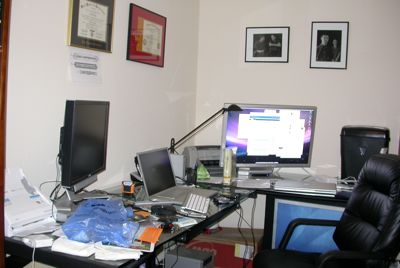
Right now my desk is a complete mess. Now I have a pretty good excuse. I am in the middle of switching over to a new laptop. I'm also in the middle of trying to switch from AT&T to Sprint for cell phone service. An order of sample gifts for clients just came in yesterday. I have rebates from sales that are partially filled out and waiting for additional documentation that is on the way. I'm working with a graphic designer on a new logo, so I have samples stuck to my walls. I don't want to throw away any of the boxes for my new equipment so they are all stuffed under the desk or on a bookshelf. Etc. etc. I'd like to say that the picture above is just something I found on Flickr. … [Read more...] about The Causes of a Messy Desk
Organize
Home Office – Effective Design

I work from my home office. My commute is a 30-second walk down the hall, down the stairs and into the portion of our house dedicated to my business. As we've moved around, I've built 7 or 8 different home offices. My home offices have ranged from a small corner in a bedroom in downtown Durango, Mexico where the chair would collapse several times each day and we had to be wary of scorpions, to my current, spacious 1000 sq foot office with its own bathroom, fireplace and outside entrance. I've found a lot of things that work well and a lot of things that didn't work out so well. In this post, we are going to discuss some of the issues and planning that should go into setting up an effective … [Read more...] about Home Office – Effective Design
Paperless Office – Reducing Paper Creation
When people think of a paperless office, they usually focus on how to store documents in a digital form. This is important, but it misses the real point of going paperless. The real benefit comes from creating documents in way that they are digital for the entire lifetime. Once a document gets printed out, you've broken the paperless life cycle. This is why scanners are simply a stop-gap solution for paperless offices. If your paperless system is set up right, scanners should only be needed to handle documents from people who aren't yet paperless. So how do you create documents that can remain paperless for their entire life cycle? Here are some areas to think about: How will others … [Read more...] about Paperless Office – Reducing Paper Creation
5 Questions To Help Organize Your Desk
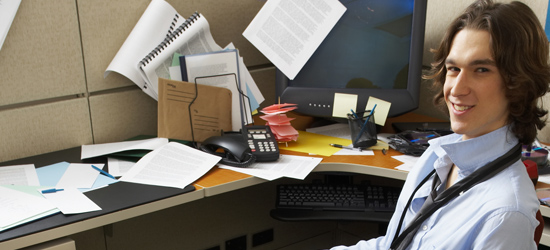
Look at your desk right now. Is it messy? If so, don't feel too bad. It isn't uncommon. This post is a series of questions to ask about the stuff that is currently on your desk. Asking these questions will help you find the cause of a messy desk and give you some ideas for stopping the disorganization at its root. This is vastly more beneficial than simply taking the time to clean your desk right now, because if you don't change your process and organization, you'll be back in the same position in a week or so. 1. Do you have reading materials on your desk? One common source of desktop disorganization is reading materials. Magazines, newspapers, etc. that come to you that you feel … [Read more...] about 5 Questions To Help Organize Your Desk
Tuesday’s Tip: Stop Communication You Don’t Need

Most everyone gets a barrage of emails, telephone calls, and physical mail that they don't really need. I'm not necessarily talking about spam. I'm talking about newsletters from organizations in which you are no longer active, donation requests from non-profits that you gave to years ago, etc. Most people just accept the interruption and toss these items into the trash, but a better option is to try to stop them altogether. Taking a few minutes to send a note asking to be taken off their mailing list can save you a tremendous amount of time in the future. If you get a monthly newsletter in the mail that you identify, consider opening and then toss in the trash, it can easily take … [Read more...] about Tuesday’s Tip: Stop Communication You Don’t Need
Tuesday’s Tip: Surrounded By What?
Take a few moments to look around your work area. What have you surrounded yourself with? Does your environment help you focus on your long term goals and celebrate past achievement? Does your environment make you want to stay organized and productive? Most people put too little emphasis on their surroundings. I'm not saying that you have to spend all your time trying to create the perfect office, but you shouldn't ignore the things around you. Your productivity can be greatly influenced by your outlook, and your outlook can be greatly influenced by your surroundings. For years, I never had a picture of my wife on my desk at work. It wasn't that I didn't love my wife, but it just … [Read more...] about Tuesday’s Tip: Surrounded By What?
5 Tips for an Organized Computer
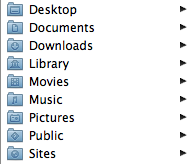
1. Use Your My Documents Folder The My Documents folder is there for a reason. If you don't have a My Document's folder, create one. The idea is to keep all of your documents in this folder. This makes it easy to backup your computer and easy to find stuff instead of looking all over your hard drive. You can take this idea step further and create folders for the types of items you produce on your computer. Here is an example of how OS X sets up your home directory by default: One of the big benefits of this type of setup is that you can go to one place to start looking for anything you've previously saved. It also gives you a single place where you can tell your backup software … [Read more...] about 5 Tips for an Organized Computer
Tuesday’s Tip: College Records
When I was in college, I quickly learned how important it was to keep records. You can't rely on your university to keep track of everything correctly. Maybe they will, but just in case they make a mistake, you need to be prepared. One habit I formed early on in college was to get a copy of my transcript each semester. One semester, there were an extra 15 hours of credits on the transcript for classes I had not taken. After doing some checking, it became clear that they had accidentally given me credit for someone else's work. I explained it to the university and they straightened out the records. However, I imagine it was much easier to get something taken off than it would be … [Read more...] about Tuesday’s Tip: College Records
Tips for Car Travel

As the summer months approach, I wanted to share some simple tips for traveling by car. We do a lot of travel and these are some of the tips we've found that make our lives easier on the road. Driving into the Light When I was younger I could drive through the night without a problem. Now I find that I get very tired driving past about 10:30pm. Tired enough that it isn't safe. By leaving early in the morning I can drive into the day light. I am much more alert getting up at 2 am and driving until 5 pm than leaving at 10 am and driving until 1 am the next day. Podcasts On a long trip I can make the hours fly by listening to technology podcasts. I feel better traveling when … [Read more...] about Tips for Car Travel
Fewer Financial Institutions

Last year I finally got fed up with all the statements I was getting from various financial institutions. I had retirement accounts with 4 or 5 different companies and stock accounts with 2 or 3 others. It was very difficult to keep track of what was doing well and what was doing poorly. I finally settled on two institutions; one for retirement type accounts and one for my non-retirement savings, checking and investments. I contacted both institutions and gave them a list of what I wanted to move over. On the retirement side of things, the transition went very smoothly. They filled out all the paperwork, sent it to me for my signature and I FedExed it back to them. The … [Read more...] about Fewer Financial Institutions
SmartShopper Grocery List Organizer Review
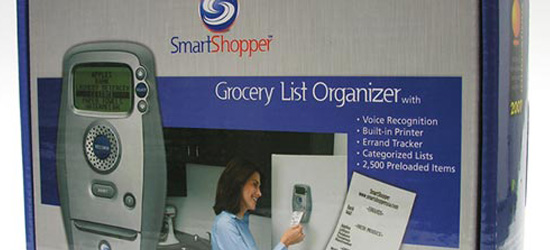
Many times I've wondered about ways to keep a centrally located, well organized grocery and errand list. Members of my family have a tendency to "borrow" the list to add something, only to forget to put the list back. Though a pen and paper are often the best and most efficient way to keep track of a to-do list, some families might need something a bit more creative. When I was handed the Grocery List Organizer to review, I was a bit apprehensive as to how well the device would actually function. Fortunately, I have been pleasantly surprised. Appearance The Organizer is an oblong-shaped device with a small screen located at the top, a large "Record" button in the middle and a … [Read more...] about SmartShopper Grocery List Organizer Review
Paperless Infrastructure

Businesses have much to gain by moving to paperless communication with their customers. Just think how much money credit card companies could save if even 5% of their customers switched to paperless communication. The problem is that most companies seem to get the whole idea of "paperless" wrong. Their solution for people who want to be paperless is that they will send you an email notifying you that you have a statement. Then you can log into their website and download the statement as a PDF. This is about equivalent to having a mailman who knocks on your door to tell you there is a letter for you at the post-office. This reflects a type of arrogance (or stupidity) that is typical of … [Read more...] about Paperless Infrastructure
Simple Stuff Reduction Tips
The more stuff you have, the more time you have to dedicate to managing and hunting for things. Here are several simple ways you can reduce the amount of stuff in your life to help make it easier to find things that are important. Keyring Cleanup - Get rid of any extra keys. If you are like most people, you probably have several keys that you can't even remember what they go to. Sometimes it helps to keep a separate keychain at home for those odd little keys that you don't want to lose, but don't need to carry with you. Card Shuffle - Go through your credit cards, ID cards, supermarket cards and get rid of the ones you won't use. I keep about 4 cards with me and the rest stay … [Read more...] about Simple Stuff Reduction Tips
Box.net Review
Collaboration on large, complex projects can be a big hassle. Giving out hard copies can create an even bigger mess if someone loses his or her copy of the information! Most of the time it is just plainly more productive to solve a problem once and for all, instead of solving that same dilemma multiple times. The people at Box.net have come up with a neat new way to share and edit information efficiently, making it possible to access all informational aspects of a project in the same place! This product streamlines the communication between team members or departments efficiently and competently. However, although Box.net is a logical choice for the workplace, it could also be used for … [Read more...] about Box.net Review
Four Important Folders on my Computer
Here are four folders that I have in my Documents on my hard drive that I've found save me time. Receipts - When I buy something online that I need to keep track of, I'll print a copy of the receipt page to a PDF and save it in this file. Usually I'll save it with the date as part of the file name. For example: 20071012-cell-phone-order.pdf. This makes it easy to find records of purchases. Rebates - Rebates are awful. Basically, companies are betting on the fact that you won't take the time to fill out the paperwork and send it in. I've found if I keep everything in a single location, it makes it a lot easier for me to gather up all the pieces of info I need and it is easier to … [Read more...] about Four Important Folders on my Computer
Dealing with Clutter

Everyone seems to have some degree of clutter in their lives. The paperless office is still a dream, so we still have to deal with many pieces of "stuff" all around us. This stuff can be paper, equipment, books, printouts, electronics, or any number of things. A certian amount of clutter may be productive. Some people just function better when things are in site. However when clutter gets to the point that it slows you down, you need to do something about it. If you find yourself spending time looking for things, that is a good indication that clutter is controlling you. Here are several tips for reducing clutter in your life: Open your mail over the trash can. This will help … [Read more...] about Dealing with Clutter
Interview: Managing Wires

We interviewed a number of bloggers about how they manage the wires in their office setup. Wireless technology was the most frequently mentioned solution, but there are a bunch of other great ideas as well. Organization interview question: What is your best tip for managing the multitude of wires in a typical computer setup? (182) Use a good computer desk or table along with zip ties to keep everything out of sight John Richardson from Success Begins Today (rss) I've also had good luck with using double sided velcro for this purpose. Another thing that seems to work well is using black electrician's tape to tape up cables that are longer than what you need. I use as many wireless … [Read more...] about Interview: Managing Wires
Setting up a Home Office

Here are some articles with tips and ideas for getting started with setting up your home office. How to Set Up Your Home Office - Beverly Block Working from home is the latest trend. The environment has a direct or indirect relationship with the output of your work. This article helps you to set up the right backdrop for your home office. The entire process involved in setting up home office is given in 5 simple steps. Seven Rules in Setting Up Your Home Office - Jenny Fulbright This article is about giving importance to productivity and creating a balance with life. 7 important steps that covers all the aspects in setting up a home office and yet not getting interrupted by … [Read more...] about Setting up a Home Office
Interview: Managing Physical Media

What is your single most important tip for keeping your books, magazines, software and other physical media organized? (549) The key to keeping your physical media organized is to have as little as possible. Only keep the absolute essentials and either trash or convert to a digital file what you want to keep. For example, I don't purchase any fiction books-- the library is perfect for that. I only keep books that I will either read again or reference in the future. CD's and DVD's are easy to convert to digital files and centralize on an external hard drive (be sure to back it up!) Basically, if you drastically reduce the amount of physical media in your life the problem of … [Read more...] about Interview: Managing Physical Media
Wireless Card Reader
I have been attempting to move everything possible to wireless. There is only so much you can do to route wires to keep them from looking sloppy. Getting rid of the wires entirely is ideal. I was pleasantly surprised to find that my new printer (HP 2605dtn) has a memory card reader that shows up on as a network drive in OS X. I can stick in a card and then pull it down to my computer over my Wifi network. So there is one less device and wire I have to keep on (or near) my desktop. … [Read more...] about Wireless Card Reader
Interview: Getting Organized

As part of our interview questions on organization we asked people what tip they would share with someone looking for a single way to better their organization skills. Then Productivity501 readers were asked to vote for their favorite answers. The results below are organized based on the results of the voting. (You can still vote on answers to other questions.) What is the single most important piece of advice you would give to someone looking to better organize his or her life? Start by reducing clutter and getting clear about your priorities. It's a lot easier said than done, but it's true. Disorganization starts with indecision caused by your own conflicting needs, values, … [Read more...] about Interview: Getting Organized
Paperless Office
These links and summaries about going paperless were compiled by my assistant in India. (In an upcoming article I'll be talking about what it is like to work with a virtual assistant.) 6 tips for a 'paperless' office - Joseph Anthony People get greater return on their hardware, software and technology investments while they partially get rid of the paper clutter. The author focuses on 6 basic things that one has to remember while moving to a paperless office. The reader gets the pointers to remember while shifting to a paperless home or business office; he is also familiarized with the benefits. Acrobat to a Paperless Office - Julie Starr This article focuses on the benefits of … [Read more...] about Paperless Office
Proper Length Cables
Quick Tip: A lot of the wiring nightmares you see are caused by cables that are the wrong length. replacing your cables with ones that are exactly the right size can really help clean things up. If you can't find the right sized cable, use black electricians tape to hold the excess. … [Read more...] about Proper Length Cables
Interview: Cause of Disorganization
What is the single biggest mistake you see people make that causes disorganization? Not following simple daily routines and systems. It is really easy to spiral into disorganization and chaos in any area of life. Success all comes back to basically two things: systems or routines that make sense for our life and our goals, and daily discipline to maintain them. If routines and systems are optional, there will be way too many days we end up not following them. As soon as we even start thinking about not sticking to our simple routines, we begin to spiral into disorganization. Melissa Michaels from The Inspired Room (rss) It tends to be the little things that are done consistently that … [Read more...] about Interview: Cause of Disorganization
Procrastination Prevention Course – Now Live!

Previously I announced that we were testing the Procrastination Prevention Course. I took the feedback from the testing group and made some changes. The course is now live. If you have trouble with procrastination, you need to go through this course. It is designed to give you some simple strategies for preventing procrastination. Each day you get a short email with a simple assignment to help you practice breaking the procrastination habit. The funny thing about a procrastination course is that the people who most need it are the ones most likely to put it off. If you are reading this and thinking "Maybe I'll do that some day" I strongly recommend that you sign up for it right … [Read more...] about Procrastination Prevention Course – Now Live!
Productive Home Office
Earlier I asked readers to share their favorite home office tip as a follow up to the previous interview. Here are the responses: Many of my clients struggle with organizing their offices (home or otherwise) because they try to fit a "square peg into a round hole." Meaning, they try to use systems and setup that works for others, but does not match the way that they think and function. Recognize are you an "innie" or an "outtie"? Innies are people that function better (are more creative, get more done, etc.) when their space is clear. They can frequently get distracted to other tasks if there are piles laying around. Tools good for innies are systems with drawers and cabinet doors. … [Read more...] about Productive Home Office
Habit List Web App
Tom from App Engines put together a web app based on the Habit List. (Thanks Tom!) It keeps all your data in a cookie on your local computer. (If you delete your cookies your data for the app will be gone.) Check it out here. … [Read more...] about Habit List Web App
Tuesday’s Tip: Throw Away Those Extra Pens
If you are like most people you probably have a coffee cup or pencil holder full of writing instruments sitting on your desk. If you are like me, a good percentage of those pens and pencils are ones that you don't like and will likely never use. So why are you letting them still clutter up your desk? Go ahead and throw them out or give them away. If you have things on your desk that you never use it just introduces visual "noise" into your work environment and a bunch of pens and pencils that you dislike aren't going to do anything to help you be more productive. My problem is that my pen and pencil holder is full of things that my wife likes and that I hate. I don't like cheap bic … [Read more...] about Tuesday’s Tip: Throw Away Those Extra Pens
Folder Templates
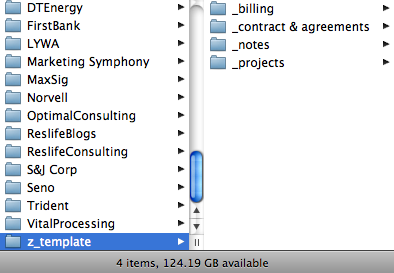
If you have a lot of computer folders that need the same organizational structure you might consider creating a template folder. For example I have a standard layout I use for the folder to keep track of client information. This includes folders for billing information, contracts, notes, etc. I created a folder in my Clients folder called z_template. This makes it stay at the bottom of the list. In that folder I setup my layout. I usually name my folders with an underscore beneath them so all of my standard files stay at the top--regardless of what else ends up in the folder. When I start a folder for a new client, I simply copy everything from my template into their folder and on … [Read more...] about Folder Templates
Reader Question: Setting Up a Home Office
From a reader: I'll be moving in a few months and with that comes a new desk and new office space. Do you or any of your readers have any suggestions on what to look at? I'm looking for a smaller desk as all I've got is a MacBook Pro and some trays for inboxes. I'll also need a good filing cabinet to work the GTD system, any recommendations? I figured I'd shoot this in as this may be helpful to not only myself, but to others looking to "Get Organized!" (Don't we all try haha). Also, side note - how about some more video tutorials! Take care, Neil Let me describe what I use. It may not be the best setup for everyone and it is definitely skewed toward equipment that breaks down … [Read more...] about Reader Question: Setting Up a Home Office
Contest – Concealed Powerstrip Giveaway
I previously wrote about the Belkin Concealed Powerstrip. With 10 outlets, wire routing, and a cover to keep everything out of sight, it is the ideal way to organize under your desk. We are going to be giving one away here at Productivity501. To enter simply sign up to receive the email version of this site in the right hand column. Once you verify your signup (you'll be sent an email with a link), you'll be entered in the contest. If you currently receive the email, you are entered already. Right now, there are about 1,000 email subscribers. Once we reach 1250 subscribers, we'll give away the Powerstrip to a randomly selected person from the list. Anyone can enter, but I'll … [Read more...] about Contest – Concealed Powerstrip Giveaway
Tuesday’s Tip: Label Your Warts
I'm referring to "Wall Warts" those blocks of plastic that transform standard house current into lower voltage needed by electronic devices. Modern electronic gadgets require power. And (if you haven't noticed) every device seems to require a slightly different type of power and slightly different type of connector. When you are setting up your office buying one item at a time, it isn't really any problem to figure out what goes where. However, if you have to move your office around, you are going to quickly discover that the power supplies all look pretty much the same and worse yet, some use the same connectors but supply different amounts of power. No big deal because you can just … [Read more...] about Tuesday’s Tip: Label Your Warts
Tuesday’s Tip: File Folders – Hanging or Traditional
Some productivity experts suggest that you shouldn't use hanging files because they take longer to just whip out a new folder for something. They suggest using regular plan folders, so you can grab one and make a new folder when ever it is needed. This makes sense, but I think I've reached the best compromise with my hybrid approach.I use hanging folders for major categories and then put regular folders in for subcategories. For example, I might have "Education" as a hanging folder and then individual normal folders for each year or each class, depending on how I'm organizing things. I have a hanging folder for "Taxes" and then a regular folder for 2006, 2007, and 2008. By using … [Read more...] about Tuesday’s Tip: File Folders – Hanging or Traditional
5 Low Tech Things That Make My Life Easier
I like simple things that save me time or make my life easier. I've compiled a list of 5 simple items I use on a regular basis that make things just a little bit easier. Self inking stamp - It is a simple thing, but having a self inking stamp for signing checks and putting return addresses on envelopes is a huge time saver. They don't have to cost a lot of money, but I would suggest avoiding the ultra cheap ones (less than $10). I started out with the cheapest I could find and it eventually fell apart. My second one was still under $20, but much better constructed. Smart Wallet - I recently replaced my wallet with this money clip. It holds bills and 4 credit cards. I've been very happy … [Read more...] about 5 Low Tech Things That Make My Life Easier
Tuesday’s Tip: List of Important Numbers
Before my wife and I went to Mexico last October, we made a list of all the important numbers in our lives. We had credit card numbers, telephone numbers for credit card companies, passport numbers, bank account numbers, insurance policies, retirement accounts, drivers license numbers, online banking passwords etc. We wrote these all up on the computer, printed out a single copy and deleted the computer file. We then gave it to my parents to keep in a safety deposit box. If anything were to happen to one of us or if our wallets were stolen, there is a single place we can go to get all the important numbers we need. This took us a very small amount of time to put together, but if our … [Read more...] about Tuesday’s Tip: List of Important Numbers
Maximizing Benefits
John posted an article about Multiple Positives which he defines as doing activities in a way that give you multiple benefits. This got me to thinking about ways that I've been able to stack things together in order to get the most benefit. In general, I consider multitasking to be a bad habit. However, there are times where "multibenefiting" is highly profitable. The difference is that with "multibenefiting" you are concentrating on a richer outcome. With multitasking the focus is just on doing things at the same time--even when the outcome is less productive. Here are some examples: 1. Mowing the Yard with a Book I hate mowing. To make things a little more bearable, I started … [Read more...] about Maximizing Benefits
My Current Working Desk
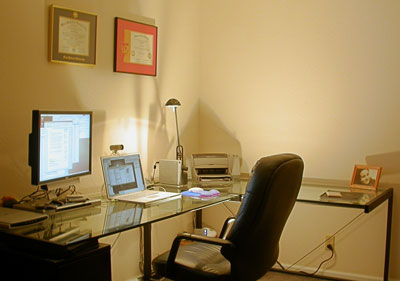
After writing the post about 12 Tips For an Organized Desk, several people were interested in seeing my setup. I've tried to map my description back to my page of tips. I'm interested in any comments or suggestions. Am I overlooking something obvious that could make things work even better? When I graduated from college in 1998 I started looking for a good desk and chair. I found these and they have been my main workstation in the US ever since. While the glass tops make these a little hard to move, it is offset by the fact that the frames come apart, so the entire thing can be packed fairly flat against the wall in a moving van. It took me a very long time to find the chair. … [Read more...] about My Current Working Desk