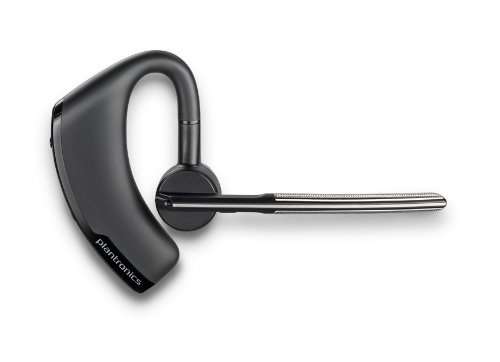
I've tried a number of Bluetooth earpieces and headphones and finally found one that I'd buy again after using it for two years. The earpiece is the Plantronics Voyager Legend. One of the big things I was looking for in an ear piece was the ability to mute it from the device itself. If I'm on a call, and there is some sort of background noise I don't want to share, I don't want to have to find the mute button on the phone or on my computer. This is especially important because I make a lot of calls while we are traveling and it is easy to get into a situation where I need to say something quickly in my local environment that would be a distraction on the call. The Legend has a physical mute … [Read more...] about Best Bluetooth Headset I’ve Owned
Misc
Five Productivity Tips
Here are five (slightly random) tips that I've found make me much more productive. Do you use any of these? Password Manager Tools like LastPass and 1Password are great ways to handle logging into the hundreds of websites we all deal with. Last time I checked, I have over 300 passwords I have to keep track of. There is no way I could do that without some software to help me. Learn Excel Excel is a very powerful tool and I regularly use it instead of writing a piece of software when I need to do something. Investing some time in really learning how to use Excel is a very good way to boost your productivity. TIP: If you want a place to start, read the help files on Pivot Tables. They … [Read more...] about Five Productivity Tips
Get More Done With Less Stuff

One of the biggest road blocks in the path to productivity is stuff. We surround ourselves with the things we own, but in many ways our stuff really owns us. We have to maintain our stuff, clean our stuff, sort our stuff, get a bigger house to hold our stuff and move our stuff to find other stuff. Now it isn't that stuff is bad, but we have to recognize that everything comes with a cost. Most people recognize this with pets. Before you get a dog, you think through the responsibility it will entail, who will watch it when you travel, etc. While stuff may not be as high-maintenance as a dog or cat, there are very few things that are truly maintenance free. The problem is that many people … [Read more...] about Get More Done With Less Stuff
Spend Less Time Deciding

One of the biggest ways people lose their productivity is in trying to decide what to do. This probably seems silly, but if you look at most planning techniques, they are mostly designed to reduce the amount of time you have to spend making a decision on what to do next. Why? Because that is probably one of the biggest time drains people face. Instead of working on something important, they spend time trying to decide or worrying about what to do next. If you are really bad about this, you can spend more time trying to decide which task to do than it would take to just complete the tasks. Years ago, I went to several Franklin Planner training sessions. The whole point of how they teach … [Read more...] about Spend Less Time Deciding
Productivity and Battery Life

I've recently made two changes that have made me surprisingly more productive. The first was switching from my 17-inch MacBook Pro to a MacBook Air. The second was switching to a newer Mifi device to get to the Internet over the cellular network. The commonality between these two changes is they both replaced devices with batteries that normally lasted about 4 hours. The new Mifi and laptop can get 8 to 12 hours of life on a single charge. When I first bought the MacBook Air, I thought it would be marginally more useful because I wouldn't have to plug in the laptop as often. Had that been the case, it probably would have been a bit more useful, but not enough for me to really notice a … [Read more...] about Productivity and Battery Life
Refining Your Online Presence

The results that show up when someone types your name into Google are becoming increasingly important for your career. It wasn't that long ago that it was rare for a potential employer to search for the name of a candidate. Now it is becoming rare for them NOT to do some type of search. In many cases, the first page of results for your name are going to be more important than what you put on your resume. It is easy to make a claim on your resume, but what Google says about you will often carry more weight because it isn't something under your direct control. However, just because it isn't under your direct control doesn't mean you can't influence what shows up in search results. Here … [Read more...] about Refining Your Online Presence
Lazy but Talented

While walking back to my hotel from a conference in St. Louis, I saw someone wearing a shirt that said "Lazy but Talented." I think it was a Nike shirt. I've always been impressed with Nike's advertising, but this slogan didn't ring true. In the US, we seem to be overly obsessed with talent as if it is the most important part of success. It isn't that talent is unimportant, but when it really comes down to what will make you successful, being hardworking is much more important. If you have tremendous natural skill, but aren't willing to work hard, it is easy to be eclipsed by someone with moderate talent but an extreme drive to succeed. Let me give you an example. Think of someone … [Read more...] about Lazy but Talented
The Power of Physical Communication
As we become more and more dependent on email, text messaging, Facebook, and Twitter for communicating, it is easy to overlook the power of sending a physical message. Physical messages can be letters, notes, flowers, etc. Anything that is going to have to be actually handled can be physical communication. Here is an example. I had a relative who was sick and needed a letter from a doctor for some insurance claims. The letter wasn't a standard form and required the doctor to actually sit down and put some time into writing it. They had been trying for weeks to get the letter. The doctor said he would, but it never got done. After hearing about the difficulty they were having, I called … [Read more...] about The Power of Physical Communication
The Future of Work Part II

In our last post, we talked about the future of work and looked at how outsourcing and telecommuting are trends you need to be aware of and prepare for in order to do well in your career. In this post, we are going to look at a few more areas that may dramatically change the way we work in the future. Education for New Employees Right now, employers don't feel that they are getting highly trained employees from university graduates. There are a number of programs that are trying to better align what is taught in college courses with what the business world needs. These efforts may help, but I think we are going to continue to see a large separation between what you learn in school and … [Read more...] about The Future of Work Part II
The Future of Work Part I

Have you ever taken some time to think about what work will look like 5, 10 or even 20 years from now? If you haven't, it is probably worth the effort because a changing work environment may have dramatic implications for how you are employed in the future. In these two posts, I want to talk about some of the trends I'm seeing and how they may play out in the coming years. Outsourcing Companies are getting better and better at spinning off specific business functions and letting them be handled by others. For example, many businesses can't justify running payroll in-house. It is cheaper to hire a company that specializes in payroll and let them handle it. We are seeing the same thing … [Read more...] about The Future of Work Part I
10 Little Habits
In this post, we are going to look at 10 little habits that can have some big benefits. Often the difference between people who are healthy vs. unhealthy, educated vs. uneducated, rich vs. poor comes down to a bunch of little habits that compound overtime. Because of this, it is worth thinking about the "little" things once in a while and seeing if your individual habits are guiding you toward success or failure in life. 1. Take the stairs Obviously this isn't going to work if you are on the 100th floor of an office building, but if you work on the 3rd or 4th floor, taking the stairs can often save you time and help offset some effects of a sedentary workday. It isn't just about taking … [Read more...] about 10 Little Habits
Changing My Reading Habits

Every few years, I have trouble with my eyes getting tired when I'm really busy. For me, "really busy" means spending a lot of time in front of a 30-inch monitor working. The last time this happened, I made some changes to my reading habits. I'm not sure if it contributed to my eyes getting better, but the changes have made my reading much more productive and I wanted to talk about it here. In the past, I've done a lot of reading on the computer. My original theory about why my eyes were getting tired was that staring at the bright screen was just wearing them out. As a result, I was looking for a way to get my reading off of the computer. I have an old Sony e-reader that used e-ink … [Read more...] about Changing My Reading Habits
Productivity and Finding a Job

In the past month, I've had several people contact me for help or advice in finding a job. Typically when I start talking with someone and looking at their resume, the fundamental problem I find is that they think about the whole process from their perspective instead of from the employer's. If someone is looking at hiring you, they want to know if you are going to be productive for them. They want to know if you are going to be able to make them more money than what you will cost them in salary and benefits. So how do you show an employer that you can be productive? Here are some tips: 1. Completed Projects Finishing is hard. It doesn't matter if you are writing a song, creating a … [Read more...] about Productivity and Finding a Job
Your Glass Ceiling

Think of someone you know who would be 10 times more successful if they would just follow good advice. Maybe it is a coworker who has a lot of potential if he'd just show up for work on time and comb his hair. Maybe it is a relative who just needs to get some basic money management skills so he or she isn't always broke. Maybe it is a friend who just isn't willing to take the risks necessary to apply for a job where his talents could really be used. My point is that everyone can look around and find people they know who aren't living up to their full potential because of they way they view life. Maybe it is a simple mental shift, a discipline they need to acquire or just constrained … [Read more...] about Your Glass Ceiling
Education for Free

Several months ago, I sat down with my grandmother and looked through some of the old papers she had from her father. My great grandfather did a lot of things. He was a preacher, ran the newspaper and was the lawyer in the small town where they lived. My grandmother was showing me his diplomas and other papers. He had a diploma from college, a diploma from seminary, and a law license. I noticed that we didn't have his diploma from law school. When I asked about it, my grandma told me that he never went for a law degree. He was enrolled in law school and after the first semester, a friend dared him to take the bar exam. He took it, passed and dropped out of school to begin practicing … [Read more...] about Education for Free
Killing off Success to Prepare for the Future

The McDonalds in my town is going to close down for several months. During that time, they are going to tear down the current restaurant and build a new one. The man who owns the McDonalds has another one in a nearby town and he did something similar there a few years ago. Still, it seems like quite a leap of faith to shut down your successful business and the cash flow for a few months in order to be able to serve more customers in the future. When the iPod Mini was at the peak of its popularity, Apple stopped making it and instead switched to the flash-based iPod Nano. On one hand, it didn't make sense. They had a successful product that had increasing demand, but they stopped making it … [Read more...] about Killing off Success to Prepare for the Future
Productivity-Draining Commute

This weekend I was talking to a couple who had moved to Kansas City about a year ago. They had just decided to move back to the small town where we live. I asked what they thought about living in the "big city" and while they liked most of it, they said the commute time was simply too great. They had moved to Kansas City to be closer to their jobs, but the husband still spent 1.5 hours and often a bit longer each way just getting to and from work. He wasn't necessarily traveling very far, but with traffic, he was spending 3+ hours a day on the road. While his commute time was definitely above average, it isn't too unusual. In 2006, Midas had a contest to find the person with the longest … [Read more...] about Productivity-Draining Commute
Productivity-Based Vehicle Shopping

We recently purchased a new vehicle. I don't particularly like car shopping, but the process of trying to decide what features/capabilities were important to us was interesting. In this post, I wanted to list some of the factors we considered that relate to productivity and time savings with a new car: 1. Range and Fuel Capacity The time you spend at the pump is time you can't spend doing something else. Most people look at the MPG a vehicle gets but fewer people look at how far they can get on a single fill-up. Depending on what your time is worth, a vehicle that has a longer range, but just slightly lower MPG, may be more efficient for you, personally, because the more frequent … [Read more...] about Productivity-Based Vehicle Shopping
Television and Training a Productive Mind

When you have kids, it's hard not to notice the correlation between their outputs (behavior, etc.) and their inputs (what they watch on TV, whom they play with, etc.). We don't watch very much television in our family. When we do watch something, we generally try to use educational programming (for example, a Nova video about lightning.) I found our kids are typically very interested in these types of videos and are engaged and asking questions about what is being said and shown. However, they are only engaged and interested when they haven't watched any "entertainment-style" programming. If they have seen a cartoon recently, they aren't nearly as interested in the educational content. My … [Read more...] about Television and Training a Productive Mind
Juggling or Television

I was recently at a show in Branson, Missouri where a juggler was performing as the pre-show. As part of his act, he called a kid up from the audience to supposedly teach him how to juggle. The kid struggled at first, but eventually got three balls going through a single cycle and caught them without dropping any. Then the music started, the kid threw the balls in the air and started doing amazing juggling tricks. The original juggler told everyone that the kid was actually his son. He explained that when his son was 8 or 9, all he wanted to do was watch television. The father couldn't get him to do anything else. Finally he made a rule: For every hour you spend juggling, you can watch … [Read more...] about Juggling or Television
Dealing with Complexity

The two things I've spent the most time studying are software engineering and music composition. While they seem to be very different fields of study, large-scale works in either area rely on one very important common skill: the ability to manage complexity. In software, you know that your complexity is out of control when it becomes harder and harder to make changes as the size of the code base grows. In music, complexity is out of control when your piece becomes less and less coherent as it grows in length and instrumentation. It wouldn't surprise me if other fields are similar. Once you get the basic skills and semantics out of the way, the biggest thing that determines whether or … [Read more...] about Dealing with Complexity
Managing Others’ Perceptions

A group of scientists were given a number of rats to test on mazes. Scientists just love running rats through mazes. Anyway, half the rats were normal. They were told that the other half were "super rats bred to be much smarter than normal rodents. In another experiment, teachers were given a classroom of students. Half of the students were normal and half had an abnormally high IQ. Neither of these experiments were designed to test students or rats. They had already been tested. All of the rats were just normal lab rats and all of the students were normal school children. There was no significant difference between the intelligence of the two groups of rats or between the two groups of … [Read more...] about Managing Others’ Perceptions
Paperless–The Wrong Goal

A paperless office sounds wonderful, but becoming paperless is a very poor goal. Becoming paperless is a side effect of creating an efficient workflow. If you set out to create a paperless office, you'll find that there are all kinds of scanners and software to help you move your files from paper format to digital files, but just changing out your filing cabinet for hard drives doesn't automatically make you more efficient. The reason so many people pursue a paperless office is because it is easy to understand. It isn't hard to understand the idea of reading files on the computer instead of on paper. Workflow improvements are a lot harder to visualize, but if you are trying to actually … [Read more...] about Paperless–The Wrong Goal
Is a 40-Hour Week Good for Productivity?

Back when the Ford Motor company was first mass-producing automobiles, they did a number of experiments in how to get the best productivity out of people. They found that a 40-hour week was pretty much the sweet spot. If people worked more than 40 hours, the amount they produced per hour started decreasing. As a result, 40-hour weeks seemed like the best way to get the most out of employees. Now days, it isn't uncommon for people to be working 60- to 70-hour weeks as a normal schedule. On one hand, this makes sense. Maybe 40 hours of the type of labor that was being done at Ford was more exhausting than sitting at a desk. On the other hand, the work being done at Ford on the assembly line … [Read more...] about Is a 40-Hour Week Good for Productivity?
Organization Mentality

Being organized is a cornerstone of being productive. However, there is a lot more to being organized than just having a clean desk. True organization is a mental state and a way of thinking. An organized desk is often a side effect, but too many people focus on trying to look organized instead of actually being organized. If you want to BE organized and not just LOOK organized, it requires you to spend some time really thinking about how you approach work and dealing with things. You can't short cut this just by picking things up and putting them out of sight. Here are some tips for becoming truly organized. Recognize that being organized isn't about trying to get more things to … [Read more...] about Organization Mentality
Specialization vs. Broad Skills

Traditionally, specialization has been the path toward making more money. A brain surgeon can make more money than a physician who is in general practice. An engineer that specializes in building long-span bridges can make more than a general engineer. This makes sense because the more specific a customer's need, the fewer people there are normally going to be to fulfill that need, and when there are fewer people to choose from, the price will migrate higher. Based on this, some of the most common advice for making more money is to develop more specialized skills. However, another shift that has occurred over the past 5 to 20 years is that the new tools are increasing the amount … [Read more...] about Specialization vs. Broad Skills
Productive New Year’s Resolutions
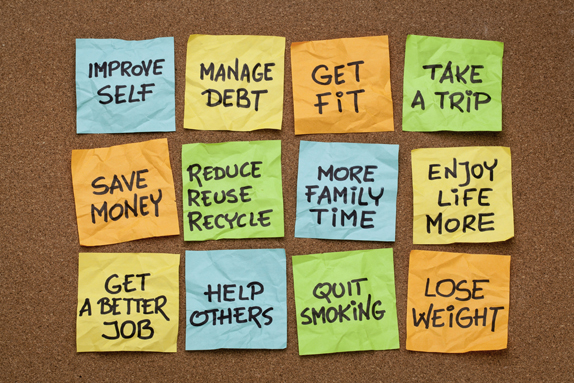
The trouble with most New Year's Resolutions is that they aren't focused on something quantifiable and specific. Vague resolutions are very easy to break because it is never clear if you are actually achieving them or not. For example, with a resolution like "exercise more" you'll never know if you actually did it or not. But a resolution like "do three pull-ups every night" is much more specific. There is no ambiguity about whether or not you did three pull-ups or not. One of the best ways to track New Year's Resolutions is to get a calendar where you can mark your progress each day. So for the pull-up example, you might put the calendar on the wall near your pull-up bar and put an X … [Read more...] about Productive New Year’s Resolutions
Becoming Smarter and More Productive
Becoming a smarter person is obviously a good way to get more done. However, we live with a bit of a myth that what we are born with is what we are stuck with when it comes to raw brain power. There are all kinds of aspects to this, but for today, I want to focus on one interesting experiment that involves mice. With two young kids, my family and I like to spend a lot of time at zoos. When we travel, we'll often try to visit the local zoo. If you've been to a zoo recently, you've probably noticed all kinds of strange things in with the animals. The elephants have colorful balls and even a car tire. The monkeys have plastic toys for toddlers. Even the otters have a pool of bubble bath … [Read more...] about Becoming Smarter and More Productive
Tips for Travel

1. Label Everything Make sure your cell phone, laptop, luggage, etc. have your name and contact information on them somewhere. If you accidentally leave your phone in a cab or a bag on a plane, you have a much greater chance of getting it back if people can tell to whom it belongs. For luggage, I like using engraved metal pet tags. If you look around, you can find them on the Internet for $2 or less. They are durable and won't rip or tear. If you get the "dog tag" style, they look more like a luggage tag and a bit less like something you'd expect to see on a dog or cat collar. 2. Plan for Taxi and Shuttles If you are going to need to take a taxi from the airport, it can be helpful … [Read more...] about Tips for Travel
Make Your Computer Faster

In this post, we are going to talk about several ways to make your computer run faster. I've seen a lot of people buy a new computer when their old one was perfectly adequate, but had just gotten bogged down with too many things running at the same time. For your computer to make you productive, you want to reduce the amount of time you spend waiting on it to do something. Some of these tips can help. 1. Reboot regularly Some people leave their computer on for weeks at a time. The problem is that some programs will start other programs, and these don't always get shut down properly. They can consume memory or use the processor in ways that you might not expect. Doing a reboot will help … [Read more...] about Make Your Computer Faster
5 Tips for a Productive Home Office

Whether you work from home or not, most people have some type of home office or place where they do work from home either for their employer or for themselves. In this post, we are going to look at five things to consider when designing your home office to maximize productivity. 1. Proximity Matters When you are designing a home office, make sure you put things that you need often near where you need them. For example, if you want to get better about shredding documents with sensitive information on them, don't put your shredder across the room or in the closet. It needs to be out where you can easily get to it. The more effort it takes to do something, the less often you will want to … [Read more...] about 5 Tips for a Productive Home Office
Mobile Paperless

On a recent trip to Philadelphia, I was struck by how much paperless functionality is available in modern cell phones. The two things that appear to be driving this change are: Cameras built into every phone Constant network connectivity Let me walk you through a small portion of my recent trip to give you some examples of what I'm talking about. With a 6 am flight, we arrived the night before at a hotel near the airport. I had all of my reservation information in an email Gmail on my Android Nexus S phone so I didn't have to print it out ahead of time. Before going to bed, I confirmed the flight time on my phone, also using Gmail's search capability. In the morning, we used … [Read more...] about Mobile Paperless
Being Extraordinary

When it comes to what you accomplish in life, how can you be extraordinary? In this post we are going to look at some habits and traits of people who get an incredible amount accomplished. 1. Perseverance What often separates "good" from "great" is the ability to push just a little harder, to try a few more times, and not to give up just a little longer. If 99% of people will give up after trying something 99 different ways, trying it one more time may very likely put you in the 1% that get extraordinary results. I've been in a lot of situations where my success had nothing to do with being skillful and everything to do with being stubborn. Years ago, I worked in the IT department … [Read more...] about Being Extraordinary
Delegating and Outsourcing
We have a large yard that takes a long time to mow. By large, I mean over two acres. By "long time" I mean three to five hours with our three-blade riding mower. This spring I found myself very short on time and went ahead and made an investment in finding someone who could mow it for me. It took a little while to find someone. The first guy that was recommended to us made it clear that he wanted to be paid in cash in order to avoid losing his disability benefits and his pricing seemed more like rolling the dice instead of somehow relating to the size of the job. Finally we found someone who seemed like they would do a good job. He just finished a few hours ago. I'm very pleased with the way … [Read more...] about Delegating and Outsourcing
Tips to Manage Your Career

Many people just let their career "happen" to them. People who really get ahead usually take a much more proactive approach and intentionally manage their career. In this post, we want to look at some things you can do to plan ahead. 1. Keep in contact What you know is important, but whom you know may determine what opportunities present themselves. The whole idea of applying for a job where no one knows you is pretty antiquated. Yes, I know people still get jobs that way, but as the world becomes more interconnected, it is becoming more and more important to "know someone who knows someone" where you want to get a job. How many people have you worked with in the past that you … [Read more...] about Tips to Manage Your Career
Sleep More–Do More

Being productive shouldn't be about just spending more time working. Productivity involves accomplishing more for each minute of work. Let's say you can do 100 units of work in 8 hours, so to get more done you work for 16 hours and accomplish 160 units of work. Have you become more productive? Not really. Imagine that you were being paid $100 per hour. So for 8 hours, you were paid $800 for 100 units of work or $8 per unit. At 16 hours, you were paid $1600 for 160 units of work or $10 per unit. Someone paying you on the outside would quickly notice that your productivity lessened because it cost them more money per unit of work accomplished. However, since most of us don't pay ourselves an … [Read more...] about Sleep More–Do More
Future Work

I lived in Michigan for the first half of the 2000s and saw a lot of people who had lost their jobs in the auto industry. What was sad is that the layoffs weren't much of a surprise to people looking in from the outside, but they were often very surprising for the people who lost their jobs. The thing is, those people were probably in a better position to understand what was happening than anyone else. It is very easy to overlook what today tells you about tomorrow when you are right in the middle of things. This post is an attempt to look at how work is likely to change in the future. Regardless of how accurate my predictions prove to be, the real value from this post is probably going … [Read more...] about Future Work
5 Ways My Phone Makes Me More Productive

1. Banking and Bills My bank recently added the ability to deposit checks by taking a picture of them in their Android application. This saves me time, makes sure that my checks don't get lost in the mail and simplifies the deposit process. 2. Reading I'm still a big fan of physical books, but having a few books on my phone means that I can do something useful when I have an unexpected delay waiting for someone. I also use it to read to my kids at night because I can turn off the room light and still read the screen. With the light off they go to sleep faster. Recently we read Around The World In 80 Days and Black Beauty. We are currently reading Journey To The Center Of The Earth. … [Read more...] about 5 Ways My Phone Makes Me More Productive
Managing Expectations and Perceptions

In my last post, I talked about two experiments that showed how the expectations of teachers can make kids get better grades and how the expectations of scientists can make rats do better on mazes. My point was that if you aren't paying attention to how people perceive you, chances are you will fall short of your full potential. In this post, I want to look at three things you can do to manage how others perceive you and how you can influence their expectations. 1. Under promise / Over deliver CEO Craig needs two projects done by two of his direct reports. He asks Tom when he can expect Project T to be finished. Tom says he will have it done by Friday of next week. He asks Vick for the … [Read more...] about Managing Expectations and Perceptions
Two Important Experiments

Let me start this post by telling you about two experiments. The first experiment involved rats. Scientists were given two sets of rats. One set had been "genetically modified" to increase their intelligence. The scientists were asked to test the rats to determine how much smarter the "super rats" actually were. In the second experiment, elementary school teachers were given two lists of their students. One list had all the students that were "gifted." The other list had the name of all the students that were just average. In both of these experiments, the thing that was being tested was not rats nor the children, but the perception of the scientists/teachers. In both cases, the … [Read more...] about Two Important Experiments
Interview: Productive Mental Zone

Regardless of what you call it, everyone knows what it is like to work in the "zone." It is the place in which everything comes together easily. You are focused, and sometimes it is easy to spend several hours without realizing the time is passing. Being in the "zone" is what you experience when you see that it is 3pm, you've been working since 9am and didn't even realize you missed lunch. So how do you create that mental zone? We asked a number of highly productive people: What method do you use to keep yourself in your most productive mental zone? One of the interesting things that stood out from everyone's answers was that "the zone" means different things to different people. I … [Read more...] about Interview: Productive Mental Zone
Interview: Increasing Productivity
I asked a number of productive people the question: How do you use planning to increase your productivity? One thing that stuck out to me after reading all the answers is that planning is really the act of making decisions together, in a batch, ahead of time. Instead of making a bunch of little decisions as to what you are going to do throughout the day, you make decisions at least about the important things all at once when you are viewing your day, week, etc. as a whole. This lets you decide what you want to accomplish while looking at the 50,000 foot level instead of having your perspective influenced by the small stresses of your daily work. At least that is what I took away … [Read more...] about Interview: Increasing Productivity
Interview: Avoiding Distractions

For this post I sent out a questionnaire to a number of people asking about their single best tip for avoiding distractions. Most everything suggested falls into two categories: Controlling your mind Controlling your environment Obviously, controlling your environment is just another way of controlling your mind. What I liked best about reading all these suggestions is the number of different ways people have for creating a distraction-free work experience. Read on. I'm sure you'll find a number of tips that will help you be more productive. Make it difficult to be distracted. Turn off notification sounds and indicators on email, social media, etc. If your corporate culture … [Read more...] about Interview: Avoiding Distractions
Bill Payment Features

Most people are familiar with the basic idea behind bill payment systems, but if you've never used one, you may not be familiar with the ways it can save you time. Even if you've used the bill payment system from your bank for years, you might not be familiar with all the features that are available from other institutions. The goal of this post is to look at some features and capabilities of bill payment systems and how these things can help make you more productive. For people that aren't familiar with bill payment systems, here is how they work. When you need to pay someone, you log in to your bank or bill payment system website, tell it who you want to pay, and send the payment. If … [Read more...] about Bill Payment Features
Paperless Document Formats
Moving from paper-based documents to paperless documents can offer a number of benefits. In addition to saving physical space, paperless documents are easier to search and to share. Paperless documents also don't have the same type of physical limitations of paper and enable workflow solutions that simply aren't possible with physical copies. For example, multiple people can view a paperless document simultaneously, while a single paper copy can only be viewed by a handful of people at the same time and everyone must be in the same room together. There are all kinds of different ways to create and manage paperless documents. It can be as simple as scanning in a sheet of paper and putting … [Read more...] about Paperless Document Formats
The Art of Pinging

In this article we are going to talk about networking. Specifically, we want to look at how to "ping" people. I believe the term "ping" comes from the excellent book Never Eat Alone. A ping is defined as a small action that keeps the relationship with someone in your network alive. First let's talk about the benefits of pinging your network of contacts, then we'll look at how to actually do it. Benefits of Pinging Our brains organize information in a very efficient way. Imagine that our memories are a bunch of envelopes in a pile. The size of the envelope corresponds to the emotion associated with that memory. So you can easily retrieve the memory of your first kiss no matter how long … [Read more...] about The Art of Pinging
Tips for Video Conferencing

As video conferencing becomes more and more common, I thought it might be useful to talk about how to best configure your computer for doing video chats. Audio Is King The most important part of a video conference is not the video...it is the audio. This may seem unintuitive, but there have been some experiments done where people were asked to rate the quality of short videos. The videos that had good audio were consistently rated better than the ones with poor audio--regardless of the quality of the visuals. We are programmed to skip over blips and problems with video, but audio issues stand out. Make sure you have a good headset microphone and that your connection is fast enough … [Read more...] about Tips for Video Conferencing
Productive Apps for Managing Money

5 to 10 years ago, managing your finances meant buying Quicken or Microsoft Money and dedicating a great deal of time to entering in all of your expenses. If you ran a small business, you probably looked at purchasing Quickbooks to track everything. While those are all great products, there are a number of free options that do a great job of integrating with your banks to reduce the amount of time you have to spend manually entering things. I know I'd much rather spend my time looking at my finances instead of putting all my effort into just entering in data. These four web applications are all designed to save you time and increase your productivity when it comes to financial … [Read more...] about Productive Apps for Managing Money
Productive Smart Phone

Chances are you have a smart phone, but does it actually make you more productive? In other words, do you have more free time and less stress because you have a smart phone than you'd have with a standard "dumb" phone? If not, you should probably rethink how you use it. Just because you can use a smart phone for something doesn't mean it is productive. In fact, smart phones will give you the capability of doing things that are extremely unproductive. If you aren't careful, you can end up worse off. So what are smart phones good for? Handheld mobile devices are great for filling in small gaps of time. If you have a 3 minute wait at the post office, you probably aren't going to drag your … [Read more...] about Productive Smart Phone
Gifts for Highly Productive People

Are you having a difficult time coming up with a gift for that highly productive person on your list? Here are some suggestions: Extra Power Adapters Taking your power adapter out of the bag, crawling around under the desk to plug it in, then reversing the process at the end of the day just isn't fun or efficient. You can eliminate those problems from someone's life by getting them an extra laptop power adapter so they can leave one at their desk and one at home or in their computer bag. Related gift ideas include an extra wall adapter or car adapter for cell phones, an extra iPad charger, etc. More Computer Memory My mom has an older laptop and at one point, it was becoming so … [Read more...] about Gifts for Highly Productive People