
If you want to reach your full potential you must constantly evaluate yourself. There are always obstacles. Sometimes, it might be a lack of skill, so you go back to school. At other times, it might be interpersonal skills that you need to develop. However, one of the biggest hurdles is something that doesn't get much attention. I'm going to call it a social glass ceiling. Whether we admit it or not, our ideas about what we can accomplish are very much related to the capabilities of the people we are around. It is as if we have an internal bell curve that we use to compare our performance with our peers. If you outperform everyone around you in a certain area, it is going to be … [Read more...] about Social Glass Ceilings
Misc
Reader Question – Smarter People

What makes some people smarter than others? How smart someone is can be measured in many different ways. The most common standard way of measuring intelligence is an IQ test. If you have an IQ of 100 then you are a completely average person. If you IQ is above 100 you are above average. A raw IQ score measures on type of intelligence. However there are many people with modest IQs who have amassed an extremely large amount of knowledge. This pool of knowledge makes them extremely intelligent. Often they will outperform someone with a higher IQ simply because they know so much. In theory, there is very little you can do to improve your raw IQ. However you can very easily expand your … [Read more...] about Reader Question – Smarter People
12 Tips for an Organized Desk
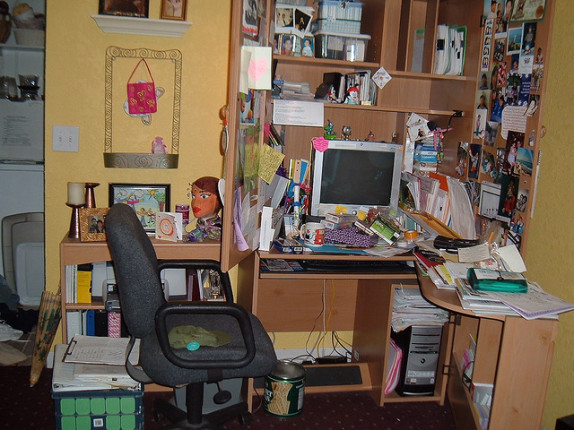
Here are twelve quick desk organization tips. These are things that have worked well for me and help me maintain an organized desk (most of the time). Most of them are probably applicable to others as well. If you have any desk organization tip suggestions of items to add please add them to the comments. (Update: If you are interested in seeing my desk, checkout this post for photos.) Get rid of pens and pencils you don't need. - I have one type of pen I like to use, but every month or so my pencil holder gets filled up with other random writing instruments. If you aren't going to use it, don't feel bad about throwing it out. It is just clutter. The less clutter you have, the closer … [Read more...] about 12 Tips for an Organized Desk
TIP: Logging Instant Messaging

I do a lot of business over instant messaging. Often, these chat sessions have important information that I need later. I used to copy out any important info into a separate file, but now many of the chat clients let you log your instant messaging. Some operating systems make it easy to search through your chat sessions to find a bit of information when you need it. If you use iChat, here is the configuration window where you can save the chats (it is at the bottom of the image). Notice you can also open the folder directly from this window. If you use the web version of Google's chat product that is integrated with Gmail, you can set it to record your chats and make them … [Read more...] about TIP: Logging Instant Messaging
The Two Types of Technology Users

Every year, a new slew of gadgets promises to solve all of our problems. Manufactures are constantly adding more features in hopes of getting us to upgrade. I've managed technology for an institution that had a large "gadget budget". Employees were able to request pretty much anything they wanted as long as there was a slight chance that it might in some way make them more effective at their jobs. I noticed that some people seemed to use the technology very well and it seemed to make a big difference in their productivity. On the other hand, there was another group of people who never seemed to get much of a benefit out of their tools. What was odd, is that the ineffective group … [Read more...] about The Two Types of Technology Users
Tuesdays Tip: Start Something

Procrastination is the first hump we have to get over to do something. Here is a trick to get over procrastination. If there is something you don't want to work on, promise yourself to start the task and work on it for 15 minutes and then you can quit. Much of the time, once you get started you'll find that what was really holding you back was just starting the task. This is a great way to handle exercise. If you dread going to the gym, go for 15 minutes. After 15 minutes if you still don't want to exercise, you can leave. If you don't like it that day, no problem, you made the effort and you'll stay longer on a day when you like it better. We can apply Newton's first law of … [Read more...] about Tuesdays Tip: Start Something
Being Organized Saves More Than Time
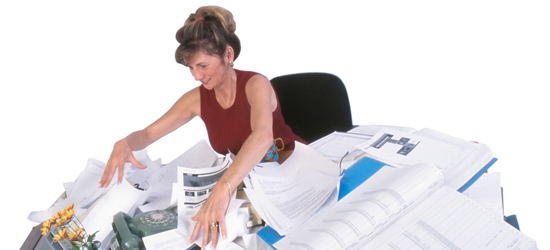
Everyone knows that being more organized can save time. But it can also save you a lot of money. How many times have you had to go out and buy something just because you couldn't locate it in your house? Some time ago we were having someone come over to house sit for a few weeks. I felt bad because we didn't have a television in the house, so I set about hooking up an old DVD player to my computer monitor so they could at least watch some movies while we were gone. The video worked fine, but I needed a connector to hook up the audio. I looked through a box of audio cables, but finally gave up and went to Radio Shack. 25 minutes and $7 later (which seems ridiculous for 6 … [Read more...] about Being Organized Saves More Than Time
Excel Transpose Trick
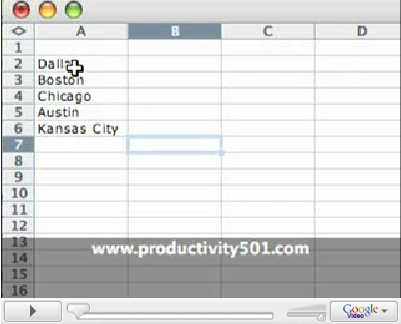
This one minute video shows you how to take a list of items in a column and copy it to a row. It is pretty simple, but when you need it this can really save you a lot of time. … [Read more...] about Excel Transpose Trick
TIP: Where Do I Look For It?
When it comes to organizing your stuff, most people deal with every item and ask "Where do I put this"? This is not the question to ask. When you go to look for the item you may or may not be able to remember the answer to the question "Where do I put this?" The real question to ask yourself is "Where will I look for this when I need it?" There seems to be a big separation between the way the brain makes connections when you are trying to store something and when you are trying to retrieve it. This makes sense because when you ask yourself "Where do I put this?" your brain is going to start thinking in terms of size, available storage space, danger to surrounding objects, etc. … [Read more...] about TIP: Where Do I Look For It?
How to keep from Wasting Time on the Web
I saw this quote on a mailing list: For personal reasons, I do not browse the web from my computer. (I also have not net connection much of the time.) To look at page I send mail to a demon which runs wget and mails the page back to me. It is very efficient use of my time, but it is slow in real time. -- Richard Stallman Basically, if he wants a page, he sends an email to a special address asking for it and the page is emailed back to him. That is definitely one way to keep from wasting time on the internet. A lot of times the internet doesn't help productivity because it wastes just as much time as it saves. Here are some tips for keeping focused. Block Ads - Ads are there to … [Read more...] about How to keep from Wasting Time on the Web
17 Things you Should Stop Doing
This is a list of 17 things you shouldn't be doing any more because they waste time. Old habits die hard and it can be difficult to shift yourself from an old familiar way of doing something to a new, better way. Take a look at the list and see if there is anything you can change to help make you more productive. If you have any suggestions please add them in the comments. Manually Depositing a Paycheck -- That is what direct deposit is for. If you spend 15 minutes every two weeks dealing with depositing your paycheck that is 65 hours over the next 10 years. Put this time to better use. Writing Checks for Bills -- That is what the bill pay service from your bank is for. … [Read more...] about 17 Things you Should Stop Doing
Borders

My wife and I moved to Mexico for a few months in 2006. I've been struck by how different people perceive the US Southern border. To some it is a definite line, something you don't cross without much fear and trembling. Other people see the border as a soft separation. It is the crossing point to another culture, but something that you can easily cross and return. Generally, the people who see the border as a barrier are the ones who don't really understand much about Mexico and haven't made many trips out of the United States. People with more knowledge and experience in international travel don't see the border as a barrier. As I noticed this great divide in how people perceive … [Read more...] about Borders
Doing Less

Much of the current writing about time management and productivity focuses on fitting more tasks into each day. The idea is that the more tasks we are able to complete, the more productive we are. To a certain extent, this makes sense. If we spend time procrastinating instead of working, we'll be more productive if we can cut out unproductive activities. However, taking an "assembly line" approach to productivity does have its limits. Today the biggest productivity gains come from what we'll call "leaps of imagination" rather than just doing more of the same faster. If we are so focused on doing more and more tasks, it can prevent us from really making the huge jumps in … [Read more...] about Doing Less
Previous Posts

Here is a list of a few important posts from past years that you may have missed. Expect Change - How a wealthy man destined his family for poverty by not expecting change. Top 5 Time Wasters - Small things that will eat up your time and keep you from being productive. Time Discounting - A look at why it is psychologically difficult to work on things that give future reward. Fewer Choices for Greater Productivity - A look at how limiting your choices helps you get more done. Not To Do List - The opposite of your to-do list. This list can be just as important as the list of things you want to do. … [Read more...] about Previous Posts
Don’t try to Catch a Pizza Thief using Email

Like most technological advances, email can help productivity, but it can also hurt it. It takes intentional effort to reap the benefits of advances without suffering from their negative side effects. Easy communication is good when you have something that needs to be communicated. Easy communication is bad when it means you are saying things that just waste everyone's time. I ran across an article titled "Efficiency Experts" that talked about how Joe Phelps (CEO of the Phelps Group Inc.) explained proper use of email to his staff using a recent example of an employee who had used email to try to track down who stole his piece of pizza. With technology revolutionizing … [Read more...] about Don’t try to Catch a Pizza Thief using Email
Excellence – Perfection vs. Efficiency
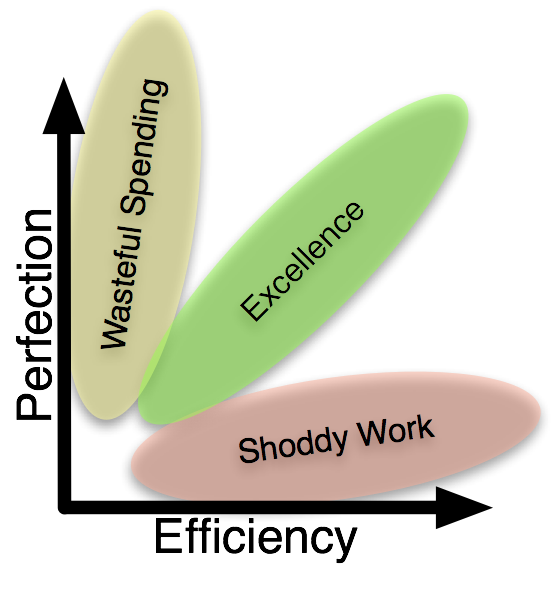
I use to work for an organization that put a lot of emphasis on "excellence". This sounds like a good thing, but it was very poorly defined and tended to become an excuse for wreaking mayhem with the budget. Spending 100% more for a 10% gain toward perfection didn't seem like what I would define as excellence. As I thought I about it, I realized the the problem stemmed from equating excellence with perfection. Excellence is actually made up of more than one dimension. Perfection is one of those dimensions, but you must have another dimension that recognizes we are dealing with finite resources. Usually this is best represented as cost in monetary terms, but it could also represent … [Read more...] about Excellence – Perfection vs. Efficiency
Group Interview – Productive Software

If you made a list of the software that helps you stay productive, what do you think people would be most surprised to find on that list? That is the question Productivity501 asked a number of productivity experts. Below are their responses. A little program called On The Job from Stunt Software. It's a simple time tracker and invoice generator for projects. But here's how I also use it: I have entered what would be my hourly rate based on my projects and income. Then, as I field phone calls, do tasks, and muck around, I click the starter button on the timer, the "Stop" at the end. The value of what I just did immediately appears on the screen. Wow. After one day of seeing how I was using … [Read more...] about Group Interview – Productive Software
Productivity501 Store
Productivity501 is launching a webstore with products specially selected to help make you more productive. In particular be sure to check out the paperless category. Here are some other items that might be of interest: Mozarts Brain and the Fighter Pilot - A great book about how the inner workings of the human mind. Hon Leather Chair - My personal favorite work chair that I've been using for over 5 years now. Surely You're Joking Mr. Feynman - The biography of an incredibly gifted scientist. It is sure to challenge the way you see the world around you. Mindmapping - This is the book I purchased years ago before taking an intense college history course that had been condensed … [Read more...] about Productivity501 Store
Tuesday’s Tip: Get a Good Pen
This may seem trivial and not even worth mentioning, but I think it is important. Your performance is related to how comfortable you are with your tools. Even if you spend most of your time on the computer, a good writing instrument is a necessary tool for getting work done. Since you have to use a pen, you might as well get one that you like. This doesn't mean you have to go out and buy a $50 ink pen (especially if you tend to lose them), but put a little thought into getting pens that you actually enjoy using. It is a small thing, but the happier you are, the better your productivity. … [Read more...] about Tuesday’s Tip: Get a Good Pen
Tuesday’s Tip: Using a Feed Reader
If you have more than one website that you check on a daily or weekly basis, this tip will help you. You probably don't realize how much time is spent checking a website only to discover that nothing has been updated. You can reclaim this time with a feed reader. Most website (including Productivity501) publish something called RSS feeds. These contain the text (or sometimes just summaries) of each article in a special format that is easy for another computer program to read. Programs that read these feeds are called RSS readers. There are two types of feed readers. One is a program that actually runs on your computer. The other are web based programs like Google Reader. The … [Read more...] about Tuesday’s Tip: Using a Feed Reader
Tuesday’s Tip: Ziplock Bags for Wires
When we were moving down to Mexico in October, I had several miles worth of various cables that I needed to take with me. Network cables, audio cables, USB cables, adapters for various devices, etc. At that point I just had them all thrown into a box and it looked like a huge rats nest. I got to thinking about how it might look to a custom's officer and decided I needed something that looked a little less disorganized. My first idea was to wrap everything up with twist ties, but we didn't have any. So I eventually settled on using Ziplock sandwich bags. It turned out that this worked even better than the ties because it keeps the cables separate so they can't … [Read more...] about Tuesday’s Tip: Ziplock Bags for Wires
Productivity Expert Interviews Recap
Back in June I contacted a number of individuals who run blogs about time management, personal productivity, and organization. I asked them all three questions and posted their answers along with my commentary. If you haven't read through these posts, I encourage you to check them out. The different perspectives and opinions give a lot of insight into common problems and solutions with the way we all approach personal productivity. What is the single biggest way people waste time without even realizing it? What change has made the most difference in making you effective in life? If someone were to read just one post from your site, which would you recommend they read and why? … [Read more...] about Productivity Expert Interviews Recap
Tuesday’s Tip: Movie List
Video rental stores are one of the most frustrating places for me. It always takes so long to find a movie and once I get to the store my mind goes blank of all the movies I want to see. On the other hand I really like services like NetFlix because they let you make a list of all the movies you want to see and then send them to you one at a time. You can use this same idea to help you in the video store. I started keeping a file with a list of movies I want to see on it. When someone says that a movie is good, I just add it to my list. When we want to find something to watch, we use the list to find an appropriate movie for the evening. This has turned what use to be a 45 minute … [Read more...] about Tuesday’s Tip: Movie List
Cost vs. Benefit Revisited
A while back I wrote a post about how to measure cost vs. benefit and talked about how we often make poor choices because we don't consider all the facts. The example I used was the idea of buying a hybrid car to save money on gas. I was simply pointing out that every person I had talked to who said they were saving money by purchasing a hybrid hadn't actually done the math. They were actually spending a lot more. Several readers commented that they had purchased a hybrid vehicle because of the pollution impact and were perfectly content to pay more in order to have smaller environmental footprint. For the past few weeks these comments have bothered me. How could a hybrid vehicle … [Read more...] about Cost vs. Benefit Revisited
Tuesday’s Tip: Organized for Happiness
I have two tool boxes. On is a large box with a bunch of tools thrown in it. It has a wide selection, but they are all just stored in the main compartment. My other toolbox is much smaller. It has an individual place to hold each tool. For some reason I hate using the large toolbox and love using the smaller one. I think this is a function of organization. Since each tool has an exact location, it just feels better to use the organized toolkit. Also I find that with the smaller toolbox, I am much more likely to put everything back, because it has a specific place for each tool. With the larger box, I'll leave a tool sitting out or in … [Read more...] about Tuesday’s Tip: Organized for Happiness
Father’s Day and Productivity

Having been a father for a whole 3 months, I am not the most experienced person to comment on fatherhood. However, I do have something to say on how your productivity impacts one's ability to function as a father. In a recent post about wasting time I received the following comment: We mustn’t get too obsessed with efficiency, otherwise we become machines ourselves. Chill out a bit, guys! I agree that when productivity becomes an end in itself, work has very little meaning. However, when productivity enables you to live a life that is richer than what others experience, it can add value. Productivity is what lets you provide for your basic needs with less effort. The less effort it … [Read more...] about Father’s Day and Productivity
Best Posts from 2005
I've had some readers asking what I considered my best past posts, so I took some time and went through the archives for 2005 and compiled a short list of what I consider to be the best content. Some are long, some are short, but these are the posts that challenged me the most in my personal productivity. Two Types of Technology User Paradox of Powerful Tools Social Glass Ceiling The Rat Experiment Making Decisions in Advance Define and Conquer … [Read more...] about Best Posts from 2005
Interview: Best Post
This is the third and final post where we interviewed a number of experts in personal productivity, time management and organization. I wanted to thank everyone who participated and also thank Leo at ZenHabits for putting together the list of 50 Productivity Blogs back in April which gave me a great starting point for these interviews. The first question we asked had to do with identifying the biggest way people waste time without realizing it. The second gave the experts a chance to share the single change that has had the biggest results in terms of being effective. The third and final question was: If someone were to read just one post from your site, which would you recommend … [Read more...] about Interview: Best Post
Interview: Becoming Effective
What change has made the most difference in making you effective? Mmmm...tough question. Ironically, I think having less time available for discretionary projects has made me more effective in the areas of my life that I choose to spend time in. So get married, have kids and take a job that keeps you busy all the time: it'll make you more effective! Brendon Connelly from Slacker Manager (rss) This seems counterintuitive, but I guess it makes sense. Having more stuff to do should help force you to be more efficient. … [Read more...] about Interview: Becoming Effective
Interview: Biggest Time Waster
Welcome Stumblers. If you like this post, please consider subscribing to the RSS feed. This is the first of a three part post where we asked a bunch of productivity experts three questions. Read after the jump to see their answers along with my commentary about each one. Thanks to everyone who participated. What is the single biggest way people waste time without even realizing it? … [Read more...] about Interview: Biggest Time Waster
Interviews With Productivity Experts
I have contacted a number of individuals who run blogs about time management, personal productivity, and organization. I asked them all three questions: What is the single biggest way people waste time without even realizing it? What change has made the most difference in making you effective in life? If someone were to read just one post from your site, which would you recommend they read and why? The response has been spectacular and I've thoroughly enjoyed reading all the different perspectives. One of the participants said this project was "ambitious". I didn't really understand what they meant until I started trying to organize all the information into a … [Read more...] about Interviews With Productivity Experts
10 Ways to Eliminate Distractions from FreelanceSwitch
Freelance Switch has a nice article called 10 Ways to Eliminate Distractions. Below is their list of 10 items along with my commentary. See the original post for their detailed discussion about each item. Turn of email notifications -- This goes along with the idea that humans can't really multi-task so you are better off only focusing on one thing at a time. I understand that in Switzerland some companies have policies only allowing employees to check their emails once each day to help minimize the interruptions from email. Your job may require to to check it more often, but each incoming email shouldn't jar you away from your current task. Remember, email is there to work for you … [Read more...] about 10 Ways to Eliminate Distractions from FreelanceSwitch
TIP: Create Productive Time

Everyone has a different point in their day where they are most productive. Sometimes you can create a productive block of time to work by paying attention to how your body functions and what it takes to get you to peak performance. Many of the most productive people in the world do a great deal of work before others even wake up. I am not naturally a morning person, but I've found that capturing morning hours can be very very productive. If I get up early and start working at 5, I can be three or four hours into my day before the rest of the world even starts logging on to their computers. It can be hard to be fully functional at five in the morning if you aren't geared that way … [Read more...] about TIP: Create Productive Time
New Changes at Productivity501
I'm moving some things around and switching from Typepad to Wordpress, so pardon the mess while I get everything sorted out. I'm afraid that FeedBurner may have reset the last 10 feeds, so I apologize in advance if a bunch of old posts show up as new again. There is still a lot of work to do in tweaking the site, but I think all of the links should work. If you come across something that seems to be broken, please let me know in a comment or email me at mwshead (at) gmail (dot) com. … [Read more...] about New Changes at Productivity501
How NOT to Wake Up
As a follow up to this mornings post, I wanted to show you a video of a new alarm clock called Clocky. It was developed by some students at MIT. The video will give you a good idea of how it works, but basically when the time comes, it shrieks, jumps off your night stand and starts running around the room making R2D2 noises. The idea is that you have to get up to turn it off. On the positive side of things, it will make you get up and move around a bit so you'll be awake. On the negative side, it may put you in a very bad mood. I heard that someone was designing something similar that would fly above your bed until you swat it down. Waking up to a giant electronic insect isn't my … [Read more...] about How NOT to Wake Up
Behance’s Action Pad Giveaway
Congratulations to Desi and John--the two winners of the Behance Action Pad giveaway. I'll be shipping them out be the end of the week. Thanks to everyone who entered by suggesting different ways to manage todo lists. You can read all the comments here. Here are a few random suggestions that I found interesting along with my comments: … [Read more...] about Behance’s Action Pad Giveaway
A Better ToDo List – Behance Giveaway
Yesterday we looked at Behance's Action Pads. Today we are going to give a few away to random commentors on this post. Specifically we are looking for comments, ideas, suggestions, or random thoughts about how to make a better todo list. So anything you've done to let you better manage, capture, or execute your list of actions is fair game. So to get things rolling, here are a few suggestions for todo lists based on my experience: Braindump list -- keep a list of all the random "todo someday" items that you think of. This gives you a place to capture them without cluttering up your daily list. Use objects -- sometimes using objects to represent your … [Read more...] about A Better ToDo List – Behance Giveaway
Behance’s Action Pads
Awhile back we looked at Behance's Action Method Process. They have a line of products to help support this process. They offered to send me a few to see what I thought and to give away to readers of Productivity501. At first I must say that I was skeptical. When it really comes down to it, the Action Pads are places to record a list of your actions--so how is that any different than the to-do list I normally keep on the index cards I carry with me? I mean can't you capture the same information using whatever paper you have available? Yes, you can. But I found that the design of the products helped change the way I approach creating a task list in positive ways. … [Read more...] about Behance’s Action Pads
Bureaucracy in Action
One of my clients is a Fortune 500 company. They need some help setting up some software for their developer teams. According to their contractor policy, no consultant can come on the premises unless they have a signed PO. That seems to make sense, but here is the problem: They recently upgraded their PO system and it didn't quite go according to plan. No one in the entire company can create a PO. So I can't come on their property until the system is fixed. What would be really ironic is if I was the person they needed to fix their purchase order system. I wouldn't be able to fix it until it was working. :) … [Read more...] about Bureaucracy in Action
TIP: Two Desks
When my wife and I first got married, she moved into my apartment with me. I had a large L shaped work area made from joining two desks that we shared. When we bought our house and she started on a Master's degree, I separated them in our office so she had her own and I had mine. I also went out and bought her a good leather office chair. It turns out this was one of the best things I ever did as far as our productivity. It was amazing how much easier it was for us both to work when we had our own work area--even though the large combined work area was more than big enough for both of us. Every person in a household needs to have their own dedicated work area and storage space. … [Read more...] about TIP: Two Desks
Productivity501 Community
I wanted to take a post and thank the people who have taken the time to comment here over the past week or so. I've really appreciated all the feedback we've been getting and I've learned a lot from the many insightful comments. Below is a list of blogs from people who comment here. I actually made the list several days ago, so I apologize if you are a recent commenter and your blog is missing. Thanks again to everyone who participates here. … [Read more...] about Productivity501 Community
Thanks for Your Help & Thoughts on Technology at College
My talk to the high school students went very well. Thank you to everyone who made suggestions. I worked a lot of your comments into my talk. Talking to a high school seniors made me remember my first year as a freshman working on my bachelors degree. When I went to college, the internet was just becoming something you could get access to outside of the academic world. Netscape was the hub for finding anything else on the web and the only way to check your email in your dorm was to signup with AOL or a local BBS system. Out of a campus of 5000 students in 1995, I was the only student with a cellphone (I did a lot of work for a health care system and they needed to be able to get a … [Read more...] about Thanks for Your Help & Thoughts on Technology at College
What Would You Tell Yourself in High School
I am giving a talk to a bunch of high school seniors about personal productivity and life skills as they prepare to enter college next semester. I wanted to ask for some help. If you could go back in time, what advice would you give yourself a few months before high school graduation? Specifically I'm looking for productivity advice related to college and entering the work force. Here are a few things I wish I had known: Don't expect other people to keep records for you. Keep copies of your transcripts, employment agreements, paycheck stubs, homework grades, etc. It doesn't matter if other people are supposed to keep those records or not, take responsibility for your own paper … [Read more...] about What Would You Tell Yourself in High School
Get a life, buddy.–Is it crazy to spend your drive listening to Podcasts.
Narek posted the following comment that made me realize that the focus of this blog might encourage people to shift the work life balance to the extreme side of work: It's sad that you consider everything in life must be done productively. "Wasting Time in the Car -- Subscribe to podcasts and get a connector for your MP3 player in your car. Spend your time learning instead of just sitting there driving." That's what pushed me over the [edge].. dude you just got to relax, just because something you are doing isn't making your life more productive doesn't mean it's a waste of time. Sometimes it is nice to just drive around to get out of the house or relieve stress. Listening to music … [Read more...] about Get a life, buddy.–Is it crazy to spend your drive listening to Podcasts.
Time to Think
It is easy to get so involved in our activities and tasks, that we stop taking time to just sit and think. Taking the time to think and plan for the future is rarely urgent, so it often gets bumped by all the little emergencies of daily life. But taking the time to think is vitally important for your productivity. Thinking can lead to more efficiency. Thinking can lead to new ideas. Thinking can help make sure you are focused on the things that are really important to you. If you aren't taking the time to sit and think, I can guarantee that you are not reaching your full potential. Your ability to improve is going to be tied to your ability to be creative and creativity … [Read more...] about Time to Think
Prepare Ahead for Tax Season
In the US, April 15th is tax day. Hopefully you have your return filed already and everything is taken care of. I'd like to make a quick suggestion: Take some time today to prepare for tax season next year. There really isn't any better time because right now you probably know exactly what would have made your life easier for tax season had you done it 1 year ago. So at a very minimum, get some folders out and label them with whatever groupings you wished you had of had this year. If you have a place to put the information ahead of time, the chances of it ending up in the right place is much higher. … [Read more...] about Prepare Ahead for Tax Season
How Much Information Is There?
Berkeley has an interesting study from 2003 that looks at how much information is being produced in the world. The results are pretty amazing. Here are some of the highlights: … [Read more...] about How Much Information Is There?
April Fools Day
Happy April Fools Day. Here is a tip for playing an April Fools joke on a coworker, spouse or friend. Make a screen shot of their desktop. (On windows, this is done by pushing "print screen" and then pasting the clipboard into Paint and saving the image. On a Mac this is done by hitting Apple+Shift+4 and then selecting from corner to corner.) Set the screen shot as the computer's wall paper. You will have two icons for each desktop icon. The real one on top and the fake one underneath. Move all the real icons to the other side of the screen, but leave the trash can in the original location. When they see the duplicate icons, they will most likely move them to … [Read more...] about April Fools Day
Blacklighter
Most office supply stores sell high-lighters. The idea is pretty good. You high-light important text in yellow or pink to make it easy to find again. So if you are reading a book or report, you simply high-light the important parts of the text. Obviously this can help you find information more quickly in the future, but it isn't really the most productive method. Instead of using a high-lighter use a black magic marker and simply cover up all the text that isn't important. That way it won't be around to distract you when you come back looking for the important stuff. This is particularly helpful if you are working with legal contracts. … [Read more...] about Blacklighter
Left Handed Pencil
I'm right handed, but I feel for people who are left handed and living in a world where so many common items are designed for "North paws". Sometimes there isn't much you can do about it, but when it comes to the standard wooden pencil, left handed writers no longer need to suffer. Here are the steps to convert a normal right handed pencil into one designed for left handers. Start with an unsharpened number 2 standard lead pencil. Wiggle the metal that holds the eraser until it comes off in your hand. Push the metal over the opposite end. (The end the right handers usually sharpen.) If necessary, use a pair of pliers to help crimp the metal back to the pencil. Sharpen the end … [Read more...] about Left Handed Pencil