As part of my paperless experiment I'm slowly moving my data to PDFs I've really started to notice the difference in resolution between my various computers. I recently got a new laptop with a 17 inch 1920x 1200. My previous laptop had the same sized screen but only 1440 x 900 pixels. On my older laptop it was difficult to read a full sized PDF--especially if the print was small. On my new laptop I'm finding that I can read print that was unreadable at the lower resolution. Here is a screen shot from the older laptop with the lower resolution monitor: If you are good at guessing you might be able to read it, but it is going to be difficult. Here is the same size (relative to … [Read more...] about Resolution Matters for a Paperless Office
Blog
Folder Templates
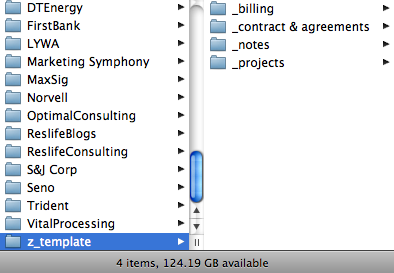
If you have a lot of computer folders that need the same organizational structure you might consider creating a template folder. For example I have a standard layout I use for the folder to keep track of client information. This includes folders for billing information, contracts, notes, etc. I created a folder in my Clients folder called z_template. This makes it stay at the bottom of the list. In that folder I setup my layout. I usually name my folders with an underscore beneath them so all of my standard files stay at the top--regardless of what else ends up in the folder. When I start a folder for a new client, I simply copy everything from my template into their folder and on … [Read more...] about Folder Templates
New SnapScan for OS X
It looks like there is a new SnapScan out for OS X. I think the scanner itself is about the same, but the new version includes Acrobat 8.0 instead of 7.0. If you are looking at purchasing the scanner, you may want to make sure you have aren't getting the older version of the software. The PC version has had Acrobat 8 since June. … [Read more...] about New SnapScan for OS X
Reader Question: Setting Up a Home Office
From a reader: I'll be moving in a few months and with that comes a new desk and new office space. Do you or any of your readers have any suggestions on what to look at? I'm looking for a smaller desk as all I've got is a MacBook Pro and some trays for inboxes. I'll also need a good filing cabinet to work the GTD system, any recommendations? I figured I'd shoot this in as this may be helpful to not only myself, but to others looking to "Get Organized!" (Don't we all try haha). Also, side note - how about some more video tutorials! Take care, Neil Let me describe what I use. It may not be the best setup for everyone and it is definitely skewed toward equipment that breaks down … [Read more...] about Reader Question: Setting Up a Home Office
Paperless Update
I have still been working on my paperless experiment, but most of my planning has revolved around trying to figure out how to keep from wasting money on something only to discover I have to buy something else. I've also been working on the workflow side of things in trying to keep my documents digital and not simply revert to printing them out whenever I need to fax or sign them. I have had pretty good luck with some online faxing services that I hope to write more about in another post. Also I've had a chance to really challenge the ScanSnap scanner. While it doesn't compete with a $10,000 sheet fed scanner, I've been very impressed. The other day my grandmother had about 450 … [Read more...] about Paperless Update
Tuesday’s Tip: Pennies
I don't know if this is actually a productivity tip or not. It might actually waste more time than anything else, but I feel like it is a good thing. Do you have a huge collection of pennies that are building up? My wife and I have a metal box full of our loose change. We run most of our expenses through our credit cards, but we still end up with a bunch of coins. I have found a use for pennies. The toll roads in Chicago take pennies. I don't know if this works in many other major areas or not. There is something deeply satisfying about throwing 80 pennies into the machine to pay for your toll. Of course you probably don't want to sit at the toll booth counting out 80 pennies. … [Read more...] about Tuesday’s Tip: Pennies
Amazon Kindle
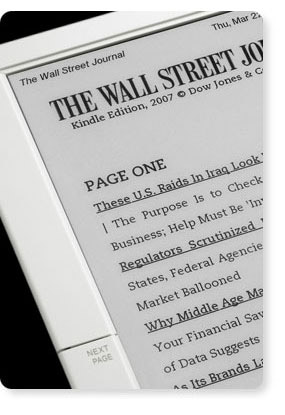
Today Amazon released their ebook reader called Kindle. I have the original Sony Reader and I've been pretty impressed with it. The new version makes a few small improvements, but is still a similar device. Even though the Kindle is based on the same e-ink technology, it takes a very different approach than Sony. One of the biggest differences it the way books are distributed. Kindle comes with built in EVDO networking. EVDO is the same technology used for high speed connections over the cellular network by Sprint and Verizon (AT&T uses something different). Instead of requiring users to get a data plan for their Kindle, Amazon packages the cost of the wireless service into the … [Read more...] about Amazon Kindle
Correct Way to Send Out Group Emails
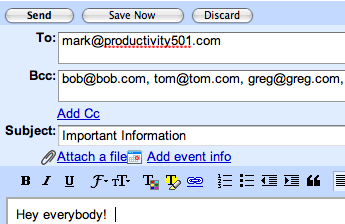
When you send out an email to a group of people, simply putting them all on the to field is bad form. First, it exposes all the email addresses, so everyone can see everyone else's emails. Second, if someone accidentally hits "Reply All" instead of "Reply" their response can easily be sent to the entire group instead of just you. A few years ago, I got an email from a friend who was studying at Yale. It was a yearly update about what was going on in his life. He put everyone he knew in the To: field. This included old classmates, current professors, relatives, etc. One of his friends got the message and decided to respond with an update of all the stuff going on in her life. She … [Read more...] about Correct Way to Send Out Group Emails
Contest – Concealed Powerstrip Giveaway
I previously wrote about the Belkin Concealed Powerstrip. With 10 outlets, wire routing, and a cover to keep everything out of sight, it is the ideal way to organize under your desk. We are going to be giving one away here at Productivity501. To enter simply sign up to receive the email version of this site in the right hand column. Once you verify your signup (you'll be sent an email with a link), you'll be entered in the contest. If you currently receive the email, you are entered already. Right now, there are about 1,000 email subscribers. Once we reach 1250 subscribers, we'll give away the Powerstrip to a randomly selected person from the list. Anyone can enter, but I'll … [Read more...] about Contest – Concealed Powerstrip Giveaway
On Scanning Your Signature
Several people have commented that scanning your signature is a bad idea because if someone got a hold of the file they could sign away everything you own. Obviously you should keep the file private. I wouldn't recommend attaching it to each of your emails or putting it on a web page or anything like that, but it is probably no more risky than anything else you do on a regular basis. Consider the following: If you ever write a check or sign a credit card receipt at a store, you are essentially handing a stranger a copy of your signature already. They could easily digitize it using the process I've just shown and use to sign things as you. Most of the time when you sign something, … [Read more...] about On Scanning Your Signature