When you send out an email to a group of people, simply putting them all on the to field is bad form. First, it exposes all the email addresses, so everyone can see everyone else’s emails. Second, if someone accidentally hits “Reply All” instead of “Reply” their response can easily be sent to the entire group instead of just you.
A few years ago, I got an email from a friend who was studying at Yale. It was a yearly update about what was going on in his life. He put everyone he knew in the To: field. This included old classmates, current professors, relatives, etc.
One of his friends got the message and decided to respond with an update of all the stuff going on in her life. She accidentally hit the “Reply All” button and sent a bunch of personal details to a list of mostly complete strangers.
There was another case awhile back where a real estate company sent out a message to a bunch of people looking for apartments in New York. Everyone was listed in the To field which provided a very handy list that any recipient could quickly sell to a competitive real estate company.
There is a simple way to prevent this. Simply put yourself in the To field and everyone else in the BCC field. That way both “Reply” and “Reply All” will only come back to you and recipients can’t see each other’s email addresses.
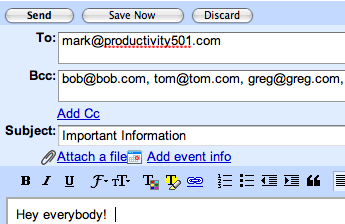
This image shows how this type of setup should look in Gmail. Often the BCC field is hidden or needs to be expanded before you can add people to it. If you can’t find the BCC field, look around or read the help file. It is almost certainly there, but you may have to turn it on.
I have a love/hate relationship with this technique. While it is wonderful for protecting email addresses and preventing reply-all bombs, it also increases the possibility of tripping spam filters. My spam filters dramatically lower the priority of messages where I don’t appear in the “To:” or “Cc:” fields. That said, anything that is being mass mailed to a lot of people probably deserves the lower classification!
The only issue with this lies in gmail itself. In most cases, messages are marked as “spam” if the sender’s address is not in the “to:” field.
According to the help file, this can be resolved if your address is in the recipient’s address book, but my experience has shown that this isn’t always true.
So I guess this is just a grain of salt type of comment…
Danny, and why do you think gmail put this filter in place to start with? due to so many people sending so many emails in the to field, which made it almost impossible to discriminate real from fake.
Let’s recall OUR inbox as property, do not let your email address on the loose
Yes this is a great tip. Another good tip is creating “Groups” within your email program and putting the group in the BCC field. This way you don’t have to enter each name each time you wanna send out a group email.
This is a part I don’t get….I have a group of twenty or so. When I go to send an email, they all end up in the to, not the BCC so I have to manually put each one in….can’t figure this out.
Another area I dislike in sending out group emails is when people do not remove all the messages header details. Some people are great at BCC a list of people but forget to remove the header information from when they hit Forward. That way the other people’s mistakes are not showing up.
Thanks for the post.
JB
@Stevenson & Danny – I agree that sending out messages in this way may trigger some spam filters. This is particularly true if you are sending messages to people you don’t normally correspond with. However, my experience has been good when I’m emailing to people with whom I normally exchange messages. Maybe this is because I’m in their address book or the spam filter is using past emails to determine what future ones will look like.
If I’m sending something that is extremely vital, I’m probably going to follow up with a phone call or ask for confirmation anyway.
@Jeff – That is one of my pet peeves as well–especially in some email programs where forwards actually show up as a message inside the message instead of just being indented.
Let’s add a quick note for those that forget these simple steps. If someone has decided to not be net-friendly and puts everyone in the To: or Cc: lines and you have something to say to the sender…hit REPLY not REPLY ALL.
Nothing is more disruptive than having a flood of REPLY ALL messages because the sender elected to not use the proper BCC format.
One other thing. If you are worried that someone won’t know what groups you send a work message out (with the BCC) to, then put it in the opening of the message. For example, “This sent to IT, Mail Room, Operations Management”
Thanks for the tip.
Mike
My group now has about 100 addresses. Each month I have to send an e-mail to all recepients. Yahoo or G-mail will not allow me to send to a group this size. I have to break down the distribution list to no more than 12 addresses, or it will NOT GO!
I’ve tried using the bcc to list my names, or even in the “to” box. Then, after breaking it down, I have to get through the spam security…trying to decipher what word is written!!! It is driving me crazy. any suggestions?
@Peggy – You could try using something like iContact to manage your list. That would give people the ability to opt out on their own. Also there use to be a way you could do a “merge to email” with Outlook where it would send each email out individually. I use a program called Contactizer on OS X to do that sometimes.
I bcc’d an e-mail to a specific group twice (a month apart), double
checked to make sure the addresses were actually all in the group,
but the message went to members of a group I had not specified in addition to the group I intended to send the message to. Has anyone else had trouble with this?
@Celinda – Is it possible that some of the addresses you sent emails to were actually groups or aliases for other people? That would explain what you are describing.
I recently had problems with my email. It is now working. However, sometimes when I send BCC it still appears in everyone’s email and sometimes it does not.
Anyone have any solutions? J
I have a problem with people using the To: line to sent out group emails. I dont appreciate them using this and then everyone else having my emial that should be private. and now getting cluttered with unwanted email from people I dont give my address to. This is more happening with my children’s teachers sending out notices. I dont even get this from my friends or co-workers. How can I nicely tell these teachers the proper netiquette of sending emails. When did teachers/school system get so lazy and so impersonal that they can not pick up the phone or request a meeting.
The best way to send out group emails is to send an individual message to each person. I wrote a custom scripting solution to do with my email client, but I’ll get there are plenty of free/cheap solutions available.
This solves all of the problems: doesn’t expose email addresses to the entire list, doesn’t trip spam filters, and doesn’t open the Reply All trap.
I did a test BCC email and on a Blackberry phone the email came in with a note “your have been Bcc’d”
I am guilty of doing this myself. Often I might choose to share one article with a specific group of people but not as a regular group. I know, I should not. I will attempt to act appropriately.
I have a group with five e-mails. When I send out a group e-mail the top three names in the group show up in the To: box. The others do not. What am i doing wrong?
I have multiple groups set up in OE. I normally place my name in the To: box and blind carbon copy the groups I wish to send to.
Yesterday I received a request from someone in one of the groups to remove her name.
The problem with her email is that it exposed over one hundred of the emails that I had blind carbon copied.
Can anyone tell me how that is possible?
Thanks
Well that is the very thing you are trying to prevent by using BCC. What does OE stand for?
Outlook Express. The person (on my group email) who responded to me says that she simply hit the reply button to send.
I have been unable to repliicate what I received from her.
That is very odd. I’d suggest going back to your sent messages and find the message that you originally sent out and make sure it showed up in the BCC field instead of just the CC field. If it was in the BCC field, then have someone who you sent it to pull it up and see if you can see all the other names. You shouldn’t see them. Then hit reply all and see what happens. You still shouldn’t see them.
I use outlook express for a group email I have just set up a new group if I put the group in BCC instead of entering each email in BCC seperatly will the members of the group see each others emails.
Can anyone help please…..if I create a group with my gmail….and I add all my contacts…when I send the email does everyone who gets the email see everyones email in the group? or with using a group to send emails ..will it allow for the other email addresses to be hidden? any help at all is very welcomed… thank you…Will.
If you add the group to the BCC field and your own email to the TO field, recipients will not see each other’s email address.
“the new version of Microsoft is on my computer, since the installation I cannot send out my group contacts..they are all there, they transfer over to the mail but will not send out, says “cannot send 0ut try later, that;s been going on for a week
Okay, so I sent out a group email about a camping trip. Someone replied supposedly to just me. We began a converation and personal things were said about someone on the group list. How can I be sure that person and the rest of the group can’t see that conversation? Again, it says the messages were sent just to me, but how can I be sure?
To double check I asked someone to email me their email of the thread. She said she couldn’t see that private conversation, yet, when she sent it to me the conversation was still on there!
Is there a way to create a group from an email I have already bcc’d or do I need add each again manually to create a group
It depends on your email client, but I think on most of them you’ll need to add them manually…unless you put them in a group in the first place.
I sent about 100 email using BCC box. Now I want to delete those emails from the BCC box. I can delete them individually by clicking on the “x” after each email. But I cannot delete them all at once. Any ideas how to delete all of them at once.
I have set up a group email through gmail and I can’t get it to come up on my gmail account. The set up indicates all 11 people are under the heading that I named it but when I go to gmail and put in the given name it doesn’t come up at all. Where am I going wrong with it?