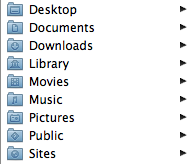
1. Use Your My Documents Folder The My Documents folder is there for a reason. If you don't have a My Document's folder, create one. The idea is to keep all of your documents in this folder. This makes it easy to backup your computer and easy to find stuff instead of looking all over your hard drive. You can take this idea step further and create folders for the types of items you produce on your computer. Here is an example of how OS X sets up your home directory by default: One of the big benefits of this type of setup is that you can go to one place to start looking for anything you've previously saved. It also gives you a single place where you can tell your backup software … [Read more...] about 5 Tips for an Organized Computer
computer
Interview: Computer Setup
In the next part of our technology interview, we asked a number of people: Describe your computer system setup and tell what parts you feel are most important for your productivity. (679) I was surprised at how many Mac users we had. Obviously everyone's setup is based around their particular needs, but there are some great tips in here. OS X itself is great for my productivity. In the year and a half I've been using a Mac, I've had only a few trivial computer problems, all easily solved. The two programs that most add to my Mac productivity are Quicksilver and TextExpander. To my mind, Quicksilver's versatility alone is a good reason to use a Mac. TextExpander, like the … [Read more...] about Interview: Computer Setup
HyperSpace
HyperSpace is small OS that lets you boot up a computer very quickly for basic tasks like web browsing and email. It doesn't replace windows, but provides a lightweight environment that boots in seconds with very low battery consumption. It looks like a great way to check your email when you only have 5 minutes and don't want to spend half of that time just getting your computer OS up and running. If you find yourself constantly running out of battery or waiting for your laptop to boot, this might be worth looking into. … [Read more...] about HyperSpace
Laptop Contingency Planning

If you have a laptop, there are three things you should plan on happening: Theft Dropping Data Loss If you are not preparing for these situations, you are asking for trouble. There are three main things you need to do to handle these areas: Security - If someone steals your laptop, what information will they have access to? All of your data? Damage - If your laptop is damaged, how long will it take you to get back up and running? Data - If all of the data on your laptop is gone, do you have a way to recover it? Security Your laptop security could be as extensive as encrypting your entire hard drive. The big thing you need to do is think about what would happen if … [Read more...] about Laptop Contingency Planning
Four Important Folders on my Computer

Here are four folders that I have in my Documents on my hard drive that I've found save me time. Receipts - When I buy something online that I need to keep track of, I'll print a copy of the receipt page to a PDF and save it in this file. Usually I'll save it with the date as part of the file name. For example: 20071012-cell-phone-order.pdf. This makes it easy to find records of purchases. Rebates - Rebates are awful. Basically, companies are betting on the fact that you won't take the time to fill out the paperwork and send it in. I've found if I keep everything in a single location, it makes it a lot easier for me to gather up all the pieces of info I need and it is easier to … [Read more...] about Four Important Folders on my Computer
Focus for Results

Computers are a great tool, but they can tend to make it hard to focus when you are trying to do planning. I've heard it said that the people who get the most done spend the first half of their day planning and the second half executing the plan. However, when I'm sitting at my computer trying to do planning and research simultaneously, it is easy to get distracted--especially when I'm trying to research something on the web. I've found a simple solution for this. By sitting down with a paper and pen away from a computer, I can better focus on my plan. In many cases, my plan will involve answering several questions that require using the internet. If I can stay focused on my planning … [Read more...] about Focus for Results
My EVDO Connection

The Internet lets me work from just about anywhere. In this video, I talk about using an EVDO connection to get the internet in areas where there is a cell phone signal, but no wired options. It includes a speed test comparing the cellular connection to a cable modem and talks about some of the bandwidth limitations from various carriers. Here is the video from VIMEO. You should be able to click the HD button watch it in high definition if you like. Broadband EVDO Speedtest Demonstration from Productivity501 Let me know what you think of these videos--particularly if it works better to use YouTube or Vimeo. I'm still trying to decide if they are worthwhile to do so let me … [Read more...] about My EVDO Connection
Virtual Box
Sun has released a free virtulization tool that is similar to Parallels and VMWare Fusion. If you have a Mac and need to run another OS, this is worth looking into. The have a commercial and opensource version. I haven't tried it yet. If you have used it, drop me a line and let me know what you think. … [Read more...] about Virtual Box
Proper Length Cables
Quick Tip: A lot of the wiring nightmares you see are caused by cables that are the wrong length. replacing your cables with ones that are exactly the right size can really help clean things up. If you can't find the right sized cable, use black electricians tape to hold the excess. … [Read more...] about Proper Length Cables
Computer: Replace or Upgrade
Quick Tip: If you are looking at getting a new computer, make sure it will really benefit you. Often simply increasing the RAM and reinstalling the OS will make your machine much faster at a fraction of the cost of a new one. … [Read more...] about Computer: Replace or Upgrade
When to Buy a Faster Computer

Computers are so closely tied to our efforts to be productive that it is valuable to take some time to think about how to maximize our use of these complex devices. There are many factors that impact one's productivity with these machines: The speed of the computer. (the raw ability of a computer to do tasks) The configuration of the computer. (settings, memory, physical placement, etc.) The software being used. (wordprocessor, spreadsheet, email, etc.) The training of the user. (informal, formal, software training, etc.) The maintenance performed by the user. (removing spyware, keeping things organized, doing backups, etc.) Each of these areas deserves their own post or … [Read more...] about When to Buy a Faster Computer
Office in a Bag
Over the past four years, I haven't had an office at my job. The organization I was working for was running out of space, so I volunteered to go without an office and let the space be used for other things. I would work from wherever I could find space. Sometimes this was an empty office, the desk of a co-worker, or even sitting on the floor. Since I was rarely in the same spot, I had to keep everything I needed in my computer bag. In addition to roaming within the building, I spent a good amount of time traveling. In time, I refined what I needed in my bag down to the items that I found made me most productive, whether I was working from a quiet spot I found on the floor in a … [Read more...] about Office in a Bag