As we enter the period of New Year’s resolution, I wanted to republish the Habit List which is my most powerful tool in developing new habits. Happy New Year!
Note: The PDF mentioned in this post is now available as part of the Habit List Course. You can enroll using the form below:
Earlier I talked about the “Habit List” I’ve been using. I wanted to walk people through the tool and show you how it works in this post. First lets revisit the theory behind it.
This tool was created with the premise that “habit” type tasks should not be on our regular todo list. There are several reasons that keeping these types of items on your regular todo list is a bad idea.
- “Habit” tasks tend to obscure the most important tasks that have to be done.
- The value of a habit, is measured over time–not just a particular day. Regular todo lists don’t allow for this.
- When your todo list is full of “habits” it is easy to get discouraged when you have a particularly busy day because the focus is on that day instead of your overall lifestyle.
The Habit List is designed to show you how you are doing an entire month at a time. The idea was to create a light weight tool that makes it easy to focus on whether or not you are regularly practicing your list of habits and minimizes the focus on a particular day. In other words, if I don’t exercise on a particular day, it really isn’t a big deal. What I want to watch for are times where I don’t exercise for an entire week.
Here is a shot of the entire Habit List:
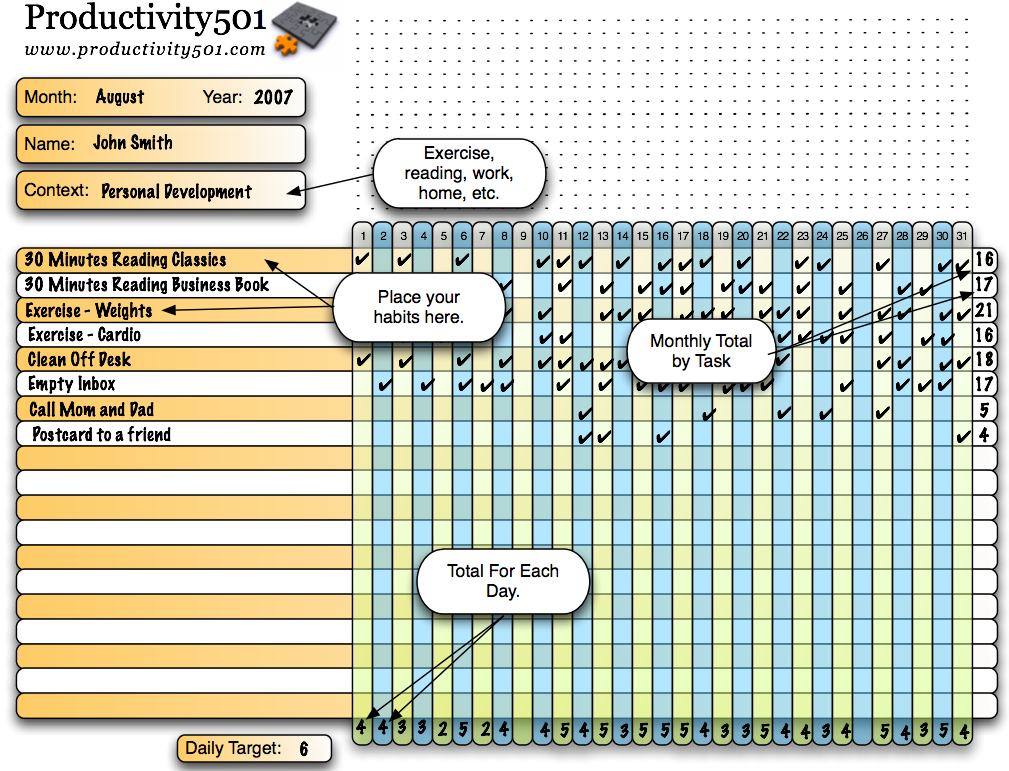
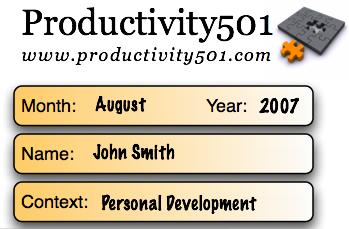
In the upper left hand corner is a place to put your name, the date, and the context. The context is in case you want to have multiple lists for different areas. For example, you might use one list just for exercise and another for your reading plan. most people are probably going to be fine with just a single list.
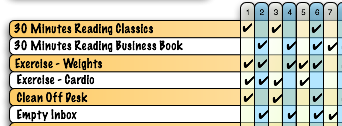
Each task is listed on a row with a square for each day in the month.
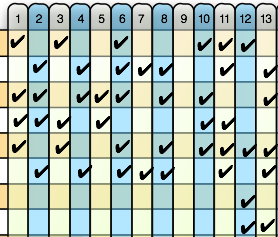
Each day, you check off habits as you practice/complete them. There is nothing wrong with skipping over an item if you can’t fit it in on a particular day. However, the Habit List lets you see at a glance if there are any areas where you may be slacking off.
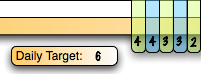
At the bottom of each day, there is a place to total how many habits you were able to practice. There is also a place to note your daily target if it helps encourage you.
At the end of each month, each task has a place to total the number of times you were able to practice it. This is just to give you a quick checkup to make sure you are practicing the things that are important to you. It lets you see if your time is being spent in a way that aligns with your priorities.
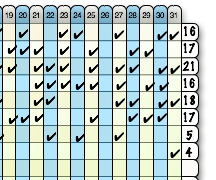
Here is a link that will take you to a larger screen shot of the entire example Habit List.
The idea is that the tool should be extremely light weight and flexible. It took me a little longer to make it available because I had added a bunch of features to it. When I stopped and looked at what I had done I thought, “Wait a minute, I would personally never use all this extra stuff.” So I simplified it back to the system that I’m actually using. There are many different types of time management software and time management tools that you can buy. Many have lots of features, bells and whistles. The Habit List is designed intentionally to be simple and do one thing very well.
If you want to get a copy of the PDF, simply sign up for the Habit List email course (at the top of the page) and it will be sent to you. If you are reading this in an RSS reader, you may need to visit the site in order to see the form.
Originally published July 2007
This is quite a nice and professional looking PDF, thanks. And it motivates me to re-check my habit goals again. For people like me who might prefer the non-paper-based version though: You might want to take a look at http://www.joesgoals.com/ for a nice free online application quite similar to the habit list. And it even sends you emails if you haven’t checked of a habit for a given number of days.
What an excellent tool, Mark!
I’ve spent quite some time looking for a similar solution for the same reason – I find it totally incorrect to have habits in my daily to-do lists.
I’ve been a regular reader of yours for quite sometime – and this great tool to optimize my time and focus my intentions is a perfect example why :)
All the best!
I like the idea, very visual.
Already a RSS subscriber and waiting for the PDF to download.
Thanks!
Thomas
@Timo – Thanks for the link to Joe’s Goals. That looks like an interesting online tool.
@Gleb – Thank you for the kind words. I hope the Habit List proves useful to you.
@Thomas – Sorry about the download time. I tried compressing everything down as much as I could, but I don’t think I can get it any smaller without using the actual Acrobat software. I hope you fine the tool useful.
Yes, Timo, that web-based goal list is nice and all. However, it is easy for me to forget to logon and record — or (worse yet!) to forget some items on my habit list when I am living my life away from the computer!
This new tool (with it’s sharp graphics and subtle blog reminder) can live with my daily calendar printout or folded in my pocket. (I like the context concept for use with multiple lists.)
Thanks, Mark … it will get a fair tryout here!
-D.
liked the list and made a spreadsheet of it I’d like to share. I couldn’t find any CC on your site so wouldn’t share without your permission first. Attribution and link back to your post would be part of it.
Great idea whether you let me share the sheet or not. :)
@Rich – No problem. Feel free to post your version of it.
I’d second (or third) JoesGoals for those that want an online solution. I’ve been using JG for better than a year for this very thing and it works great for me. It’s my homepage, so being reminded of the things that make the greatest difference is never far away.
Great post. Thanks for writing it.
There must be some synergy going on. I am one of those guys who lists habits on my ToDo list. In fact, my first todo list item is “Planning” which is a habit right?
The problem is, my philosophy is to have no more than 4 major A tasks on a list at any one time. Putting “planning” up there cuts out one of those tasks.
Sure it’s a small issue, but it’s good to have an alternative that makes sense. This is a good template. Thanks!
This looks like a great tool – I use iGTD but it gets cluttered up with a number of ‘habit’ items.
I subscribed (via email) but it hasn’t arrived. :o(
Any chance it could be emailed again? I’d really appreciate it.
That is a very good solution and I love the graphics. I would like to know which software did you use to create that. Omni Graffle? Omni Outliner?
Just curious.
I assume you are familiar with Sciral consistency?
Some people use it for tracking tasks, but i see it more suitable for tracking habits.
http://www.sciral.com/consistency/
@Rasa – I used Omni Graffle. I’ve been pretty impressed with the flexibly of the Omni products and it is easy to concentrate on the task at hand without investing a bunch of time learning how the tool works.
@Juha – I hadn’t seen Sciral Consistency before, but I’ll definately check it out. Thanks for pointing it out to me.
I’m a visual learner and love graphics, so this was an excellent idea for me. Thanks for sharing!
Mind-reading thief! I started doing this a year ago and LOVE it. Granted my chart was no where near as pretty.
The hard part I found is that as I’ve tried to add new habits to my life the list has gotten extremely long. I started a second “parking lot” where habits I wanted to add were placed until others became more regular and could be removed. By keeping the list at around 10 it’s not so overwhelming to look at and I can really focus on making some habits so natural that they don’t need to be there.
I came because I liked the habit list, but after looking around for it I realized the productivity blog was taking too much time!
Best of luck with others,
Josiah
#1 on Mark’s ToDo list:
Post To Do list for us.
@Carl – The To Do list is being made available to the RSS readers of Productivity501. If you subscribe to the feed, you’ll see the link at the bottom of each post. Hope that helps.
@Josiah – This is a common problem for a lot of people. They spend all their time learning how to be more efficient, but never actually do any real work. :) I would suggest subscribing to the email feed. That way you get new tips and hints as they are published, but don’t have to come back to the site on a regular basis unless you want to look something up.
Wow, I think this is an interesting way to help benchmarking the mastery of habit building. I’m a productivity coach, and I am going to point my clients to this tool as a “report card” on effective habit building. It looks like a great way to track progress.
I second Brad Isaac: There must be some synergy going on. I was just thinking of elaborating a list like this. Thanks!
I like the idea of having your tasks in specific days of the month, instead of “every wednesday do that, tuesday do this” and so on.
Nice idea. Habit List is more compelling than To Do list
A software for that hobby list would be good :)
This is soooo cool! I have been trying to figure out how to track all my habits (or, rather, want-to-be-habits) but everything I came up with was too complex. This is brilliantly simple! :) Thanks.
Looks like you’ve created a simple but very effective tool, Mark. Well done. One thing you might want to think about is incorporating a way to prioritize those “habits” you’re putting in much like Stephen R. Covey does in “The 7 Habits..” i.e. what are quadrant II tasks versus quadrant I tasks, etc. In other words looking at how much you’re keeping up with lifelong goal-oriented habits versus daily, “housekeeping”-type habits. Just something to think about.
Good food-for-thought post!
@Matt – Originally I had a way to prioritize everything, but I took it out because it just made things more complicated. If you want to prioritize, put a number or letter at the beginning of each habit. Another suggestion is to write “important” tasks from the top down, and write less important tasks from the bottom up.
@Matt – Or use a couple of lists with the “context” feature Mark integrated. :)
I also was developing my own system for this when I ran across the Habit List form. I like the form very much. I was thinking of assigning some point values to the habits. Some habits, like a 1/2 hour session at the gym require more time and effort then say “playing with the dog”. Both are things i need to do more of but clearly one requires more dedication then the other. There are some things we all need to do and change that are relatively simple but require some thought and planning to work in to our routine. Other things take much more effort. “Going to the Gym” or “Writing a personal note” are “5’s” — “Tossing a toy around with the dog” or “reading a non-fiction book” might be a “2”. Just total the points and see how you’re doing!
Hello,
Maybe I’m slow on the uptake, but the file isn’t working for me…I’m running Mac OS X and Adobe Reader 7.0.9. I can open the file, but I can’t seem to type anything in the fields. Is this file only for printing and then manually hand-writing information?
I’d appreciate any help–this file looks very useful and I’d love to get it working. Thanks.
@CMM – I just print the Habit List out and write on it. If I get a version of Acrobat that will let me turn it into a form, I might see about making it so you can type on it, but right now that isn’t possible. The examples with typing on it were done by creating a graphics layer on top of if and manually placing everything.
@Craig – I made the list and started using it. When I was cleaning it up to post, I added a points system where each item had a different weight and you totaled your points at the end of the day, etc. However, I took it all back out because it seemed like it was over complicating things and it wasn’t something that I would use myself. If you want a points system, simply draw a dotted line to make boxes at the start of the space where you fill out your tasks. That will give you an easy way to create points. You can then fill in the squares with the number of points earned and total them for the day instead of using check marks and counting the number of check marks.
@Mark–
Thanks for the information–I had assumed that the file functioned as a form with fields to type in because of your example, so I’m glad to hear that I wasn’t doing something wrong with the PDF! I’ll still use it and simply write on it, as you directed.
Looks like a great idea. I will start using the list in September when I move back to my parents house. I will also be tracking the list on my blog at http://www.traderbubs.com
Whoa! This is seriously one of the coolest things I’ve ever come across, im so used to putting things in a todo list and have so many daily habits (learning languages, gym, business work, uni work etc that I can’t fit them all in right)
Thanks!
— Solace
Any chance of getting this in an Excel version?
@Hobbit – It is basically just a grid, so it wouldn’t be too hard to put one together on your own if you prefer Excel. It probably isn’t something I’m going to do any time soon because I wouldn’t personally use it.
about joesgoals.com – what makes it (extra) useful to me is that i can take a quick look at my points/status via an iGoogle widget.
the same with dontbreakthechain, for a more bird’s-eye view or extra important habits.
incidentally, i’m also trying out todoist (for timed tasks) and nozbe (for untimed/ next-when-i-get-to-it tasks). one of the criteria when looking for these was the existence of an iGoogle widget…
and so i have a quick look at both my timed and untimed tasks, both my small and important habits, my email, my calendar (palm treo to airset to google calendar to iGoogle widget…) – all in all a pretty good picture of my day.
however, if i was using paper, Mark, i would print your pdf :)
This tracking sheet really works – it is very much in sync with the way the brain works.
I’m a neuroscientist and one thing that keeps popping up again and again with my work is that the brain is great at handling the big concepts, but terrible at spotting slow, small, incremental changes.
Breaking things down into easily digestible chunks is like this with some sort of realtime vs historical performance is a real wake up call to getting your brain focused back on the tasks you should be doing.
Patrick
I put all my habits in to RTM in Habits list as a reoccuring task. The act of making it off as complete reinforces the habit. If I find I miss taking action, I still use RTM but also write it down on a simple piece of paper. The act of writing it down and crossing it off reinforces the habit with the other side my brain. It has the AutoFocus TM effect.
This is really excellent! I was feeling so overwhelmed with so much of things that I have to do. I realised that half of my tasks are all dealing with creating habits. This form is just the thing I need for this motivation. Thanks a load for sharing this with us.
How long does it take you normally to make a habit? It would be great to read some experiences on this to know how it feels like when making a new habit. This way I’ll be more efficient in making it.
:-)
Yeeho!
I’m glad to say that I’m still using the habit list and its turning out really helpful. Thanks for sharing. :)
This tool is a little bit of genius, and proves once again that good things come in small packages. I work as a physician, and I’ve given this as an assignment to a half-dozen patients so far. The verdict is in: it works, and it’s fun, to boot!
It works for all kinds of problems – helping folks build habits that help beat depression, challenging others to face anxieties and phobias, encouraging anyone to practice the basic habits of a healthy life. As a bonus, it’s proving itself a brilliant device for those with eating disorders, because it capitalizes on their perfectionist tendencies. Now, when they choose to not-eat, they no longer see this as “an achievement,” but rather, a lost opportunity to get a check-mark. Where previously, “giving in” to eating was seen as a failure, now, not-eating – and not getting that check-mark – means they’ve failed. It’s certainly not the only way to motivate people, but I’m surprised by how well it works – sometimes when it seems that nothing else will.
I plan on using it myself now, to form some new good habits of my own – from simple things like “clean the litter box” to more ambitious goals, like “spend 30 minutes a day working on my book.” Figured I should practice what I preach. You know what they say, “Physician, heal thyself!”
Mark, thank you for this great tool. Is this available in excel format? I did receive the pdf version. I love it. thank you. it would be neat if I could keep on my desktop as well as paper.
No, it is just a PDF, but it would be easy to make something similar in Excel if you like.