
What is the best way to wake up if you haven't slept? If you feel drained because you haven't had enough rest, the best thing you can do is go ahead and get some sleep. This is a little like asking "How can I stop from feeling thirsty when I haven't had anything to drink?" Your body is trying to tell you something and you should listen to it. There are somethings you can to to help stay awake, but you can only trick your body so long. Here are a few things might help if you are having trouble focusing because you are tired: Take a short walk - The exercise will help wake you up. Lower the temperature - If you feel overly warm your body may start trying to go to sleep. Work standing … [Read more...] about Reader Question – How to Wake Up
questions
Questions and Answers

Here is a collection of some random questions that have come in, either by email or search terms that brought people to this site. The run the gamut from banks to bullets and cover a lot of area in between. If you have questions you'd like to see answered, please send them to [email protected]. Why do banks fail? In the US, banks fail when the FDIC decides they are under-capitalized and force them to sell to another company. This happens when a company makes a bunch of loans that go bad. Much of the current financial crisis was brought on by banks investing in complex investments in mortgages that turned out to be much more risky than originally thought. Why create a … [Read more...] about Questions and Answers
Reader Question – College or No?

Should I drop out of college? Probably not. If you feel like it is too expensive, consider attending a less expensive in-state school. You should be able to get a college degree spending less than $5000 per year on tuition, books, and fees. If you are willing to work hard, you should be able to get a job while attending school that will cover many of your living expenses as well as your school fees so you can graduate without any debt. Getting a full time summer job can help give you enough of a financial cushion to cover anything you can't earn during the school year. Four years of living frugally is well worth having a bachelors degree. Your diploma won't guarantee you a high paying … [Read more...] about Reader Question – College or No?
Reader Question – Guns and Safety Deposit Boxes

Can I keep a gun in a safety deposit box? I talked with someone in the safety deposit department of a large national bank in Kansas City and they said it was not allowed. Even if it was, there is the issue of taking a gun into the bank in the first place. Many banks have security devices behind the scenes that are watching for these types of things. The individual I spoke with couldn't tell me about the bank's security system, but he made it clear that bringing a gun into a bank would not be a very wise thing to do--even if you were just going to put it in the safety deposit box. I also talked to the VP at a small bank in Oklahoma. He said it wouldn't be a problem at his bank if they … [Read more...] about Reader Question – Guns and Safety Deposit Boxes
Reader Question – Emailing Your Boss

How to write emails to your boss Don't try to impress with the length of your email. Most of the time they will appreciate a short and to the point message. If you need to explain something in more detail, consider listing the main points as bullets at the top and add the rest of your explanation at the bottom or as an attachment. This allows them to quickly grasp the issue without reading through several hundred words. Another advantage of a short message is that it is more likely to get read. If your boss is busy, they may read a short email and leave longer ones to be read later. You can help your boss prioritize your emails, by adding a short code in the subject. For example, … [Read more...] about Reader Question – Emailing Your Boss
Reader Question – Hanging Folders

How do you use hanging folders? I use hanging folders to hold regular manilla folders. So I may have a hanging folder for "Personal Taxes" and another for "Business Taxes". Then within each of those folders, I'll have one for each year "2004 Personal Taxes", "2005 Personal Taxes", etc. (I talked about this in a previous Tuesday's Tip.) Many people organize their files alphabetically. This isn't a bad idea, but if you have a few files, it may be slower than some of the alternatives. For example: Every time you use a hanging folder put it in the front of the drawer. That way the most frequently used folders are always in the front and the less frequently used folders slowly make their way … [Read more...] about Reader Question – Hanging Folders
Reader Question – Organized Work Desk

How should I organize my desk at work Get a file cabinet. Most of the junk on a work desks is paper that should be filed. Take the time to setup a reasonable filing system and then commit to keeping your papers stored in the file cabinet. Limit your personal clutter. A family picture or two is fine, but 20 framed photos, three baseballs, 2 snowglobes, and 4 unidentified objects is a bit excessive. Keep your extra stuff at home. Don't use your desktop for storage. If you need additional storage space, get some boxes you can put on the shelf or a cabinet of drawers. If you use the top of your desk for storage it will quickly accumulate many more items. Route your wires. Computer and … [Read more...] about Reader Question – Organized Work Desk
Reader Question – Getting Your Money

How do you get money back from someone who owes you? Generally if you are asking this question, you've probably made a mistake somewhere. Here is a list of rules I follow for loaning money. Never loan money to friends or family that you can't afford to lose. If you can't forgive them the debt without holding it against them, you are not the person who should be loaning them money. Do everything in writing. Don't expect to remember the terms of the loans. Get it in writing and signed. Make sure you have terms listed to handle the case where they don't pay. This could be listing an item as collateral, late payment fees, etc. You need to leave yourself an out if they don't pay. Be … [Read more...] about Reader Question – Getting Your Money
Reader Question – Tidying Up Computer Wires

How do I clear my desk of computer wires? Make sure your cables are long enough - Many messy wire situations are caused by using cables that are too short. Route your cables using velcro straps - Bundling wires together and routing them out of sight can help you keep your desk clear. Black electricians tape is another option if your wire setup doesn't change too often. Get rid of equipment you don't need - If you have a bunch of gadgets that aren't being used, remove them from your desk. For example, your scanner might be better of keeping in the closet if you only use it once or twice each month. Use wireless - WiFi for networking and bluetooth for keyboards, mice, and audio can … [Read more...] about Reader Question – Tidying Up Computer Wires
Reader Questions
If you have any questions you'd like to see answered on Productivity501, remember to send them to [email protected]. … [Read more...] about Reader Questions
Reader Question – Organization & Saving

How can being organized save you money? If time is money and being organized saves you time, it saves you money. Lets say you look for 6 things each day that take you on average 5 minutes apiece. You reorganize your office and reduce the time to 1 minute search for each item. You are now saving 24 minute each day or about 146 hours each year. Even if you have to invest half of that time staying organized that still gives you 73 hours of extra time from being organized. This is an extra 9 days each year. You can reinvest your extra time back into work to try to earn more money, spend it with your family, or just take some extra time to relax. … [Read more...] about Reader Question – Organization & Saving
Reader Question – Checking Email Abroad
How do I access my email from a foreign country? In most countries you can check your email just like you do in the US. If you are using a web mail provider like Gmail or Yahoo, you just have to find an internet connection. Many countries have internet cafes where you can use their computer for the internet by paying an hourly fee. If you are in China or another country where they limit citizen's access to certain sites on the internet, it might be more difficult to check your email. If you are traveling with a laptop and want to download your mail, things should still work about the same as in the US. Many internet cafes will let you connect into their network with your laptop for the … [Read more...] about Reader Question – Checking Email Abroad
Reader Question – Credit Cards
Why do people use credit cards? If you have financial self discipline, using a credit card can be much safer than using cash or debit cards. Credit cards offer you better protection from fraud. They are also setup to protect your rights as a consumer because you can leverage the credit card company against a merchant who sold you a defective product. In a previous post, I discussed 4 Reasons You Should Use A Credit Card. Many people are conditioned to avoid credit cards at all costs. This is a good strategy if you have no financial discipline--just a like an alcoholic should steer clear of even driving near a bar. If you treat your credit card like a checking account and keep track of … [Read more...] about Reader Question – Credit Cards
Reader Question – Desk Organization
What should you have on your desk? Everything you need to do your job and as little as possible to distract you. Is a clean desk an organized desk? Not necessarily. If you clean your desk simply be stuffing everything into your drawers, your clean desktop may just be superficial. The best measurement of organization is how quickly you can find anything you need. If you have to spend a lot of time hunting for files and bits of information, you are not organized--no matter how clean your desktop is. Also see the post 12 Tips for an Organized Desk. On Fridays we publish questions from our readers. If you have a question you'd like to see answer here, please send it to … [Read more...] about Reader Question – Desk Organization
Reader Question – Lighting for your office
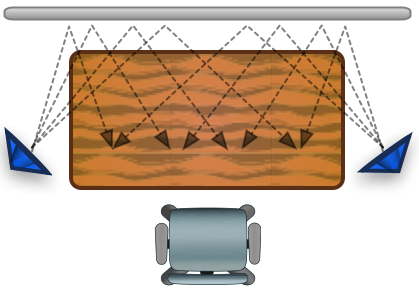
I have an office in my basement. My desk is a table with a fluorescent light over it. My question: should my desk be parallel or perpendicular to the light for best lighting? Thank you for your time and attention to this question.Sincerely,Lou Sartori Louisville, KY If the light is over the table, you will probably get the most even light by having the light parallel to the table. If it is perpendicular to the table your body and objects will tend to cast more of a shadow. With the parallel arrangement you have more light hitting your workspace from different directions which will help keep shadows off your work surface. I'm assuming you are talking about a 3 or 4 foot fluorescent light … [Read more...] about Reader Question – Lighting for your office
Reader Question – Uncompleted Tasks
I've been an avid enthusiast (not to say follower) of GTD and productivity blogs in general. (This one has long been chief on that list; keep up the good material without diluting it.) Currently I just started a new role at work where I have a bit more responsibility.To keep track, I've been using tasks--via Outlook 2007 and Remember the Milk. Both are great ways to quickly catalog things to be done. However, the other side of my job is that I can get "interrupted" with urgent things that legitimately take precedence over my (usually) non-urgent tasks. So days can go by without me getting any tasks completed. This feels pretty crummy. What do I do with that? Any mentality tips you can … [Read more...] about Reader Question – Uncompleted Tasks
Reader Question – Working from Home
Why would it be valuable to work from home? Lets say you commute 30 minutes to work each day. Working from home will save you at least 5 hours per week of drive time. If you apply this time to your job, you should be able to pull ahead of people who have to invest those 5 hours in driving to work. You can also choose to invest those extra 5 hours in sleep, your family, a hobby or whatever you like. Sometimes working from home can help you focus. Being out of the office means it is more difficult for people to distract you--they can't just pop into your office or cubicle. Of course if your home work environment is distracting, you may not see much benefit. If you want to know more … [Read more...] about Reader Question – Working from Home
Reader Question – Memorization
How should I memorize a speech? I don't generally memorize any of my presentations. If you create a detailed outline and then practice giving your speech to a few friends, you'll probably do fine unless you have really bad stage fright. If you do have stage fright, simply memorizing your speech word for word is likely to cause you problems because it will be difficult to remember while under pressure. If you want to give your speech word for word, you can memorize it, but keep the speech with you just in case you have to revert to reading the speech. If you do this, make sure you use some type of method to keep track of where you are in the speech. You don't want to stumble around for 2 … [Read more...] about Reader Question – Memorization
Reader Questions – Being Absent
I went through my site statistics and found some interesting questions that were typed into Google and led people to Productivity501. Over the next few fridays I'm going to attempt to answer some of these questions. Should you call your boss if you are going to be absent? Yes. I can't think of any reason you shouldn't call and let your boss know that you are going to be absent. It doesn't matter if you are sick or have some type of personal issue you need to tend to. Simply not showing up is one of the worst things you can do. Even if you don't feel your current job is where you want to work, you should still approach it professionally. Treat your boss with the same courtesy that you … [Read more...] about Reader Questions – Being Absent
Reader Questions
In the next few weeks I'm going to start posting answers to reader questions every Friday. I'm going to start off with some existing questions that have come in via email or on Google searches, but I wanted to open it up to everyone. If you have a question you think would be interesting to see answered here, please send it to [email protected]. … [Read more...] about Reader Questions