Productive Home Office

February 7, 2008

Earlier I asked readers to share their favorite home office tip as a follow up to the previous interview. Here are the responses:

Many of my clients struggle with organizing their offices (home or otherwise) because they try to fit a “square peg into a round hole.” Meaning, they try to use systems and setup that works for others, but does not match the way that they think and function.

Recognize are you an “innie” or an “outtie”?

Innies are people that function better (are more creative, get more done, etc.) when their space is clear. They can frequently get distracted to other tasks if there are piles laying around. Tools good for innies are systems with drawers and cabinet doors. Only the project currently worked on is out.

Outties are people that would hold the thought “out of site is out of mind.” Frequently outties have sticky notes all over the place to help them remember tasks. Things behind closed doors and drawers would be detrimental for this type of thinker. A better furniture choice would be open shelving and open file cabinets (the wire kind on casters.)

Stephanie LH Calahan from Productive & Organized - Finding Your Way (rss)

This is good advice. If you aren’t most productive with an immaculate office, then don’t beat yourself up trying to keep everything off of your desk. This isn’t an excuse for being disorganized, but it is very important to recognize who you are as an individual. Just because someone else keeps their office in a certain way doesn’t mean that is best for you.

Don’t save paper you don’t need. I’ve seen lots of people whose file cabinets include nicely-organized utility bills for the last 10 years - and these are people who don’t take a home office deduction and have never once referred to the papers since they filed them.

I’ve also found with my own files that many things I used to keep in paper form I no longer need - I’ve replaced the paper with computer bookmarks in my browser.

Stuffing the file cabinet full of useless paper makes it harder to file the things you truly do need or want to keep.

Jeri Dansky from Jeri’s Organizing & Decluttering News (rss)

I usually try to clean out my paper files once each year. This will be even easier now that I’ve implemented my paperless system. I don’t know how much harm it does to keep lots of files if you have a good system and don’t plan to move much, but in my opinion the less stuff you have the better.

Make sure you consider ergonomic standards as you set up your home office. You only have one body — make sure it will be comfortable in your setup! Desk height, chair adjustments, placement of tools, use of a footrest, and so on can all make a huge difference in your comfort and therefore your productivity. In fact, I would say scrimp a bit on the technological tools to have a little money to ensure your comfort.

Julia Benson-Slaughter from Art of the Firebird (rss)

I know that for me it is easy to get so focused on the technology and systems of my work process that I miss the simple things like positioning my chair correctly or sitting an appropriate distance from the monitor.

Share Your Answer - Tips for a Home Office

February 3, 2008

Recently we did a group interview with a bunch of bloggers.  Each one was asked for the single most important tip they could share for setting up a home office.  The answers were great and I know I learned quite a bit by reading through them.

Now is your chance to participate If you have a tip on setting up a home office you’d like to share, please submit it here.  If you have a blog or website be sure to fill in the appropriate blanks–if people like your answer they may want to checkout the other things you’ve written.

We will only keep things open until Tuesday afternoon, so if you have something to share, please do it right away.

I’m experimenting with some new technology for collecting the responses.  If something seems wrong, drop me a note at mark (at) productivity dot com.

Advice for Setting up a Home Office - Group Interview

January 21, 2008

If you like this post, why not subscribe to the RSS feed or email feed for this site?

I recently emailed a number of bloggers asking them for the most important non-intuitive piece of advice for setting up a home office. Here are their responses along with my thoughts. If you find a response that seems especially relevant to you, consider subscribing to the author’s blog rss feed (included below).

I learned this from Tannaz Sassooni, one of my favorite Wise Bread bloggers: Put an old fashioned egg timer on the desk. When I start a long or boring project, I’ll set the timer at 15 minutes, and no matter what happens, I’ll force myself to take a break when the alarm goes off. At first I thought the timer will (a) stress me out or (b) distract me. But it turned out to be a great idea. I often procrastinate because I hated doing long and boring projects. But if I promise myself a 15 minute break no matter what, I’m much more likely to be productive. The gentle ticking of the timer is also a lot of fun. I sometimes pretend I’m a spy trying to break top secret codes from the NSA, while in reality I’m just answering emails from cool bloggers like yourself.

Will Chen from Wise Bread (rss)

This is actually one of the techniques I recommend in the Procrastination Prevention Course–although I haven’t ever tried the NSA spy scenario.

Piece of Advice for Home Office/Workspace: Invest in a comfortable chair. I’ve found that the investment easily pays for itself (unlike many superfluous environment purchases) by allowing you to focus on your work instead of an uncomfortable seat.

Scott H Young from ScottHYoung.com (rss)

Right now at my desk I have a very comfortable chair that took me well over a year to locate. I’ve been very happy with it and it is now over seven years old. Since we travel a lot I’ve found that I can usually adjust to just about any seat. The worst one I had to deal with was a metal folding chair in Mexico that would collapse 2 or 3 times each day.

Firewall your attention. Depending on your sensitivity to interruptions, this could be as simple as closing a door, or as complex as configuring software to keep you from browsing the World Wide Time Sink when you’re supposed to be working.

Bren Connelly from bren : blog (rss)

Firewalling your attention is a good way to put it. Sometimes the things we expect to act as inspiration are actually distractions when we are trying to work.

Get a door you can close. Make sure you can shut yourself off from the daily grind at home. It’s very tempting to work in the livingroom or have your spouse or kids come in every time for some fun or little questions. Make the agreement that when the door is closed, no one is allowed in.

Frank Meeuwsen from What’s The Next Action (rss)

The closed door can help a lot. Sometimes it also helps to put your office in a part of the house that isn’t in the middle of where everyone else is. An office in the basement or somewhere else out of the way can help make you just a little less accessible.

The closed door can also help you make the mental disconnect from being at home that is very important in getting work done. I’ve heard of people who work at home who leave the house and walk around the block to “go to work” and then leave their home office and walk around the block to “go home” at the end of the day.

Let me start by saying non-intuitive to me is different than to many people. Clients hire me because my training and experience in setting up offices is based on knowing what works. So, your question flips around for me to be: what mistake does most people make in setting up their workspace.

My top piece of advice in setting up an office that many people don’t consider is: be sure to take whether you’re right or left handed into account. Your orientation will impact where vital components are situated from your lighting to file location to monitor & keyboard location.

If you have a desk light it should not cast a shadow on your work over your writing hand. Thus, lefties should have a desk light in the upper right corner of their desktop and visa versa for righties. Your keyboard and monitor should be positioned so that you can put paper and pen on your natural writing side. I’ve worked with clients that have to continually reach over their keyboard to write. It’s a slow and uncomfortable position.

Susan Sabo from Productivity Cafe (rss)

This isn’t something I have ever thought about. However in looking at my desk, it looks like I’ve done most of this on accident. Anything I need to grab is on the right hand side of my desk. My lamp is the “wrong” side though. I’m guessing that it hasn’t bothered me because I do so little handwriting and I have other light sources.

I think many people don’t realize how dramatically the way you arrange your office furniture and storage in your home office space affects your productivity. So many home offices I go into have all their furniture up against a wall. They also work facing the wall which is not good for their eyes and can cause eyestrain and headaches if they don’t get up often.

The desks many people use at home today don’t have supply drawers handy, so their supplies end up all over the place and they lose efficiency. They also don’t have file drawers built in. So people buy file cabinets - but don’t place them near their desk so they can use them constantly as they work. Not having handy filing space encourages them to create TO FILE piles and even worse piles all over the floor behind them. Things get lost, damaged, stepped on and more. Don’t even get me started on what I’ve seen pets do to the piles people have on the floor.

The first thing I usually do with people after we get everything picked up and sorted out is rearrange the space. Usually into an L or U shape to create lots of storage and workspace. This way we can create a designated zone for everything they need to do and the supplies they need to do it. Most important is to create a home for all the paper they use regularly. We create homes for action paper, reference paper / files, space to hold binders, and sometimes spaces to hold their piles off the floor. Then we do whatever is necessary to create homes for supplies. We create supply storage using baskets, boxes, or setting up monitor risers.

You can see photos and examples of what I mean in my Office Organizing photo gallery at: http://www.neatandsimple.com/gallery/index.html

Ariane Benefit from Neat & Simple Living (rss)

I’ve have my two desks setup as an L shape although I’ve considered going to a single desk since I think everything would fit. Ariane’s before and after pictures are pretty interesting to look at.

Make it your own. By this I mean: (a) set up your space for how look like to work, e.g., minimalist, uber-organized, or even creative-chaotic; (b) do what you can to make it a space where you *want* to be; and (c) most importantly, make it a space where no one else goes - you can’t be productive if you’re constantly interrupted by others.

GTD Wannabe from GTD Wannabe (rss)

Good advice. I once had a friend who went to an interview and came back very excited. He said that they had a very lenient policy with how you setup/decorated your office space–even to the point that if you wanted to bring in sand for your floor to make it feel like a beach that was fine. While this might be a bit extreme, (and I’m sure the sand would have a negative effect on computer equipment) it is good to think about what works for you. Just because someone else is super organized doesn’t mean that is the best for your working style. I’m not suggesting that you try to be disorganized, but some people actually work better with what looks like a small amount of chaos.

Begin forming diligent work habits from Day 1: if you allow yourself to lay on the couch and watch TV instead of working, this will become
your habit. Instead, develop a routine that will find a balance between getting the work done and enjoying your home office. That routine might include:

  • Showering and dressing before you work (you’re more productive that way).
  • Making a list of the 3 things you want to accomplish today.
  • Starting on the first thing on that list before you check email.
  • When you finish a task on your list, reward yourself with something fun.
  • Only check email twice a day.

Your individual routine will vary depending on your style and needs, but the key is to have a routine and make it a habit.

Leo Babauta from Zen Habits (rss)

This is great advice for anyone working from home. You have to approach it like a “real” job. If you wouldn’t wear your pajamas to work, you probably shouldn’t wear them to work in your home office.

Checking email twice a day can be a very big time saver for some people. It doesn’t work for me personally because most of the work I do for clients is over email. However I have learned to stop checking email when it is a distraction. For example, if I’m writing a letter and get stuck on how to word something, my tendency is to jump over and check my email. This isn’t helpful and I training myself to stop it.

Separate it from the rest of your life - This advice works two ways:

  1. It’s difficult to be productive if you’re in the middle of everything else going on at home, the vacuuming, the kids playing, etc. Make sure you can isolate yourself from anything else going on at home.
  2. When it’s time to take a break from work, don’t have it sitting where you can see it. You will be distracted by the thought of uncompleted work. If your home office space needs to do double duty, have some way of closing off your work when you are done for the day.

Ian McKenzie from Ian’s Messy Desk (rss)

For a lot of people the biggest struggle in working at home is being able to switch off work mode and switch on home mode. Shutting down your computer can be one way to literally turn off work mode when you can’t physically shut off your work space.

How many drawers and shelves do you REALLY need? If you plan to have places to stick stuff, you will accumulate even more stuff to put there. But if you plan a spartan space with few hiding/sticking places, you will have to think twice about all those papers and doodads that come into your office. My suggestion: one pencil-type drawer and a place for some files.

Andrew Flusche from Legal Andrew (rss)

This is a very interesting suggestion. Obviously you need to have adequate storage space, but too much storage can encourage bad habits. I’m not sure I could get by with one pencil drawer and a place for files. That wouldn’t give me any place to store spare batteries, extra cables, backup cell phone, broken ipod speaker, my old wallet, random extension cords, boxes from items I no longer have, money from foreign countries, a voip adapter with no power cable, a cool metal box that I found, 5 rocks (???), and an old laptop. Hm… Maybe I do need to cut down on my storage space. :) Very good suggestion.

My Desk Layout

January 13, 2008

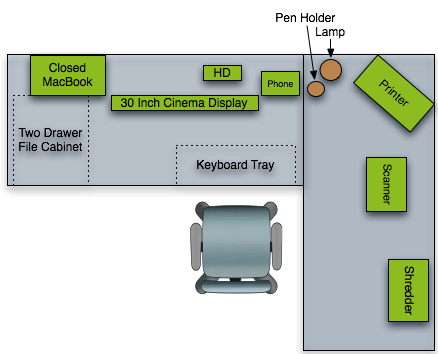
This weekend I rearranged my desk.  My goal was to remove some equipment that was no longer essential and try to reposition everything where in a way that reflects my work pattern. Here is a diagram of the current layout.

desk-layout.png

I’ve experimented with the 30 inch display in several different positions.  When I started moving things around I originally had it up against the wall, but I found I couldn’t see it from that distance.  When I got the new display a graphic designer friend of mine asked if I found myself pushing back from my desk because the screen was so huge.  I’ve found the opposite is true.  The high resolution means there are quite a few more pixels per inch that what I had previously. I find I have to be closer to the screen in order to see it well.

By moving the monitor forward I gain some space behind it.  This works out to be a good place to put my hard drive for automatic backups.  Eventually I’d prefer to have it somewhere out of sight, but that will take a few special extension cables.

You’ll notice I have my shredder on top of my desk.  I prefer to keep it on the floor, but I don’t want it anywhere within reach of a toddler until my daughter gets a bit older.

One thing absent from my desk is any networking equipment.  I don’t have any routers, firewalls, or cable modems on my desk.  Instead I have a box that they sit on where I can keep all the wires inside out of the way. I’m working on a slightly more elegant solution, but this works well for now because it keeps the wires out of sight, but I can still quickly view the status of a piece of equipment through my glass desktop.

Wireless networking has done a lot to reduce my wires.  My keyboard and mouse use bluetooth so I don’t have to deal with those cables.  Also my internet and and printer connection are both wireless.  I still have my fair share of cables all over the place, but there are significantly fewer than what it would have taken a few years ago.

I’m not particularly happy about the MacBook placement.  When I was using a smaller screen I used the MacBook monitor in addition to the external screen.  With the larger screen this isn’t necessary and I’ve found it is kind of hard to use that way.  I wish there was some type of vertical docking station I could put behind the monitor where I could just slide my laptop into it.  The other option I was considering is to put it under my desk on the top of the file cabinet.  However, the cables for the display aren’t really setup to allow this.

So far it seems to be working well, but I’m sure I’ll make some adjustments this week once I start using it.

The Causes of a Messy Desk

December 10, 2007

Right now my desk is a complete mess. Now I have a pretty good excuse. I am in the middle of switching over to a new laptop. I’m also in the middle of trying to switch from AT&T to Sprint for cell phone service. An order of sample Christmas gifts for clients just came in yesterday. I have rebates from Black Friday sales that are partially filled out and waiting for additional documentation that is on the way. I’m working with a graphic designer on a new logo, so I have samples stuck to my walls. I don’t want to throw away any of the boxes for my new equipment so they are all stuffed under the desk or on a bookshelf. Etc. etc.

20071129_dscn5615.jpg

I’d like to say that the picture above is just something I found on Flickr. It isn’t. That is my desk at this very moment.

In looking at my desk I realized that most of the clutter comes from problems with my system. Obviously adding an extra computer, 2 keyboards, 3 mice, 4 cell phones and everything else will fill up my desk, but there are still items on my desk that are just there because I haven’t put them away.

When your desk is the messiest is the best time to evaluate your organization system. Here are the problems I’ve discovered with my organization system:

  1. I used to keep my pocket stuff (wallet, keys, etc.) on a space on a bookshelf. Over time I’ve filled the bookshelf space and these items have migrated to my desk. I need to rearrange the bookshelf or find another place for them.
  2. The drawer on my file cabinet is sticking. As a result I don’t like to try to open it any more than I have to and papers have started accumulating on my desk to be filed. This wasn’t as much of a problem when the drawer worked correctly. It is time to admit that the $15 file cabinet from Wal-mart just isn’t going to meet my needs.
  3. Various items have migrated to my desk over time that belong elsewhere. Right now I have a tire gauge that belongs in the car, two quarters that belong in the car for paying tolls, a memory card of unknown origins that fits nothing I own, and a grocery card that probably belongs in my wife’s wallet. The problem isn’t that this stuff is here. The problem is that it has been here for too long. I tend to empty my pockets before sitting down to work for a long stretch. I need to establish a routine where I can put this type of stuff where I will take it back out with me when I leave (and hopefully put it where it belongs).
  4. I thought I was being very smart by creating a folder on my computer for rebates and putting all the related documents in the folder. It appears that I also need a paper folder because I need a place to physically collect things while I rip the front pages off of manuals, cut out UPC symbols, etc. The folder on my hard drive is making things easier, but a lot of the rebate forms are still easier to fill out using a pen.

So now you’ve seen my desk at its messiest.

Reader Question: Setting Up a Home Office

November 29, 2007

From a reader:

I’ll be moving in a few months and with that comes a new desk and new office space. Do you or any of your readers have any suggestions on what to look at? I’m looking for a smaller desk as all I’ve got is a MacBook Pro and some trays for inboxes. I’ll also need a good filing cabinet to work the GTD system, any recommendations?

I figured I’d shoot this in as this may be helpful to not only myself, but to others looking to “Get Organized!” (Don’t we all try haha).

Also, side note - how about some more video tutorials!

Take care,

Neil

Let me describe what I use.  It may not be the best setup for everyone and it is definitely skewed toward equipment that breaks down to be easy to move. My desk and storage area consists of:

  • Two large glass tables on metal frames in an L shape.  While these don’t offer any storage (other than a keyboard drawer), they break down to nearly flat which makes them extremely easy to move in a crowded moving trailer.  I purchased these around 8 years ago from Organized Living
  • One file cabinet with two drawers under one of the desks. This is a $20 file cabinet from Wal-mart.  I use the top drawer for supplies (extra folders, label maker, envelopes, etc.) and the bottom for hanging files.  I use to have a 3 drawer version that lasted me several years, but I gave it away when I moved.  This one doesn’t seem as sturdy because the file drawers are starting to bend and they don’t slide as well any more.  I’m looking to replace this.
  • A chest of 8 drawers behind my desk. This holds things like: extra chargers for computers and phones, shipping supplies, extra pens, extra usb and ethernet cables, etc.  This makes up for the fact that my desk doesn’t have drawers.
  • A bookshelf in my office.  This bookshelf folds flat and is made out of actual wood instead of compressed sawdust.  The fact it folds up makes it easy to move–which is why I still have it. My less essential books are in storage, so this holds items I use regularly like: reference books, software packages, stationary, and a bottle of windex and paper towels (hidden behind some books).
  • A bookshelf that holds small storage containers in a closet.

We’ve moved around a lot in the last few years, so my setup is fairly spartan.  I still have a lot of stuff in storage that I rarely need to access.  In some ways this has been an advantage because I’m not cluttering up my work area with 10 years worth of stuff that I might need someday.

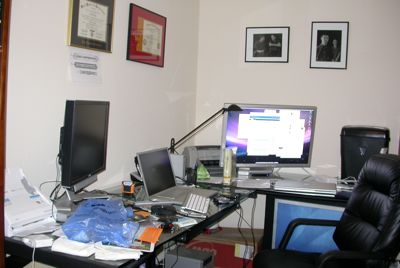
Here is a photograph of my current desk setup:

Desk and Work Area

 One thing I’ve learned is that having extra work surface isn’t always a good thing.  It tends to encourage you to store stuff on your desk instead of putting things away.  I’ve considered removing one of my desks, but I’m waiting until I get my new computer system setup to see if this will work or not.  Also as my daughter is becoming more mobile, I’ve moved more equipment off the floor and onto the desk where it is out of her reach if she happens to come into the office.  It may look funny to have a large shredder on top of my desk, but it isn’t worth the risk of having it anywhere she can get to it.

Up until recently I would have suggested an inexpensive file cabinet from Wal-mart.  However my current one is bending and the handles keep falling off–and it is only 6 months old.  Personally what I would like is a single drawer for files with two pencil drawers on top.  I had one of these at a previous job an it worked very well.  Unfortunately while I was on my last trip, the local office supply store had and auction and shutdown.  I haven’t had a chance to go to a larger city and really look around to see what is available.

One thing to make sure you look for is built in rails for hanging files.  If they don’t have this, you’ll have to purchase a metal frame to go in the drawer.  You can make this work, but it isn’t very convenient at all.

As far as a desk goes, if I wasn’t planning on moving and had a lot of money to spend, I would probably go with a large wooden desk with plenty of storage space.  My grandparents have an old roll top desk that use to be in the Kansas capital building.  It is simply amazing, but I don’t know if I could fit my monitor in it very easily.

If I was looking for a good desk that I wanted to be able to move and wanted to save money, I think I’d take a hint from Amazon.  I don’t know if it is still this way, but in the early days of Amazon all the desks were made out of a door with 4×4 nailed on as legs.  This gave them a great deal of surface area and a total cost of maybe $40 or so.  This was in sharp contrast to the dot-coms that were giving everyone Aeron chairs.

I would probably use a smooth door without any pre-drilled holes laid across two two-drawer file cabinets.  If I could find two nice looking saw horses, I might use those instead of file cabinets if I needed a different height.

Another option is to build your desk into the room.  A desk attached directly to the wall can help you maximize the amount of space in a small room and it doesn’t have to be particularly expensive.  One advantage of this route is that you can customize it to really fit your needs instead of relying on something that was built for the lowest common denominator user.

For an office chair, let me say that I’ve never been impressed with the chairs at Office Max/Office Depot type stores.  I’m not sure why, but they always seem cheap to me.  I finally found an office chair I liked at a small out of the way office supply store.  It is a HON model 2091SR.  The leather is starting to show a little age on some seams after 7 years of use, but I’m still very happy with it.  Now days I believe it runs $250 to $350.

One of the most important things to consider in setting up your office is ergonomics.   You want to make sure you don’t set things up in a way that you can hurt yourself.  My current office works pretty well, but I find I usually use the keyboard on my laptop.  While the height works well for preventing wrist strain, it forces me into bad posture with my back.  My plan is to switch from using my laptop keyboard at my desk and start using a bluetooth keyboard on my keyboard tray.

Hopefully that is some useful info.  If you happen to live near an IKEA, I would definately go there and look around.  Even if you don’t buy anything, you’ll probably get some good ideas about how to make the most efficient use of your space.