In today’s business world, it is very important to be able to share information in a safe and secure fashion. While email attachments can take care of some kinds of file sharing, there is a limit to the size of file attachments. This is where a tool such as drop.io becomes useful. However, drop.io is far from being a simple file sharing service, although it remains simple to use. Some of the abilities this tool possesses are the options to view the uploaded files in a media, blog or system view, record voice mail for the drop, and many others.
How drop.io works
Drop.io works by creating specific information storage spaces for information uploaded through “drops.” Users can share video, audio, files photos and more. After the user creates a specific account with a guest password, they can also set up admin access to the drop with a different password. This is not required, but it is recommended. The admin account, however, controls which privileges the guest users can have. Some options are allowing guests to delete files from the drop, comment on the drop or add files to that drop.
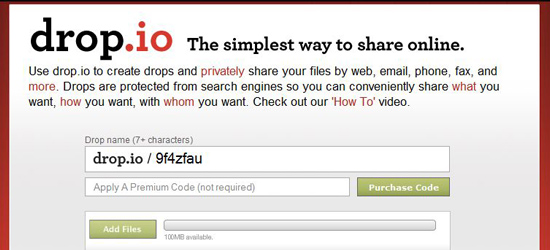
One neat thing is that the user doesn’t necessarily need to sign up to use this service. Storage space is limited to 100MB per drop for the free account, however. Those that are using drop.io for business purposes may need to purchase more storage space for their drops. This just costs a small amount, though. At the main page, the user types in a specific name for the drop, which will become the drop’s address. After creating the address name, the button immediately below is used for adding the files that are to be shared. More than one file can be selected for upload at the same time by holding down on the Ctrl key while selecting files.
For more information on how this product works, visitors may watch this video at the drop.io website.
Time Specific Storage in Drop.io
Another neat aspect of drop.io is that it allows the user to specify how long the files will be available for access before they are deleted. The times range from deletion after one day, to 1 year after the last view.
Contact and Communication Features
Drop.io is especially useful in that it offers some neat ways to add more content to the drop. Users can record voicemail which is saved as an mp3 in the drop, send email to the specific email address generated when the drop was created, or use the special conference call line that was also created specifically for the drop. Also, guests and the administrator can send and receive faxes through the system.
Adding Content to Drop.io
In addition, users have the ability to add content to the drop in the form of notes, files and links. Drop.io seems focused around the idea of a drop, which starts with an individual file. This is a different mentality than some other services like DropBox where the focus is on synching folders.
Drop.io Sharing Capabilities
Users can set the account to give them email alerts when drop content is updated, get an RSS feed on the content, and receive podcast updates using iTunes.
Guests and the administrator can send individual files through a variety of methods, such as embedding the file, emailing it, sending it to another existing drop, or sending it to a mobile device.
Drop.io Manager
The drop.io manager adds some additional capabilities and lets you manage drops in one central location. It still seems focused on sharing individual files. I have heard that there are some additional features like text to mp3 conversion, but I can’t seem to find it mentioned anywhere in the documentation. The video below shows some of the drop.io manager features.
Drop.io Platform
Drop.io seems positioned more as a platform than an end product. Although the ability to share individual files are useful, the real power seems to come from software that integrates with the drop.io platform and lets you do things like share files directly from your desktop or work with groups of files.
For more information about this product and its capabilities, please visit the developers’ website.
Leave a Reply