In the past we’ve talked about how to scan your signature to help go paperless. In this post, we are going to look at the fundamentals behind sending truly encrypted emails and documents that can be verified with a digital signature. The idea is to show you the concepts so you understand what is going on behind the scenes to make a secure communication channel over email.
So why spend the time on this? As we switch to doing more business over the internet, secure communications are going to become much more important. Even if you don’t have a use for encryption right now, you probably will over the next 3 to 5 years (if not before). There is a lot of value in understanding why email encryption is secure–even if you don’t understand all the complicated math behind it.
I find it frustrating that so few people and businesses use email encryption and a digital signature on their emails. If businesses would use encrypted emails, they could just send me a PDF of my bill instead of requiring me to login and download my bill from their website. Many of the processes that currently require printing on dead trees and then using dead dinosaurs to transport sheets of paper through the mail could be done electronically if more people would use encryption. This article is me doing my little part to help raise awareness of how encryption works. If you want to help save paper and think this article is useful, please pass it on to someone else.
Encrypting a Document
To use a digital signature or encryption you must have a digital id also known as a digital certificate. A digital id/digital certificate used to do two things. First, it can be used to do email encryption or encrypt files so that they can only be read by the person they are intended for. Second, it can be used to “sign” or place a digital signature on a document to guarantee that it arrives in the same state it was originally sent and no one has added or changed things.

A digital id or digital certificate consists of a public and private key. Your public key is shared with everyone. Your private key is kept private. These keys are text documents full of what appears to be random numbers and letters, but with the proper algorithm, these numbers and letters have a very unique property.
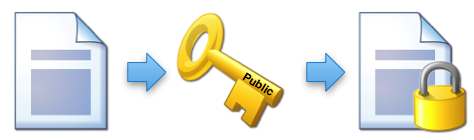
If you take a document and run it through an algorithm with your public key, you get back an encrypted document or an encrypted email.
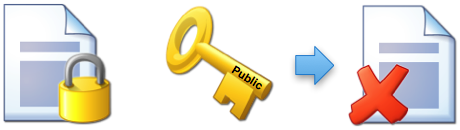
Once it is encrypted, the public key can’t be used to decrypt the document. The process is one way so it doesn’t matter if other people have the public key, they can’t read the document.
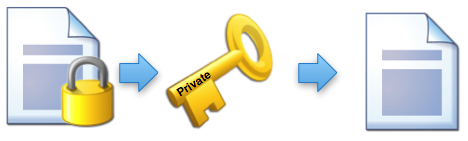
To decrypt the document you must have the private key. If you give the encrypted document to an algorithm with the private key, you will get back the original document.
An Email Encryption Example

Lets start with Tom and Suzie. They want to communicate securely to keep Hitler from reading their messages. They are going to use email encryption to communicate.
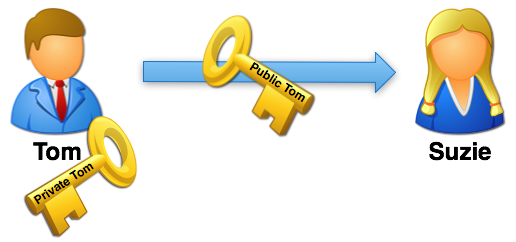 First Tom, sends Suzie his public key. This usually happens automatically when Tom sends Suzie a normal email message. Their email programs handle sending Tom’s key and recording it on Suzie’s side of things. When Suzie sends Tom a regular message, Tom gets her key as well.

Suzie takes Tom’s public key and uses it to encrypt an important message. Then she emails the encrypted message to Tom.
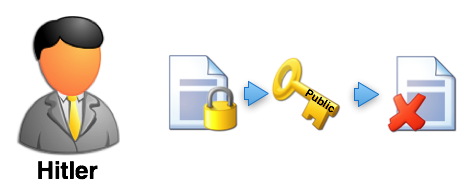
But wait! Hitler intercepts the message by infiltrating Suzie’s ISP and breaking into her email. He now has the encrypted email message that Suzie sent to Tom. Hitler also has Tom’s public key that Tom sent to Suzie. However, no matter what Hitler does with the public key, he can’t decrypt the message. The only thing that can decrypt the message is the private key that Tom keeps safe. Email encryption prevents Hitler from reading the message–even though he has a copy of the email that was transmitted over the internet.
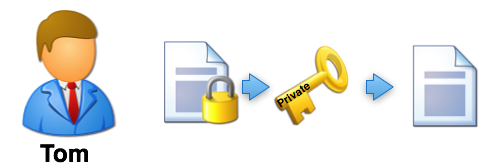
When Tom gets the message from Suzy, he takes his private key and uses that to decrypt the message. He can now read Suzie’s email. It doesn’t matter who else gets a copy of the email that Suzie sent. Email encryption insures that Tom is the only one who can unlock it as long has he doesn’t share his private key. If he wants to reply to Suzie, he simply uses her public key to encrypt his reply and sends it back to her.
Signing a Document with a Digital Signature
With an understanding of how documents can be encrypted, we can look at how to “sign” a document using a digital signature. This is very different than a scanned signature that merely attaches an image of your written signature to a document or email. An encrypted document does two things.
- It guarantees that the document wasn’t modified in route.
- It guarantees that no one else can read the document.
For a lot of communication, item two isn’t necessary or even desired. For example, if I want to send a message out to 25 people, chances are pretty high that it isn’t extremely confidential. In fact, sending a separate message to each person encrypted with their public key might be quite a burden. However, I still may want each recipient to be guaranteed that the document came from me and that it wasn’t modified in transit–we want to put a digital signature on it that says guarantees who sent it and that it wasn’t modified.
Outside of signed email, I may want to post a message on a website that can be read by the world where anyone can check to make sure that the message hasn’t been changed from when I wrote it and confirm that it was truly written by me. A slightly different example of this is when a company posts a piece of software or a patch for existing software. The people who will download it want some way to know that they are getting a legitimate file and not a virus that was posted by hackers to trick people.
This is where signing a document (or file) comes into play. Signing a document (applying your digital signature to it) guarantees the first two items on the list, but does it in a way that allows anyone to read it. People can verify your digital signature without getting a digital id or digital certificate for themselves.
This can be difficult to explain, so I am going to simplify the math a bit. My version won’t be nearly as secure as what is actually used, but it will give you a good general idea of how it operates.
Checksums
First, let’s talk about checksums. A checksum is a simple way to send an extra piece of information along with some data that can be used to make sure that the data is the same on both sides. In human terms, this is kind of like asking someone to repeat a number back to you over the phone. While repeating information back works fine for short numbers, it could be a bit troubling if you have large amounts of data. So we create a short cut. Let’s say that, for some reason, I’m trying to give you the values of 100 checks over the phone. I’m reading them from Excel and you are typing them into Excel. In the end, we want to make sure that we didn’t miss anything. I could have you repeat all the numbers back to me, but that would take a long time. Instead, I might ask you to give me the total. If your total matches my total, then one of two things happened:
- We successfully transferred the numbers verbally.
- We made some mistakes that perfectly canceled each other out.
Since option two is pretty unlikely when dealing with a large list of numbers, we can assume (with a reasonable degree of certainty) that we didn’t make a mistake.
Computers use checksums in a similar way. Back in the days of modems, computers would send an 8 bit byte where the last bit was a checksum. So, the computer might send a binary message that looked like this:
01101010
The first 7 bits contained the data: 0110101. The last bit is the checksum was used to tell if there were an even or odd numbers of ones present in the data. In this case we are using a 0 to say that there are an even number of ones. If the receiving computer got a byte where the number of even bits and the checksum bit disagreed, it would ask for that data to be sent again.
This type of approach reduces accidental errors. However, it does nothing toward preventing someone from intentionally changing the data. If you wanted to change the data en route, it would be simple to flip the checksum bits to match whatever you wanted to send in the data. We need a way of generating a checksum type value that is hard to fake.
Hashes for Digital Signatures
In simple form, a hash is an algorithm (or set of steps) that you can run a piece of data through (text, a file, etc.) and get out a number that represents the original. You can’t recreate the original from the number, but for most practical purposes you can use that number to represent the input. In other words, it will be very difficult to find another input file (or text) that will produce the same output.
Let’s construct a simple hash of the following text:
The quick brown fox jumped over the lazy hound.
Our hash is going to be created by multiplying the number of letters by the number of words.
38 letters
9 words
38 x 9 = 342
So now if I send you this message, I can include the number 342. You can do the math on the message you receive and it will give you a pretty good idea if the message is the same as what was sent.
Obviously, this type of solution will only protect against unintentional changes in the data. If someone changes the email in route, they could just as easily change the number “342” to match whatever the hash is for their modified message.
If we want to protect against this, I can send the hash value through a different channel. For example, I could send you the message via email and then call you on a secure phone line and say, “the hash value is 342”. That way if someone wanted to modify the message, they could only change it to something that produced a hash value of 342. (In our very simple hash algorithm, this would be hard, but doable. With the complex hash algorithms that are actually used, it would be impossible, for all practical purposes.)
Obviously, it is inefficient if I have to call you up on the phone. We need some way to put a secure channel in the email. If I try to encrypt the hash number with your public key, the message is only readable by you–I might as well just encrypt the whole message. If I encrypt it with my public key, then I’m the only one who can read it–not particularly useful either.
But look what happens when I encrypt it with my private key.
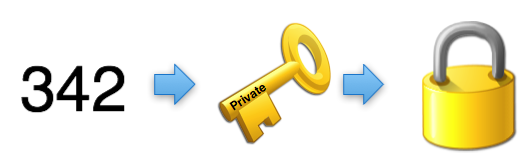
We now have the value 342 encrypted in a way that can be opened by anyone with my public key. Since my public key is the only thing that can decrypt that value, it guarantees them that I was the one who originally encrypted the number 342.
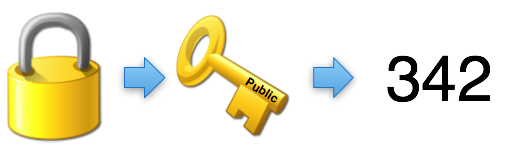
If someone wants to change the message and change the hash value, they would have to be able to encrypt it with my private key.
So, when you send messages signed with a digital signature, the hash value guarantees that the message hasn’t been changed. Encrypting the hash value with your private key allows anyone to verify that the hash value, itself, hasn’t been changed using your public key. This is normally handled automatically by your software, and it will give you a warning if you get a message where decrypting the hash value produces a different number. The encrypted hash value is added as a small attachment or added to the bottom of the email.
Conclusion
And there you have it. You now understand encryption and digital signatures better than 99% of the population. If you are interested in starting to use email encryption, I recommend getting a free set of certificates from Thawte or Comodo. (Thawte may be canceling their free program, so Comodo may be the better choice.) The setup process is fairly simple and they have instructions on how to get various email clients configured.
As I said before, this article is me trying to do my part to help society move from paper to digital. If you want to help, please take a few minutes to share this with someone else.
Hey, great article, thanks for explaining public key encryption. I just wanted to note that in checking out the company you mentioned, Thawte, it looks like they’re ending their email encryption service on November 16th and migrating all of the users over to VeriSign, whose email encryption service is $20 a year.
@Jim – That is too bad. I added a link to Comodo which still offers free certificates.
The Hitler usage is hilarious but it will be perfect with a pair of small mustache.
I just want to let you know, as a Fascist, I feel we are under-represented in the faceless Fisher-Price people avatar world, and so I thank you for that — awesome job. Moreover, I want to say I was so impressed with this article and it’s eco-friendly beginning that I printed eighty copies of it for my friends on 200# stock glossy photo paper made glossy with baby seal fat rubbed on the paper with bald eagle feathers (come on, I said I was a Fascist!). Wonderful explanation, well-written article.
I like to refer to the public key as an open padlock. I can send you an open padlock by courier, you could then lock a box with it and send it all back. Only I have the key to open the padlock (my private key). Anyone else handling the parcel along the way wouldn’t be able to open it.
With all this occurring on the Internet, the padlocks can be limitlessly duplicated and each locked box would actually have a million differrent padlocks to stop anyone trying to pick the locks.
This is a good way of explaining PKI. Thanks for sharing it.
Here from Brazil, as a non native English speaking one I’m a bit hesitant to post this question. But let’s “the mind speak”: In the last paragraph before the CONCLUSION you say “Encrypting the hash value with your public key guarantees that the hash value, itself, hasn’t been changed.” Wouldn’t it be “Encrypting the hash value with your PRIVATE key guarantees that the hash value, itself, hasn’t been changed.” Maybe I’m not grasping the meaning. Your answer will drive me ahead in the article or in the language. Or both! Thanks.
Thanks for catching that. It looks like said it backwards. I’ve updated the post to correct it.
Love this article. I use it to explain to customers how email encryption works better than I could explain myself. I personally use Thunderbird Mail with Enigmail plugin that utilizes GnuPG the free encryption algorithm. Whichever way a person chooses to go the concept is the same and solid. It’s a good habit to get into after researching the various ways a person can not only intercept but impostor as someone else based on the “man in the middle” attack. Simple to use and sound advice. I once read an article from a major corporate attorney that email was not a secure means for communication, After extensive research into this concept, that guy may want to retract his comment.
Well I would agree that the way most people use email is not secure.
Hi, I have a question about “edit message” function in outlook. I wonder whether to digitally sign and encrypt email are able to prevent using “edit message” in outlook?
If something is digitally signed, then you will be able to tell if the message was modified since it was signed.
Just called Comodo – only free for 90 days, then you have to pay.
StartSSL (startssl.com) also offers free email certificates, though should you need to revoke it there is a handling fee (currently US $24.90 according to their FAQ, except for EV certificates which are exempt from that fee).
Helo Mark,
This is a great article about encryption, digital certificate etc. Well explained and extremely simple language. Thank you.
Would you trust PKI and CAs given the rate at which they get hacked (comodo, diginotar, etc) or exposed to be dishonest (etisalat). Furthermore, given that these CAs legally limit their liability in these cases, would you trust them with anything that could potentially result in loss to you that exceeds their liability (which is just a few thousand $)
To add a bit more clarity in your pictures you could put the person’s name on their key in your key icon. You have only public or private and opposite orientation. If you had public with Tom under it or private with Tom under it and likewise for Suzie or some 3 letter female name like Sue so you don’t need to create a larger icon, this would eliminate confusion even more! Good explanation though.
A follow on explanation article to go to the next level might be an intro to PKI. This would give an explanation of what a Cert is and what a CA does and what a root key is as as part of a PKI explanation.
Excuse I reviewed your article again and saw that you did put the name in the key icons in some cases but not in all where it might add clarity. Who knows though, some geniuses might start thinking digital signatures are only used between men and women. :-)
Most of the cryptographic examples talk about Alice and Bob, so maybe I should have stuck with those names. I used Hitler just because I had an icon that reminded me of Hitler for some reason.
Digital Signature:
It guarantees that the document was actually sent by the sender.
It guarantees that the document wasn’t modified in route.
It guarantees that no one else can read the document.
Well…a Digital signature by default only provides authentication, nonrepudiation, and integrity. In order to satisfy the last clause “no one else can read the document”, you will have to encrypt the document with other parties Public key, then do the digital signing which is “hash the message, encrypt with your private key.
CAcert.org will always be free. Their root server is not included by default, but is very easy to add.
This is an international WoT organization providing a full suite of certificate types.
The only issues are that you have to find some other members to verify who you are to get certificates with expirations longer than 6 months, and you and your friends need to install the CAcert Root certificate..
Sounds very nice if you are dealing only with people who can install the Root certificates.
Hi, have one question…. for the statement “If someone wants to change the message and change the hash value, they would have to be able to encrypt it with my private key.”
what if the interceptor decrypt the message using the sender’s public key included in the message and modify the message/hash (considering the message is now a plain text) and sign and encrypt the message back with his own private key and send it back to the receiver? How come receiver knows if the message is from sender? (As the message would be having interceptor’s public key).
I may be didn’t understand the situation correct, please make me clear?
Good question. So lets say I send you a message and along with the message I send a hash that has been encrypted with my private key. You can calculate the has on the message and then use my public key to decrypt the encrypted hash that I sent to you. If they match then you know that the message you have matches the hash I calculated when I sent it to you. Now, lets say someone changes the message and then replaces the encrypted hash with a new hash that they encrypted with their private key. When you use MY public key to decrypt the hash, it isn’t going to work. If it does produce anything, it isn’t going to match the hash that you calculated. You’d have to use the public key of the person who messed with the message to get the hash that they encrypted–which you wouldn’t do because you are trying to verify that the message came from me. Does that make sense?
very insighful and very easy to understand
there is one thing which I wanted to clarify .
The usage of Digital Signature is only to attach the signature to the message to be verified but not encrypting the whole message .
While the usage of Https for instance is to do the encryption for the whole message plus you have the option of attaching the digital signature into the message .
Hope my understanding is correct
That is correct. Using a digital signature will allow everyone to verify that the sender of the messages is who they claim to be. It does not restrict who can view the message.
Thanks Mark , That helped a lot
Hi Mark,
Great information, I am studying CCNA via resources from internet and could not find a lucid, real world and ‘in context’ explanation of digital signatures until I found your blog. When I have my time management sorted I will read more!
Bless you
Hi, this is a great article! I have one question:
An encrypted document does three things:
1.It guarantees that the document was actually sent by the sender.
2.It guarantees that the document wasn’t modified in route.
3.It guarantees that no one else can read the document.
How can an encrypted document ‘guarantees that the document was actually sent by the sender.’? (if it is not signed)
Thanks!
Good point. Item 1 only applies if it is signed as well. I’ve updated the post based on your feedback.
got rid of my 6 months of confusion about digital signatures concatenated with public and private keys.
have one question.
is it true that hashed value and message is encrypted with the receiver’s public key and then the entire encrypted(with receiver’s public key)message is digitally signed with sender’s private key?
and then the receiver decrypt it with the sender’s public key and the again decrypt the whole message with his own private key to get the original hash value and the original message?
I still did not understand how receipt would figure out if encrypt of the hash (which is to be used to confirm that message was not changed) was changed in transit ?
In this case, despite message was not changed and authenticated and because encrypt of has was changed, it will fail ?
How receipt will know encrypt of has was changed as decrypting of (even if it was changed) hash would still produce something which will say contents are different.
Hi, Sorry if this has been asked.
If I send the encrypted email to someone, Could I See it?
Or would I have to send it myself as well?
What goes in the ‘sent’ folder?
Many Thanks