
What is your single most important tip for keeping your books, magazines, software and other physical media organized? (549) The key to keeping your physical media organized is to have as little as possible. Only keep the absolute essentials and either trash or convert to a digital file what you want to keep. For example, I don't purchase any fiction books-- the library is perfect for that. I only keep books that I will either read again or reference in the future. CD's and DVD's are easy to convert to digital files and centralize on an external hard drive (be sure to back it up!) Basically, if you drastically reduce the amount of physical media in your life the problem of … [Read more...] about Interview: Managing Physical Media
Archives for June 2008
Contests
Just a reminder about two current contests. First we have the Belkin Concealed Powerstrip giveaway. When we get to 1250 email subscribers of them will get the powerstrip. (We are currently at 1088. It has been slow because many people have been switching over to feedreaders.) Second we have the Bento software giveaway. The last person to comment on the post gets the software. … [Read more...] about Contests
Past Post: Paradox of Powerful Tools
Paradox of Powerful Tools - Simple is often better. … [Read more...] about Past Post: Paradox of Powerful Tools
Younger Look for Resume
Thursday's WSJ has an example of how a 49 year old woman was able to get more attention for jobs by adding a photo to her resume where she was dressed to look younger and trendy. She also tried to minimize the length of her experience by removing her graduation date and some of the earlier jobs. What do you think of adding a photo to your resume? … [Read more...] about Younger Look for Resume
Review of Shoeboxed.com
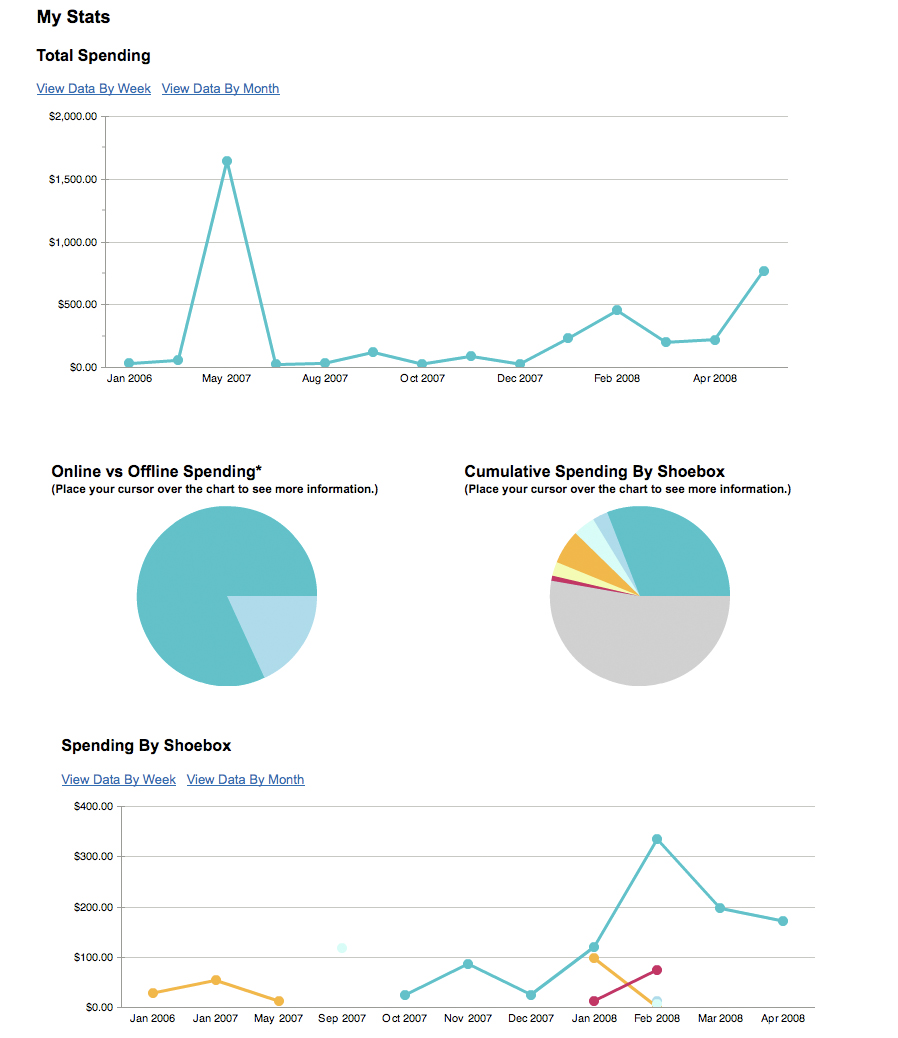
At times, the amount of paperwork that one person has do deal with can become extremely overwhelming. Many people find that a pile of unorganized paper can have drastic effects on the amount of work that they accomplish. For many of us, the motivation to organize the chaos is sometimes too much to even contemplate. However, an enterprising business has found a way to make the lives of the ordinary person much simpler. Shoeboxed.com is an organization that provides a service that categorizes and organizes your receipts in a hassle-free manner. There are several levels of service that the company provides. One is the free version, in which you must scan in or direct your online order … [Read more...] about Review of Shoeboxed.com
Boston Magazine
Productivity501 got a nice little mention on page three of the Boston Magazine on an article about American Express Concierge services. This explains the surge in comments from people doing "damage control". … [Read more...] about Boston Magazine
Virtual vs. Inperson Assistants
It is hard to beat having someone you can send to the store with your grocery list or wait in line for you at city hall. Maybe I just lucked out, but my non-virtual assistant is really cutting down on the amount of running around I have to do. … [Read more...] about Virtual vs. Inperson Assistants
Past Posts: Personal Productivity From Management
Personal Productivity From Management Theory - How academic management theories can be used to help improve your self management. … [Read more...] about Past Posts: Personal Productivity From Management
Bill Gates on XP
This email is a pretty interesting account of Bill Gates trying to install Movie Maker. … [Read more...] about Bill Gates on XP
DevonTHINK’s Classify Feature

As part of my paperless office experiment I'm finding that scanning is actually the easiest part of the whole setup. A lot of what is difficult is finding a workflow that makes sense. For example, if your assistant scans in 250 documents from your file cabinet, you need some way to classify and organize those into your system. Obviously you can look at each one and figure out where it goes, but this is very slow. DevonTHINK has a feature that helps with this. It looks at the text in the document you want to classify and then looks at the text of documents already in the system. Then it suggests a location that puts it with similar documents. This is extremely useful--especially when … [Read more...] about DevonTHINK’s Classify Feature
Past Posts: The Rat Experiment
The Rat Experiment - How your expectations determine your results. … [Read more...] about Past Posts: The Rat Experiment
Interview Posted
Kris from FreshFocus (rss) did an interview with yours truly that you may find of interest. … [Read more...] about Interview Posted
Telecommuting From Home

This post is a series of links I asked my assistant in India to compile and summarize on telecommuting. With skyrocketing gas prices, now is a good time to consider telecommuting. You can even approach your boss about doing it to help the environment. (We've previously written about how to approach your boss about telecommuting.) Ever Given a Thought to Telecommuting? - Vishal P. Rao Should you be confused about telecommuting, this article acts as an eye-opener. Starting with a perfect definition of the term, the article also gives the advantage and the steps that can eliminate the drawbacks involved. The author also provides a link to gain additional knowledge and help you get … [Read more...] about Telecommuting From Home
Past Post: Two Types of Technology Users
Two Types of Technology Users - A short look at how different people approach technology. … [Read more...] about Past Post: Two Types of Technology Users
Links of Interest
This is a very large list of links to articles we found interesting here at Productivity501 on no topic in particular. If you like these you might want to add Productivity501 as a friend on StumbleUpon, Digg, and/or Twitter. Also consider subscribing to our RSS feed. Matt Goes Digital - Matthew Cornell Matt Cornell shares some tips on moving away from a paper based system. Particularly useful if you use a Mac and OS X. Organizing Your Desk and Paper-Ariane Benefit Some helpful advice for keeping you desk from becoming one massive pile of clutter. Also gives tips for using items you already have around the house to help you become more organized. Research That Reveals New … [Read more...] about Links of Interest
Non-Virtual Assistant Story
Jed has a post about using a non-virtual assistant to facilitate going to a show in Chicago. … [Read more...] about Non-Virtual Assistant Story
Poisoning Her Husband Slowly

There once was a woman who hated her husband. She decided to kill him. After contemplating a direct murder, she couldn't come up with any plan that seemed unlikely to result in her getting caught. Finally, she settled on poisoning him with a bad diet. She figured no one would suspect her if he died from eating a typical, American unhealthy food. To accomplish her evil intent, she started cooking for him. She made him all kinds of fried, fatty foods. She fed him donuts and always encouraged him to eat an extra large helping of dessert. The husband of course thought he was in heaven as his wife tried to slowly kill him. In the end, they worked things out and she stopped trying to … [Read more...] about Poisoning Her Husband Slowly
Quote from Buckminster Fuller
“If you are in a shipwreck and all the boats are gone, a piano top . . . that comes along makes a fortuitous life preserver, but this is not to say that the best way to design a life preserver is in the form of a piano top. I think that we are clinging to a great many piano tops in accepting yesterday’s fortuitous contrivings.” … [Read more...] about Quote from Buckminster Fuller
Should You Use a PDA?

Many people believe that having a personal digital assistant like an iPhone/IPod Touch, Palm Pilot or Windows Mobile device greatly increases their productivity--regardless of whether or not it is true. These devices can be great, but they don't help everyone. It is important to consider the cost of technology, not just in terms of money, but in terms of time. I've seen people spend hours and hours trying to get their calendar synchronized when their pocket calendar did the job much better for a fraction of the cost. This article should help give you some things to think about when it comes to deciding if a PDA would be beneficial to you. To start off with, lets look at some reasons you … [Read more...] about Should You Use a PDA?
Password Creation Technique
I ran across a nice post on creating unique passwords today. Also see our previous post on the subject. … [Read more...] about Password Creation Technique
I've been playing around with Twitter on a test acount and have finally created my "real" account for Productivity501. … [Read more...] about Twitter
Creative Bookshelves
Weburbanist published some pictures of highly creative bookshelves. There some very interesting space saving ideas. I particularly liked the invisible bookshelf. … [Read more...] about Creative Bookshelves
Virtual Box
Sun has released a free virtulization tool that is similar to Parallels and VMWare Fusion. If you have a Mac and need to run another OS, this is worth looking into. The have a commercial and opensource version. I haven't tried it yet. If you have used it, drop me a line and let me know what you think. … [Read more...] about Virtual Box
Bento
I was sent a free copy of Bento to try out. Here is my take on the software after playing around with it for awhile. We are giving the software away to a reader. See the bottom of this post for info on how to win. What is it? Bento most reminds me of the database program that came with Appleworks on the Apple IIc. It isn't so much that it works the same, but it is geared toward the same type of market. People who need to store database type information without becoming an expert at understanding databases. The program runs on OS X and has the nice look and feel that you'd expect from an Apple application. Libraries and Collections Bento uses the idea of Libraries and Collections. … [Read more...] about Bento
Laptop Unfriendly Library
I went to a library today to do some research and some writing on my laptop. The internet browsing librarian informed me that I wasn't allowed to plug my computer in to the outlet. I asked why and he said it was "library policy". This wasn't an answer--he was just being redundant. I prodded a bit more and found him even less helpful--probably because I was infringing on his valuable web surfing activities. I gave up and just used my battery. Most libraries are trying to redesign themselves to attract people. I've been to some where they added rows and rows of tables with Ethernet and power jacks for people with laptops. This one seems to be concerned that patrons might actually come … [Read more...] about Laptop Unfriendly Library
Fear of Interruption

I have a phobia that prevents me from operating at my full potential. It isn't athazagoraphobia (the fear of forgetting) or atelophobia (the fear of imperfection). I also have no fear of looking up (anablephobia) or of peanut butter sticking to the roof of my mouth (arachibutyrophobia). My Phobia In fact, I haven't been able to find a name for my phobia and as you can tell I started with the A's and worked my way down. My phobia is fear of being interrupted. Obviously this hasn't crippled me in any significant way, but I consistently find myself not working on my most important task because I'm afraid I'll be interrupted. I put them off until I feel like I won't get interrupted. In … [Read more...] about Fear of Interruption
Back to My Mac
I've recently started trying out the Back to my Mac feature of Leopard that works with a .mac account. It didn't work at all until I installed 10.5.3, but now I've been pleasantly surprised. In a nutshell it lets you access computers as if they were on your local network--even if one computer is at your house and the other is at Starbucks. It makes it easy to look over the shoulder of my assistant if she needs help with something or quickly transfer a file. … [Read more...] about Back to My Mac
Vote on Interview Answers
If you can spare a few minutes to vote on some of the answers from interviews it will help us improve the quality of upcoming posts. Pick an interesting question and then choose the best of the two answers provided. … [Read more...] about Vote on Interview Answers
Interview: Hard Drive Organization

We asked a number of bloggers to share their tips for keeping their computer organized. The answers fall into two camps. One group prefers a good folder hierarchy while the other prefers no hierarchy and just uses search. I use the latter method for my email, but I'm still getting a lot of benefit from my file folder structure. What is your most important tip for keeping your computer hard drive organized? (837) A folder structure that makes sense is essential. I've seen people with a folder called "Work" and a folder called "Personal" and nothing more, each containing hundreds or thousands of files without any semblance of organization. I've also seen structures with more folders … [Read more...] about Interview: Hard Drive Organization
Controversy over Virtual Assistants
My posts on virtual assistants generated more controversy than anything else I've written and got me called an ignorant coward. Check out the comments and add your opinions. … [Read more...] about Controversy over Virtual Assistants
StumbleUpon
If you use StumbleUpon, consider adding Productivity501 as a friend. … [Read more...] about StumbleUpon
Cordless Phone at Odds with Skype
Skype usually works great for making phone calls, but when I moved my office a few weeks ago people stopped being able to hear me. I finally traced the problem to my cordless phone that was now sitting near my wireless access point. I moved it 3 feet away and Skype call quality returned to normal. So if you are having trouble with Skype on a wireless network look for sources of interference. … [Read more...] about Cordless Phone at Odds with Skype
Offending the Entire VA Industry

Let me start off by saying that this is a long post, but I wanted to share the story of my experience interacting with virtual assistants other than India over one of my previous posts. If you are an easily offended virtual assistant, you might want to skip this. If you think you might ever want to use a virtual assistant, read on. Ok, so I haven't offended the entire industry--just a subset of the people on the Virtual Assistant International Group. My Ultimate Guide to Virtual Assistants generated a lot of input from virtual assistants. Most of them were telling me that I could get much higher quality help if I was willing to pay more money. The idea that paying someone four times as … [Read more...] about Offending the Entire VA Industry
Wireless Card Reader
I have been attempting to move everything possible to wireless. There is only so much you can do to route wires to keep them from looking sloppy. Getting rid of the wires entirely is ideal. I was pleasantly surprised to find that my new printer (HP 2605dtn) has a memory card reader that shows up on as a network drive in OS X. I can stick in a card and then pull it down to my computer over my Wifi network. So there is one less device and wire I have to keep on (or near) my desktop. … [Read more...] about Wireless Card Reader
Batch Processing
Darren at Problogger has written a great post on Batch Processing. Basically he has found that he can get more done by batching similar tasks together. I generally set aside Monday mornings (and usually Wednesdays also) for writing posts. I take my laptop - camp out in a cafe - spend most of the morning off-line (so there are no other distractions) and just write. My goal is to write at least 5 posts that I can then use later in the week. Quite often I’ll write as many as 10 posts in a 5-6 hour period. About twice each year I do something similar for Productivity501. I'll spend about a week writing posts for the next 6 months. I'll spend 3 or 4 hours a day for 4 or 5 days just writing … [Read more...] about Batch Processing
Credit Cards as a Productivity Tool
Credit cards are an important part of how I manage my finances efficiently. I don't recommend them for going into debt, but the can make it much easier to track expenses and do things in a paperless manner. One big time saver is the ability to give an assistant their own card on your account. You can setup whatever limits you need (if you don't trust them completely) but it sure is easier than trying to deal with giving them cash to run errands for you. … [Read more...] about Credit Cards as a Productivity Tool
5 Tips for Dealing with Mail

Everyone gets mail. It can consume a lot of your time, effort and storage space to process and store. Here are 5 tips to help you manage your incoming mail. Open your mail over a trash can. This simple tip can help make sure that any mail that doesn't belong in your house gets taken back out. If you have a trash can outside, that may be an even better place to open it. This is a particularly good way to make sure that the envelopes and generic mailings don't clutter up your work area. Get off the lists. If a company has you on their mailing list, but you don't want to receive anything else from them, simply ask to be taken off. It is better for the company, better for the … [Read more...] about 5 Tips for Dealing with Mail
Ease of Collaboration
Most people completely overlook the collaboration tools they have at their disposal. If you find yourself doing a lot of inefficient collaboration, take some time to learn how to use some of the following: Comments in Word, tracking changes in Word, Shared Google App Documents, and Wikis. Investing in a little education about your tools can pay very high returns. … [Read more...] about Ease of Collaboration
Controversy over Pay by Pound Flight Idea
In May I asked if readers would be willing to pay by the pound for airline travel. (The idea sounds fair to me.) The comments are pretty interesting to read so I thought I'd point them out for anyone who is interested. Bloomberg has a story about the idea as well. … [Read more...] about Controversy over Pay by Pound Flight Idea
Stop Reading on the Internet
A few weeks ago, my eyes started bothering me when reading things on the computer. I think they were just tired, because they seem fine now. However I did make one small change that has proved useful. I've tried to stop reading news on the Internet. I subscribed to the Wall Street Journal and it comes every day with more news than I care to read. If I catch myself starting to go to a news site on the internet, I stop and pick up the newspaper. I've found that this reduces the amount of time I spend reading news and the quality of what I'm reading is usually higher. … [Read more...] about Stop Reading on the Internet
Your House Temperature
Quick Question: As summer weather sets in, what do you keep your thermostat set to? I'm just curious how our 77 degrees compares to other people. Also do you keep it constant (we do) or do you change it based on the time of day. … [Read more...] about Your House Temperature
Quick Paperless Update
My paperless experiment is going well. Most of my incoming paper gets filed in DevonTHINK and I've been very happy with the the results. DevonTHINK will let you do stuff like put the same file in two folders. Once you get a number of documents in the right folders, DevonTHINK can automatically suggest where to put new incoming documents. This is surprisingly helpful and extremely accurate. The ScanSnap is good with flat paper, but sometimes has trouble with items that have been folder (think anything that comes in the mail). I'm contemplating looking for a higher end scanner just to simplify the scanning process. It isn't bad, but it isn't a smooth as I'd like it to be. … [Read more...] about Quick Paperless Update
Learning to Delegate
When working with an assistant it can be difficult to learn to delegate. One way to practice is to find a task that they can't mess up. For example, getting quotes on a print job from a handful of print shops. Let them know that there isn't anything they can mess up and tell them you want them to handle the process on their own. Give them as much info as they need and ask them to clarify if they have any questions. Then turn them loose on the project and don't interfere. This is good practice for you and good practice for them. It will teach you both how to work together more efficiently. … [Read more...] about Learning to Delegate
Take a Vacation to get Ahead
40% of the workforce took a vacation last year. This year 33% of workers plan to take a vacation. Don't underestimate the value of having a week away from your job. It can make a marked increase in your productivity. Make sure you are in the 1/3 of your coworkers to go on vacation this year. … [Read more...] about Take a Vacation to get Ahead
How To Memorize Resources

Here are some great resources on memorization in addition to our popular post and memory tool for memorizing verbatim text. If you like this collection, please consider signing up for the daily email or rss feed. Memorizing Lines - Grace Fleming Looks at how to decrease the effort of memorization by including multiple senses. A combination of sound, sight and emotions can do wonders. Steps are provided to include each sense organ. Strategies to Improve Memorization - Joni Rose Different techniques to help you remember better. This simple article covers a lot of different ideas in memory technique. Memorize This - 7 Ways to Memorize Anything! - Gideon Addington Each of us are unique … [Read more...] about How To Memorize Resources
Interview: Getting Organized

As part of our interview questions on organization we asked people what tip they would share with someone looking for a single way to better their organization skills. Then Productivity501 readers were asked to vote for their favorite answers. The results below are organized based on the results of the voting. (You can still vote on answers to other questions.) What is the single most important piece of advice you would give to someone looking to better organize his or her life? Start by reducing clutter and getting clear about your priorities. It's a lot easier said than done, but it's true. Disorganization starts with indecision caused by your own conflicting needs, values, … [Read more...] about Interview: Getting Organized
Early Withdrawal from an IRA
If you have a lot of money in an IRA you might be interested in 72(t) distributions. They allow you to start taking a certain amount of money out now (and paying normal income tax on it) instead of waiting until you are 59.5. For most people this isn't a good idea, but it is a good option to know about. … [Read more...] about Early Withdrawal from an IRA
Ultimate Virtual Assistant Guide

I have been experimenting with using virtual assistants. I've worked with two, one in the US for about two weeks and one in India for two months. It has been an excellent learning experience and I wanted to share it with everyone in the form of this guide. My goal is to give readers a good idea of how a remote assistant can help them, along with an idea of the benefits and drawbacks. This guide should give you a pretty good idea of what you need to get started working with a virtual assistant and should help you avoid some of the errors I made in the process. I am also going to look at the idea of having a local assistant and how that compares to working with their virtual counterpart. … [Read more...] about Ultimate Virtual Assistant Guide
Michigan’s Big Bet
Recently the state of Michigan made a big bet. The government decided that they could spend money more efficiently than businesses could, so they raised business taxes. I don't understand the logic making it harder for businesses when a good percentage of your work force is looking for jobs. The result is that businesses are moving out of Michigan. This along with a number of companies simply shutting down is putting a strain on the economy. The thought of "if we only had more money we could fix our problems" is prevalent in government, business and personal life. If your focus is on getting more money you will often overlook solutions that actually solve the problem. Worse still, … [Read more...] about Michigan’s Big Bet
Paperless Office

These links and summaries about going paperless were compiled by my assistant in India. (In an upcoming article I'll be talking about what it is like to work with a virtual assistant.) 6 tips for a 'paperless' office - Joseph Anthony People get greater return on their hardware, software and technology investments while they partially get rid of the paper clutter. The author focuses on 6 basic things that one has to remember while moving to a paperless office. The reader gets the pointers to remember while shifting to a paperless home or business office; he is also familiarized with the benefits. Acrobat to a Paperless Office - Julie Starr This article focuses on the benefits of … [Read more...] about Paperless Office